Server Version#: 1.20.4.3517
Player Version#: 1.22.0.1421-be6a7c42
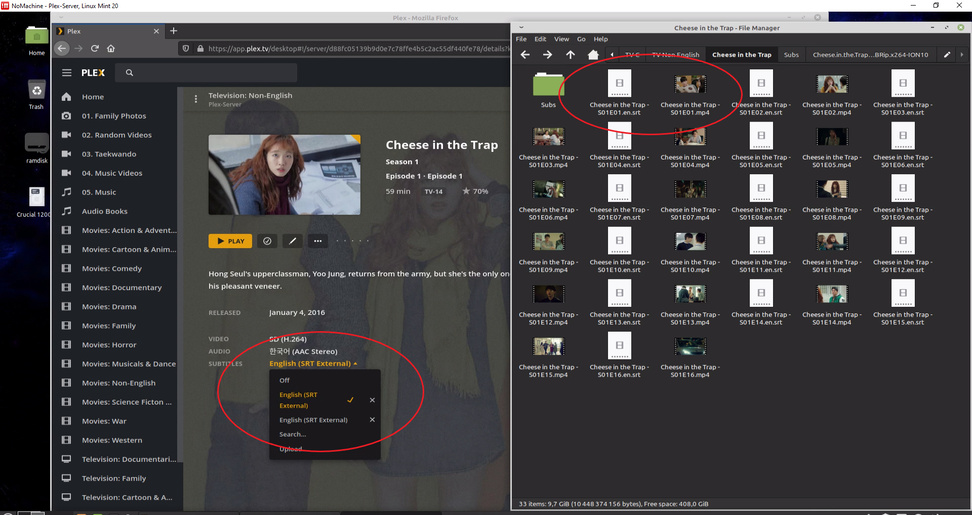
I seem to have run into a little problem with subtitles. I have come across mp4 files that appear to have embedded subtitles. On Plex Media Player, Plex for Windows, etc they only display the embedded subtitles, and when trying to search for other subtitles it comes up with nothing, in fact the search results in other random movie / TV show’s subtitle instead. I have local subtitle files which Plex Server does not appear to find.
I am wondering what I need to do to over-ride / disable / delete the embedded subtitles (which is in language I do not use)
I tried in Language settings to set the preferred language of subtitles, I have set them to off so I can subtitles manually while viewing, i have tried every variation of language / subtitle setting but nothing seems to work. If I play the mp4 file in VLC, it automatically picks up the local subtitle!
NoMachine - Plex-Server, Linux Mint 20 2020-11-10 22_39_32|690x365
Can you post that srt file?
To delete undesired tracks:
Windows: X-Media Recode, https://www.xmedia-recode.de/en/ (MP4 & MKV)
Mac: Subler, subler.org (MP4/M4V only)
Win/Mac/Linux: MKVToolNix: https://mkvtoolnix.download/. (MKV only)
With X-Media Recode, copy (do not convert) the desired video and audio tracks.
With Subler, delete the desired tracks and save. It is also easy to add/delete/modify embedded metadata with Subler.
With MKVToolNix, use the Multiplexer tool to remove any undesired tracks. Use the Header Editor to add/delete/modify embedded metadata.
To be clear, the subtitle your server is showing is the external one, not anything embedded into the MP4 file. Please note that MP4 only support WebVTT subtitles. If you have some other sort of subtitle in there, they may not be detected.
The subtitle which appears in Plex is not the sidecar sub.
The sidecar sub is a SRT subtitle in english, while the subtitle in Plex is shown as SUB in macedonian language.
I assume this subtitle was downloaded within Plex.
The reason why the SRT subtitle is not picked up by Plex is
- the file name is not identical to the video file (compare casing)
- I haven’t seen the full folder structure, so it looks to me like you don’t have any season folder or a proper tv show folder structure at all.
Hi
Sorry for the late reply… this particular TV series has only 1 season, and I have included the English subtitles within the same folder as the mp4 files as I have found this to be the only way Plex picks up the existence of the subtitle. If srt file is not in the same folder my Plex server does not find them.
The subtitle folder you at the top left corner are more srt for this series in other languages I do not wish to use, but do not wish to delete in case some day in the future I require the subtitle for another language. They sit there and Plex server does not seem to find them, so I have left them there, as I do for other series I have.
I name both the media file eg. Shining Inheritance - S01e01.mp4 and the SRT file Shining Inheritance - S01e01.en.srt according to Plex naming convention, Both files reside in same folder. All the media and subtitle files reside in folder named Shining Inheritance, there are no season folders because it is only 1 season. I do the same for other Asian series I have which are only 1 season with extra unused subs in a folder which Plex server does not pick up. I have included picture of another series saved in same format with media file and srt in same folder, with extra sub folder sitting unused on top left corner.
This is totally correct.
That doesn’t matter. If you want Plex to pick up the sidecar subtitles, you need to have a “season” subfolder. Even if this show only has one season.
The first screenshot above shows
Shining Inheritance - S01E01.mp4
Shining Inheritance - S01e01.en.srt
This is Linux. And Linux differentiates between upper and lower case letters in file names.
Better make sure you have them named exactly identical, (apart from the language code and the filename extensions).
It was the difference between Upper and Lower case “E”. I renamed all the srt files and rescanned and the subtitles now appears. I didn’t even see the difference there before. Sorry for such a noob mistake, I wouldn’t have even realised this would have caused it, even if I had seen the difference.
Thanks for your help once again…