Hi guys
I have two Plex servers on my home network, my main one for TV and movies and a second one on an old Synology NAS for music. I have remote access set up for the main one, but how do I do it for the second one? They both have the same local port, 32400. Do I need to change the local port on the second one? If so, how do I do that?
I’ve set the external port as 32401 and set up a forwarding rule in my Linksys router to forward traffic to/from 32401 external port to 32400 on the Music Plex (at 192.168.0.50 in my case). WHen I enable remote access in the remote access tab of the Plex management pages it says it’s connected, but after a while it seems to lose that and shows as unconnected. I can’t find anywhere to change the internal port that Plex uses in the settings.
Ultimately I’m trying to get my Sonos account to see the Plex Music server but it currenly only sees the main one most of the time (which doesn’t have any music) which I’m presuming is because the second doesn’t have remote access when it’s trying to access on Sonos.
It’s ok for both servers to use the same internal port. You’ll need to establish a manual port forward for each of your servers, giving each of them a different PUBLIC tcp port.
Schema:
<public tcp port #1> → forward to: <PMS #1> at internal port 32400
<public tcp port #2> → forward to: <PMS #2> at internal port 32400
Example:
32401 → forward to: 192.168.0.50:32400
PMS remote access configuration of server #1 set to use public port 32401
32402 → forward to: 192.168.0.51:32400
PMS remote access configuration of server #2 set to use public port 32402
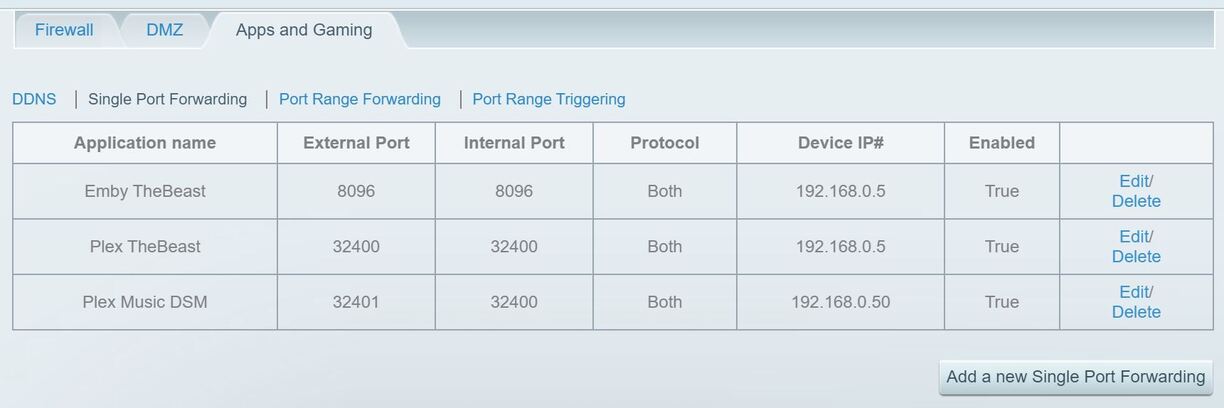
Thanks for the reply. I have my router set up like this for the port forwarding, does this look correct? (TheBeast is the main Plex server on 192.168.0.5, the Synology is on 192.168.0.50)
You only need to enable tcp as the protocol. Otherwise those seem ok.
Have you reflected the respective external ports in the remote access configuration of your 2 PMS?