Is it possible to stop Plex from populating data that it believes is associated with the content being added?
Many DVDs I’m adding are often wrongly retitled or being associated with actors that have nothing to do with the film.
Is it possible to stop Plex from populating data that it believes is associated with the content being added?
Many DVDs I’m adding are often wrongly retitled or being associated with actors that have nothing to do with the film.
Most likely, you are not following the naming std.
https://support.plex.tv/articles/naming-and-organizing-your-movie-media-files/
That probably is correct as I didn’t realise there was a requirement to title content in a particular way. I just added the DVDs that I ripped to a folder and then added the content to Plex.
That’s about 120 episodes over 10 seasons.
I’ll review the link you provided, but is it possible to turn off Plex’s ability to add data, at least for my current content, otherwise I will have to rename every title.
Thanks for your help.
Try this. You can rename all those shows in a minute with no typing
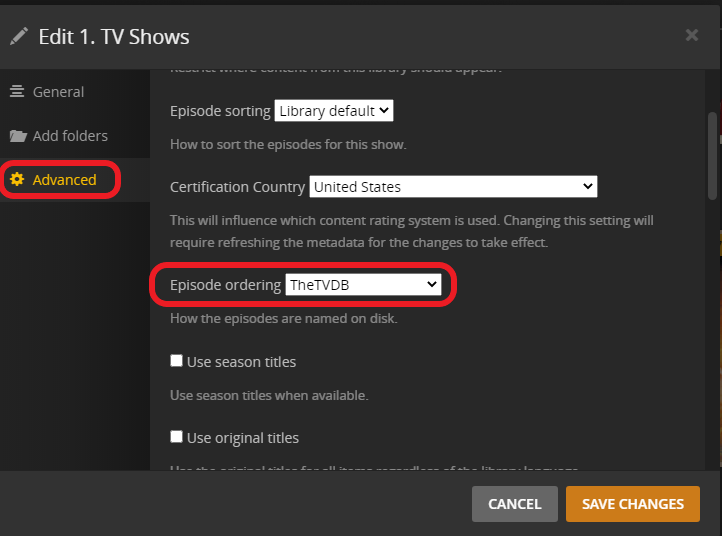
Set the TV library to use the TVDB show order
3 dots next to the library → Manage Library → Edit → Advanced
If the DVD order is different you can either line the shows up in the order the TVDB has or change the library to use the DVD order here
Click the pencil in the show poster and go to advanced
I do recommend a file rename utility, like Filebot
As an alternative, and not recommended, create a new library of the type “Other Videos” and put your medias there
Many thanks, everyone, for the suggestions.
I will review and see what’s best for my requirements.
I’ll also take some time to learn the correct naming rights and, no doubt, save myself some grief going forward.
Thanks.