alexf00
November 11, 2022, 8:33pm
1
Server Version#: 1.29.2.6364 (Docker)
I know there’s a major difference to QuickSync usage now since 1.29.1. But since then, hardware tone-mapping fails with my machine.
Nov 11, 2022 21:15:48.900 [0x7f1f164bab38] ERROR - [Req#100/Transcode/p58htcq9inidsobb8i4dmqfx/b4ab7ade-f1df-4c69-832b-4686f9c5c21d] [Parsed_tonemap_opencl_3 @ 0x7f525d366400] Failed to finish command queue: -5.
Nov 11, 2022 21:15:49.406 [0x7f1f164bab38] ERROR - [Req#125/Transcode/p58htcq9inidsobb8i4dmqfx/b4ab7ade-f1df-4c69-832b-4686f9c5c21d] Error while filtering: I/O error
Nov 11, 2022 21:15:49.406 [0x7f1f164bab38] ERROR - [Req#126/Transcode/p58htcq9inidsobb8i4dmqfx/b4ab7ade-f1df-4c69-832b-4686f9c5c21d] Failed to inject frame into filter network: I/O error
Nov 11, 2022 21:15:49.406 [0x7f1f164bab38] ERROR - [Req#127/Transcode/p58htcq9inidsobb8i4dmqfx/b4ab7ade-f1df-4c69-832b-4686f9c5c21d] Error while processing the decoded data for stream #0:0
Nov 11, 2022 21:15:49.664 [0x7f1f164bab38] DEBUG - Request: [127.0.0.1:48692 (Loopback)] GET /identity (11 live) #122 Signed-in
Nov 11, 2022 21:15:49.665 [0x7f1f1c81bb38] DEBUG - Completed: [127.0.0.1:48692] 200 GET /identity (11 live) 0ms 398 bytes (pipelined: 1)
Nov 11, 2022 21:15:50.431 [0x7f1f1ca58b38] DEBUG - Jobs: '/usr/lib/plexmediaserver/Plex Transcoder' exit code for process 517 is 1 (failure)
Nov 11, 2022 21:15:50.431 [0x7f1f1b0e9b38] DEBUG - Streaming Resource: Changing client to use software decoding
Now I get these errors when trying to transcode any HDR video.
I doubt myself as I only read it works with most machines, especially with J4105s. Any guess on the basis of the attached logs?
Plex Media Server Logs_2022-11-11_21-28-25.zip (2.2 MB)
ChuckPa
November 11, 2022, 9:10pm
2
Do you still have the intel-Compute-Runtime drivers manually installed ?
Asking because I’ve successfully tested on a QNAP NAS which didn’t have anything installed.
The CPU there is N5105
[~] # cat /proc/cpuinfo | grep model
model		: 156
model name	: Intel(R) Celeron(R) N5105 @ 2.00GHz
1 Like
Well I can confirm that HW HDR tone mapping works with 1.29.0. but fails since 1.29.1. Running docker official repo, unraid and J4105 (gemini lake).
ChuckPa
November 11, 2022, 10:24pm
4
I fully expect and concur 1.29.1 had problems.
1.29.1 was incomplete on some processors.
When I spoke with Engineering about it, they were already aware and 1.29.2 would contain the hardware support which was missing in 1.29.1
@premikkoci
The entire (J / N) series , since they’re all Gemini Lake CPUs, work.
We have a few ASUSTOR J4xxx and N5xxx units in our lab in addition to QNAP boxes.
I suspect the container and installed drivers.
How difficult is it to -
Stop the existing container
Create a parallel “Test” container, which uses PMS 1.29.2 (public)
Points to the existing /config/Library/Application Support/Plex Media server
This would allow creation of a pure , fresh, container, containing only the Plex drivers with the existing server .
I would gladly help more with unraid if I could figure out how to create a test VM without purchasing their full product
alexf00
November 11, 2022, 10:52pm
5
Had to change the topic title as stupid me didn’t realize it’s a J5040.
Sounded like a good idea to uninstall all the drivers first.
sudo vainfo

error: XDG_RUNTIME_DIR not set in the environment.
error: can't connect to X server!
libva info: VA-API version 1.14.0
libva info: Trying to open /usr/lib/x86_64-linux-gnu/dri/iHD_drv_video.so
libva info: va_openDriver() returns -1
libva info: Trying to open /usr/lib/x86_64-linux-gnu/dri/i965_drv_video.so
libva info: va_openDriver() returns -1
vaInitialize failed with error code -1 (unknown libva error),exit
Still the same result though.
To revert back to 1.29.0 for the time being I’ll have to install the drivers back now…
Edit: No well, it’s using VAAPI now to transcode, which should be alright until I hopefully figure out pretty soon what’s the issue.
I have tried clean installs with every new release and hw HDR tone mapping keeps failing since 1.29.1. Might be related to kernel 5.19.17?
I think unraid offers 14 days trial.
alexf00
November 11, 2022, 11:37pm
7
I tried with several kernels - starting from 5.17.0 via 5.18.0 and 5.19.x to 6.0.8 now. None of them made hw tone-mapping work.
ChuckPa
November 11, 2022, 11:54pm
8
Please stop with the the kernels game? Run the default kernel, which has ALL the right runtime libraries…
Changing just the kernel will screw the pooch because this will work with older kernels too
This is GeminiLake – Kernel 5.10 is more than enough.
[~] # cat /proc/cpuinfo | grep model
model		: 156
model name	: Intel(R) Celeron(R) N4505 @ 2.00GHz
model		: 156
model name	: Intel(R) Celeron(R) N4505 @ 2.00GHz
[~] # uname -a
Linux QNAP-TS262 5.10.60-qnap #1 SMP Wed Dec 29 01:54:08 CST 2021 x86_64 GNU/Linux
[~] #
alexf00
November 11, 2022, 11:58pm
9
That’s alright. But reverting to the standard kernel for Ubuntu 22.04, which is 5.15, will not make a difference either.
ChuckPa
November 12, 2022, 12:18am
10
I tested on Ubuntu 20.04 and 22.04. It does work.
Looking at your logs shows the server is accessing the hardware successfully
Nov 11, 2022 21:15:41.397 [0x7f1f192feb38] DEBUG - [Req#c4/Transcode] [FFMPEG] - Format 0x56323234 -> yuv440p.
Nov 11, 2022 21:15:41.397 [0x7f1f192feb38] DEBUG - [Req#c4/Transcode] [FFMPEG] - Format 0x50343434 -> yuv444p.
Nov 11, 2022 21:15:41.397 [0x7f1f192feb38] DEBUG - [Req#c4/Transcode] [FFMPEG] - Format 0x33434d49 -> unknown.
Nov 11, 2022 21:15:41.397 [0x7f1f192feb38] DEBUG - [Req#c4/Transcode] [FFMPEG] - Format 0x30313050 -> p010le.
Nov 11, 2022 21:15:41.397 [0x7f1f192feb38] DEBUG - [Req#c4/Transcode] [FFMPEG] - Created surface 0.
Nov 11, 2022 21:15:41.397 [0x7f1f192feb38] DEBUG - [Req#c4/Transcode] [FFMPEG] - Direct mapping possible.
Nov 11, 2022 21:15:41.399 [0x7f1f192feb38] DEBUG - [Req#c4/Transcode] TPU: hardware transcoding: final decoder: vaapi, final encoder: vaapi
Nov 11, 2022 21:15:41.400 [0x7f1f192feb38] DEBUG - [Req#c4/Transcode/JobRunner] Job running: EAE_ROOT=/tmp/pms-c1365533-c6c7-447e-a4ff-fb2ec0159fc4/EasyAudioEncoder FFMPEG_EXTERNAL_LIBS='/config/Library/Application\ Support/Plex\ Media\ Server/Codecs/c4efa15-4387-linux-x86_64/' LIBVA_DRIVERS_PATH=/usr/lib/plexmediaserver/lib/dri OCL_ICD_VENDORS="/config/Library/Application Support/Plex Media Server/Cache/CL-ICDs" X_PLEX_TOKEN=xxxxxxxxxxxxxxxxxxxx4a5d-975a-9ddaa16185bd cl_cache_dir="/config/Library/Application Support/Plex Media Server/Cache/Shaders/icr-9-linux-x86_64/" "/usr/lib/plexmediaserver/Plex Transcoder" -codec:0 hevc -hwaccel:0 vaapi -hwaccel_fallback_threshold:0 10 -hwaccel_output_format:0 vaapi -hwaccel_device:0 vaapi -codec:2 eac3_eae -eae_prefix:2 p58htcq9inidsobb8i4dmqfx_ -analyzeduration 20000000 -probesize 20000000 -i "/media/HDD6/Filme/Blond (2022) {imdb-tt1655389}/Blond (2022) {imdb-tt1655389} - 1080p WEB h265 [DMPD].mkv" -filter_complex "[0:0]hwupload[0];[0]scale_vaapi=w=1920:h=1080:format=p010[1];[1]hwmap=derive_device=opencl[2];[2]tonemap_opencl=tonemap=mobius:format=nv12:m=bt709:p=bt709:r=tv[3];[3]hwmap=derive_device=vaapi:reverse=1[4];[4]hwupload[5]" -map "[5]" -codec:0 h264_vaapi -b:0 20000k -r:0 24 -force_key_frames:0 "expr:gte(t,n_forced*1)" -filter_complex "[0:2] aresample=async=1:ocl='stereo':rematrix_maxval=0.000000dB:osr=48000[6]" -map "[6]" -metadata:s:1 language=eng -codec:1 aac -b:1 256k -f dash -seg_duration 1 -dash_segment_type mp4 -init_seg_name 'init-stream$RepresentationID$.m4s' -media_seg_name 'chunk-stream$RepresentationID$-$Number%05d$.m4s' -window_size 5 -delete_removed false -skip_to_segment 1 -time_delta 0.0625 -manifest_name "http://127.0.0.1:32400/video/:/transcode/session/p58htcq9inidsobb8i4dmqfx/b4ab7ade-f1df-4c69-832b-4686f9c5c21d/manifest?X-Plex-Http-Pipeline=infinite" -avoid_negative_ts disabled -map_metadata -1 -map_chapters -1 dash -map 0:5 -metadata:s:0 language=eng -codec:0 ass -strict_ts:0 0 -f segment -segment_format ass -segment_time 1 -segment_header_filename sub-header -segment_start_number 0 -segment_list "http://127.0.0.1:32400/video/:/transcode/session/p58htcq9inidsobb8i4dmqfx/b4ab7ade-f1df-4c69-832b-4686f9c5c21d/manifest?stream=subtitles&X-Plex-Http-Pipeline=infinite" -segment_list_type csv -segment_list_size 5 -segment_list_separate_stream_times 1 -segment_format_options ignore_readorder=1 -segment_list_unfinished 1 -fflags +flush_packets "sub-chunk-%05d" -start_at_zero -copyts -vsync cfr -init_hw_device vaapi=vaapi:/dev/dri/renderD128 -filter_hw_device vaapi -y -nostats -loglevel quiet -loglevel_plex error -progressurl http://127.0.0.1:32400/video/:/transcode/session/p58htcq9inidsobb8i4dmqfx/b4ab7ade-f1df-4c69-832b-4686f9c5c21d/progress
Nov 11, 2022 21:15:41.400 [0x7f1f192feb38] DEBUG - [Req#c4/Transcode/JobRunner] Jobs: Starting child process with pid 517
Nov 11, 2022 21:15:41.406 [0x7f1f164bab38] DEBUG - Request: [127.0.0.1:60276 (Loopback)] PUT /video/:/transcode/session/p58htcq9inidsobb8i4dmqfx/b4ab7ade-f1df-4c69-832b-4686f9c5c21d/progress?status=startup (11 live) #b9 Signed-in Token (alexf00) (range: bytes=0-)
Nov 11, 2022 21:15:41.406 [0x7f1f1c81bb38] DEBUG - Completed: [127.0.0.1:60276] 204 PUT /video/:/transcode/session/p58htcq9inidsobb8i4dmqfx/b4ab7ade-f1df-4c69-832b-4686f9c5c21d/progress?status=startup (11 live) 0ms 203 bytes (pipelined: 1) (range: bytes=0-)
Nov 11, 2022 21:15:41.412 [0x7f1f1628bb38] DEBUG - Request: [127.0.0.1:60276 (Loopback)] PUT /video/:/transcode/session/p58htcq9inidsobb8i4dmqfx/b4ab7ade-f1df-4c69-832b-4686f9c5c21d/progress?status=startup (11 live) #c8 Signed-in Token (alexf00) (range: bytes=0-)
Nov 11, 2022 21:15:41.412 [0x7f1f1c618b38] DEBUG - Completed: [127.0.0.1:60276] 204 PUT /video/:/transcode/session/p58htcq9inidsobb8i4dmqfx/b4ab7ade-f1df-4c69-832b-4686f9c5c21d/progress?status=startup (11 live) 0ms 203 bytes (pipelined: 2) (range: bytes=0-)
Nov 11, 2022 21:15:41.413 [0x7f1f164bab38] DEBUG - Request: [127.0.0.1:60276 (Loopback)] PUT /video/:/transcode/session/p58htcq9inidsobb8i4dmqfx/b4ab7ade-f1df-4c69-832b-4686f9c5c21d/progress?status=opening (11 live) #c9 Signed-in Token (alexf00) (range: bytes=0-)
Nov 11, 2022 21:15:41.413 [0x7f1f1c618b38] DEBUG - Completed: [127.0.0.1:60276] 204 PUT /video/:/transcode/session/p58htcq9inidsobb8i4dmqfx/b4ab7ade-f1df-4c69-832b-4686f9c5c21d/progress?status=opening (11 live) 0ms 203 bytes (pipelined: 3) (range: bytes=0-)
Nov 11, 2022 21:15:41.416 [0x7f1f1628bb38] DEBUG - Request: [127.0.0.1:60276 (Loopback)] PUT /video/:/transcode/session/p58htcq9inidsobb8i4dmqfx/b4ab7ade-f1df-4c69-832b-4686f9c5c21d/progress?status=opened (11 live) #ca Signed-in Token (alexf00) (range: bytes=0-)
Nov 11, 2022 21:15:41.416 [0x7f1f1c81bb38] DEBUG - Completed: [127.0.0.1:60276] 204 PUT /video/:/transcode/session/p58htcq9inidsobb8i4dmqfx/b4ab7ade-f1df-4c69-832b-4686f9c5c21d/progress?status=opened (11 live) 0ms 203 bytes (pipelined: 4) (range: bytes=0-)
Nov 11, 2022 21:15:41.416 [0x7f1f164bab38] DEBUG - Request: [127.0.0.1:60276 (Loopback)] PUT /video/:/transcode/session/p58htcq9inidsobb8i4dmqfx/b4ab7ade-f1df-4c69-832b-4686f9c5c21d/progress/stream?index=0&id=0&codec=hevc&type=video (11 live) #cb Signed-in Token (alexf00) (range: bytes=0-)
Nov 11, 2022 21:15:41.416 [0x7f1f1c81bb38] DEBUG - Completed: [127.0.0.1:60276] 200 PUT /video/:/transcode/session/p58htcq9inidsobb8i4dmqfx/b4ab7ade-f1df-4c69-832b-4686f9c5c21d/progress/stream?index=0&id=0&codec=hevc&type=video (11 live) 0ms 195 bytes (pipelined: 5) (range: bytes=0-)
Nov 11, 2022 21:15:41.417 [0x7f1f1628bb38] DEBUG - Request: [127.0.0.1:60276 (Loopback)] PUT /video/:/transcode/session/p58htcq9inidsobb8i4dmqfx/b4ab7ade-f1df-4c69-832b-4686f9c5c21d/progress/stream?index=1&id=0&codec=eac3&type=audio (11 live) #cc Signed-in Token (alexf00) (range: bytes=0-)
Nov 11, 2022 21:15:41.417 [0x7f1f1c618b38] DEBUG - Completed: [127.0.0.1:60276] 200 PUT /video/:/transcode/session/p58htcq9inidsobb8i4dmqfx/b4ab7ade-f1df-4c69-832b-4686f9c5c21d/progress/stream?index=1&id=0&codec=eac3&type=audio (11 live) 0ms 195 bytes (pipelined: 6) (range: bytes=0-)
Nov 11, 2022 21:15:41.417 [0x7f1f164bab38] DEBUG - Request: [127.0.0.1:60276 (Loopback)] PUT /video/:/transcode/session/p58htcq9inidsobb8i4dmqfx/b4ab7ade-f1df-4c69-832b-4686f9c5c21d/progress/stream?index=2&id=0&codec=eac3&type=audio (11 live) #cd Signed-in Token (alexf00) (range: bytes=0-)
Nov 11, 2022 21:15:41.417 [0x7f1f1c81bb38] DEBUG - Completed: [127.0.0.1:60276] 200 PUT /video/:/transcode/session/p58htcq9inidsobb8i4dmqfx/b4ab7ade-f1df-4c69-832b-4686f9c5c21d/progress/stream?index=2&id=0&codec=eac3&type=audio (11 live) 0ms 195 bytes (pipelined: 7) (range: bytes=0-)
Nov 11, 2022 21:15:41.439 [0x7f1f1628bb38] DEBUG - Request: [127.0.0.1:60276 (Loopback)] PUT /video/:/transcode/session/p58htcq9inidsobb8i4dmqfx/b4ab7ade-f1df-4c69-832b-4686f9c5c21d/progress/streamDetail?index=0&id=0&codec=hevc&type=video&profile=Main%2010&width=1920&height=1080&interlaced=0&sar=1:1&level=120&frameRate=24.000&disp_default=1 (11 live) #ce Signed-in Token (alexf00) (range: bytes=0-)
Nov 11, 2022 21:15:41.439 [0x7f1f1c618b38] DEBUG - Completed: [127.0.0.1:60276] 200 PUT /video/:/transcode/session/p58htcq9inidsobb8i4dmqfx/b4ab7ade-f1df-4c69-832b-4686f9c5c21d/progress/streamDetail?index=0&id=0&codec=hevc&type=video&profile=Main%2010&width=1920&height=1080&interlaced=0&sar=1:1&level=120&frameRate=24.000&disp_default=1 (11 live) 0ms 195 bytes (pipelined: 8) (range: bytes=0-)
Nov 11, 2022 21:15:41.439 [0x7f1f164bab38] DEBUG - Request: [127.0.0.1:60276 (Loopback)] PUT /video/:/transcode/session/p58htcq9inidsobb8i4dmqfx/b4ab7ade-f1df-4c69-832b-4686f9c5c21d/progress/streamDetail?index=1&id=0&codec=eac3&type=audio&language=ger&channels=6&layout=5.1%28side%29&sampleRate=48000&disp_default=1 (11 live) #cf Signed-in Token (alexf00) (range: bytes=0-)
The problem is elsewhere.
What is this being played on?
alexf00
November 12, 2022, 12:22am
11
Oh my god. I’m kinda sorry actually.
I don’t know why I updated in the first place, obviously shouldn’t have done that.
Thanks a lot.
ChuckPa
November 12, 2022, 12:23am
12
Your logs are all over the map.
One attempt it gets hardware, the next it doesn’t.
The log is from the 6.0.8 kernel
Please go back to the supported 5.15 kernel
ChuckPa
November 12, 2022, 7:57pm
13
I use Unraid “as main System” on Bare Metal and “Inside Unraid” a Plex Docker.
I think you can use Virtual Box on your PC and Install Unraid as a VM, but the "Problem is here that you need to create a Virtual Boot Stick to Boot Unraid (Unraid Boots in to the RAM ).
If you want write me a Privat Message and i can Share my screen and we can do some Testing together if this helps.
@ChuckPa
ChuckPa
November 16, 2022, 4:55pm
16
No.
Either I’m a complete idiot about making a boot thumb drive or Unraid can see the ESXi hypervisor.
Why they don’t offer an iso is beyond my understanding.
@ChuckPa I guess the license is bound to a usb drive. Are you able to access your esxi machine physically?
ChuckPa
November 16, 2022, 7:53pm
18
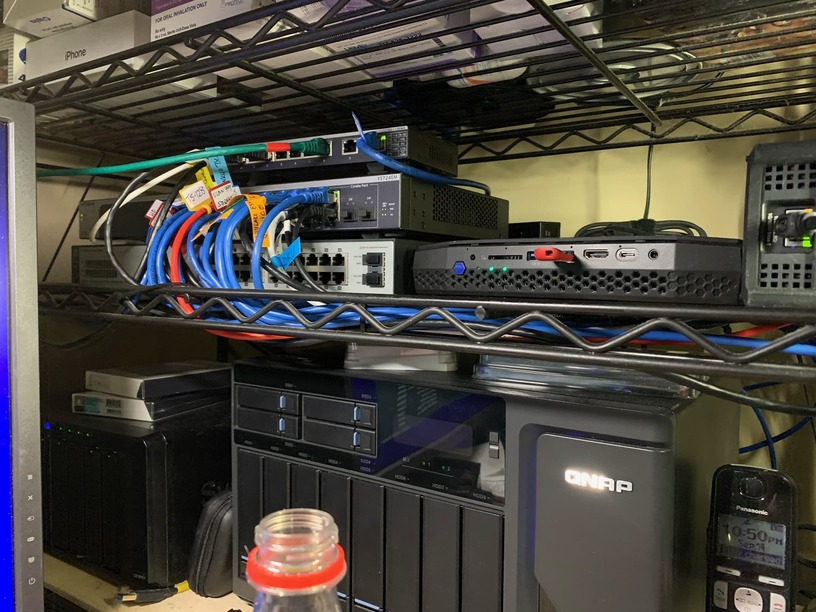
Yes, it’s the NUC here. Since this pic, I’ve added another.
@ChuckPa Perhaps this guide might help you.
Thanks for all your efforts.
ChuckPa
November 16, 2022, 11:15pm
20
Thank you for that.
He shows a very important step which I’ve not gotten past.
Download the tool
Insert thumb drive
Write to USB
For me, The thumb drive is always “Incompatible”.
Thoughts?
What’s the formatting for Windows? Blank? NTFS? FAT32 ?