Server Version#: 1.41.5.9522
Player Version#: Chrome web, Samsung Tizen, Android Mobile etc
Issue: Transcoding a 4K HDR file to 1080p 8Mbps H264 causes 3 seconds of playback then no longer plays or takes 30 seconds to play another 3 seconds.
Disabling HW Tone Mapping fixes the issue completely but then the video is grey on certain clients.
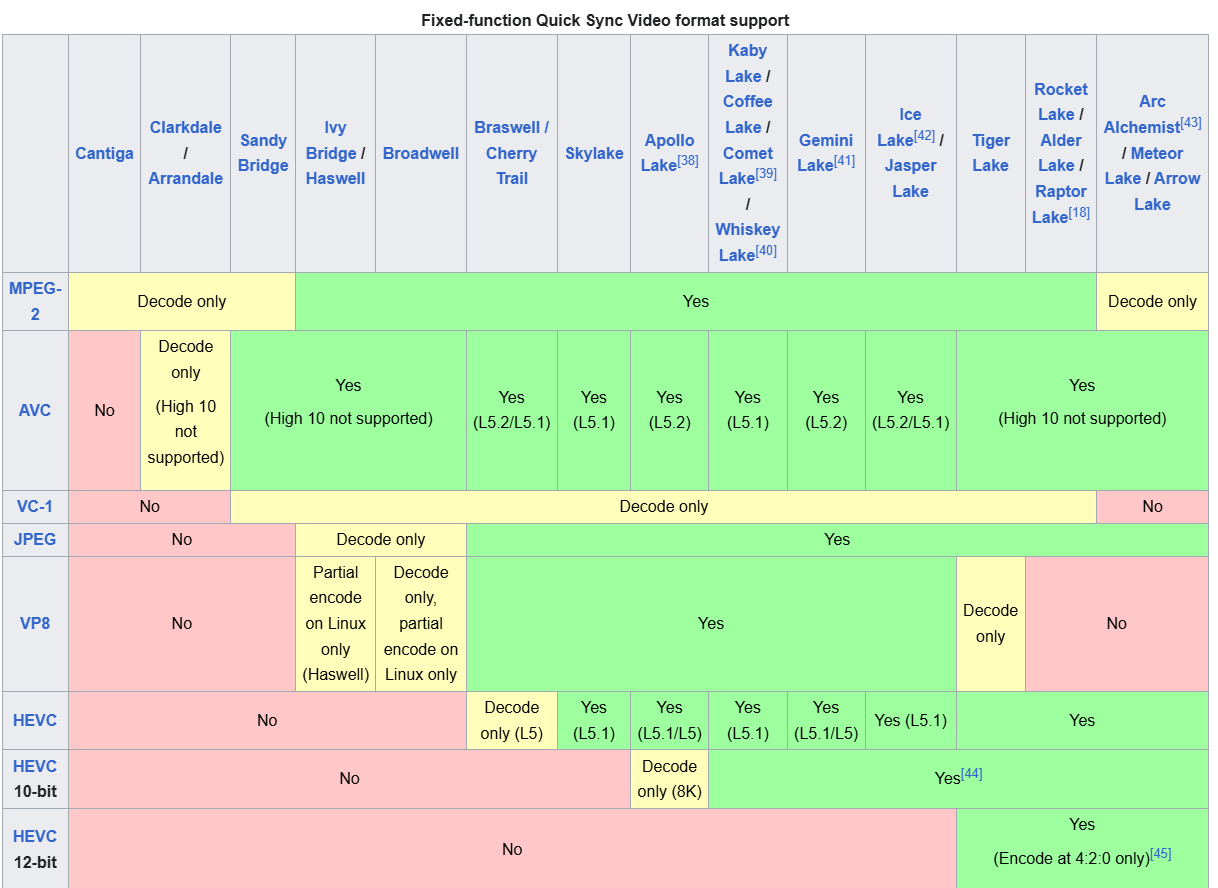
I just bought Plex Pass to be able to use this feature with my Jasper Lake N5105 CPU/iGPU. This feature works perfectly fine on Jellyfin with it’s FFMpeg under Windows 11 so I know it’s not a hardware issue. I can transcode 3 simultaneous 4K HDR videos to 1080p with Jellyfin and it’s FFMpeg variant.
I’ve attached server logs. Some people over on Reddit said it may work on Linux but I don’t know how to use Linux and frankly it’s unfair after paying £100 for Plex Pass and the feature doesn’t work, any help please? I can provide more info
I’d just like to add that Jasper Lake does support HW Transcoding + Tonemapping officially , as it also works on Jellyfin too, I tested it side by side
I think I just solved the issue. I enabled HEVC video encoding and now it’s using hardware acceleration, the video starts almost immediately, no buffering, low CPU/GPU usage in servers task manager. I know this makes very old devices that can only decode H264 not work but I won’t ever be using a device that old.
This seems like a bug no? Why would it easily support hw transcoding and hw tonemapping to HEVC but not H264?
I would still like Plex to update to support iGPU’s that can actually do this natively on a hardware level, it seems unfair to only support the latest ones whilst the hardware can do it perfectly fine
Which devices? Playback devices like Roku, Apple TV, others or Servers?
Plex will transcode to the format(s) your device is capable to playback - x264, x265, etc.
Turning on the x265/HEVC options does not force x265 streaming, it only ads it as an option for devices which support it. Otherwise, it will fall back to x264 etc
Yes that’s right. Although it’s an arbitrary software restriction from Plex since it works fine with Emby and Jellyfin via Windows. So I’d like Plex to improve their product up to parity with the competition in that aspect as they are superior mostly everywhere else.
Yes you’re correct, but H264 doesn’t work at all with any client with the current configuration is all I meant, playback becomes broken because of it. I don’t think I could setup Linux without issues since I have no clue with it vs 20 years of Windows
There is a distinct difference between how pre-Tiger Lake iGPU’s compared to newer iGPU’s handle HDR Tone Mapping. Significant development would be required to bring those older iGPU’s up to handling HDRTM on Windows machines.
It works on Emby and Jellyfin because those projects chose to sink considerable resources into getting it to work. Plex’s decision not to do the same as due to the audience it would benefit being smaller than you would think, and shrinking as time passes. That same audience has a simple alternative of using Linux.
It’s a relatively bog standard Product Team decision about how to best allocate resources and it just didn’t make the cut.
I see. I’ve been trying to get Ubuntu up and running but i’m a total noob to it and it’s not very user friendly. On the internal app store I can get Plex running fine there but my other server software and remote desktop stuff I’m having more issues with. It’s such a shame, I guess i’ll just sell my server and buy a new one since it’s doubtful Plex will retroactively update
I use Ubuntu for my server and it works great once you get it going. It does for sure take some effort to do every little silly thing that Windows does automagically, but that ends up being the beauty of it.
The way it is user friendly is by being tremendously documented all over the place. It’s extraordinarily easy to find guides and answers to each of those silly little things.
I suggest using the DEB package installation method to and going through the steps to add the “repo” to your system. This makes it possible to manage Plex using the “apt” command that you will get familiar with. If you want to get a little more advanced beyond that, installing via Docker is worth learning but does and a bit more complexity and things to understand.
The part that trips up most new users is mounting HDD’s and getting permissions setup right for media files.