My 2690s are V2s I believe, but I wish you the best with V4s! 8 of them do work very well, but when you have a shared Plex, CPU tends to always become a bottleneck.
OK, I think I am actually ok and now my impatience is clouding my investigating skills…
Peeked into logs and the only errors I saw were to “VAAPI”. I assumed this must be an issue and started hunting it down. After lots of googling, apparently “VAAPI” isn’t used in most (from my reading) of NVIDIA GPUs, its an API for most (from my reading) AMD GPUs, hence why Plex sees the error and immediately starts testing “nv_enc” and “nv_dec” for encoding and decoding substitutions that are NVIDIA based.
I use the term most because I do not wish for my research to be gospel to anyone
Sep 22, 2021 19:57:52.422 [0x7f43dfaa3b38] DEBUG - [Transcode] Codecs: testing h264_vaapi (encoder)
Sep 22, 2021 19:57:52.423 [0x7f43dfaa3b38] DEBUG - [Transcode] Codecs: hardware transcoding: testing API vaapi
Sep 22, 2021 19:57:52.423 [0x7f43dfaa3b38] ERROR - [Transcode] [FFMPEG] - libva: vaGetDriverNameByIndex() failed with unknown libva error, driver_name = (null)
Sep 22, 2021 19:57:52.423 [0x7f43dfaa3b38] ERROR - [Transcode] [FFMPEG] - Failed to initialise VAAPI connection: -1 (unknown libva error).
Sep 22, 2021 19:57:52.423 [0x7f43dfaa3b38] DEBUG - [Transcode] Codecs: hardware transcoding: opening hw device failed - probably not supported by this system, error: I/O error
Sep 22, 2021 19:57:52.423 [0x7f43dfaa3b38] DEBUG - [Transcode] Codecs: testing h264_nvenc (encoder)
Sep 22, 2021 19:57:52.423 [0x7f43dfaa3b38] DEBUG - [Transcode] Codecs: hardware transcoding: testing API nvenc
...........................................
Sep 22, 2021 19:57:52.958 [0x7f43dfaa3b38] DEBUG - [Transcode] Codecs: testing h264 (decoder) with hwdevice vaapi
Sep 22, 2021 19:57:52.958 [0x7f43dfaa3b38] DEBUG - [Transcode] Codecs: hardware transcoding: testing API vaapi
Sep 22, 2021 19:57:52.958 [0x7f43dfaa3b38] ERROR - [Transcode] [FFMPEG] - libva: vaGetDriverNameByIndex() failed with unknown libva error, driver_name = (null)
Sep 22, 2021 19:57:52.958 [0x7f43dfaa3b38] ERROR - [Transcode] [FFMPEG] - Failed to initialise VAAPI connection: -1 (unknown libva error).
Sep 22, 2021 19:57:52.958 [0x7f43dfaa3b38] DEBUG - [Transcode] Codecs: hardware transcoding: opening hw device failed - probably not supported by this system, error: I/O error
Sep 22, 2021 19:57:52.958 [0x7f43dfaa3b38] DEBUG - [Transcode] Codecs: testing h264 (decoder) with hwdevice nvdec
Sep 22, 2021 19:57:52.958 [0x7f43dfaa3b38] DEBUG - [Transcode] Codecs: hardware transcoding: testing API nvdec
...........................................
Sep 22, 2021 19:57:53.471 [0x7f43dfaa3b38] DEBUG - [Transcode] Codecs: Testing with profile 'High'
Sep 22, 2021 19:57:53.496 [0x7f43dfaa3b38] DEBUG - [Transcode] Scaled up video bitrate to 17148Kbps based on 1.500000x fudge factor.
Sep 22, 2021 19:57:53.496 [0x7f43dfaa3b38] DEBUG - [Transcode] MDE: Cannot direct stream audio stream due to codec eac3 when profile only allows aac
Sep 22, 2021 19:57:53.496 [0x7f43dfaa3b38] DEBUG - [Transcode] MDE: The Orville - S1 E8 - Into the Fold: selected media 0 / 9676
Sep 22, 2021 19:57:53.496 [0x7f43dfaa3b38] DEBUG - [Transcode] Streaming Resource: Calculated bandwidth of 8669kbps exceeds bandwidth limit. Changing decision parameters provided by client to fit bandwidth limit of 8000kbps
Sep 22, 2021 19:57:53.496 [0x7f43dfaa3b38] DEBUG - [Transcode] Streaming Resource: Determining preferred transcode encoders through transcode only decision.
Sep 22, 2021 19:57:53.496 [0x7f43dfaa3b38] DEBUG - [Transcode] Codecs: testing h264_nvenc (encoder)
Sep 22, 2021 19:57:53.497 [0x7f43dfaa3b38] DEBUG - [Transcode] Codecs: hardware transcoding: testing API nvenc
...........................................
Sep 22, 2021 19:57:54.037 [0x7f43dfaa3b38] DEBUG - [Transcode] Codecs: testing h264 (decoder) with hwdevice vaapi
Sep 22, 2021 19:57:54.037 [0x7f43dfaa3b38] DEBUG - [Transcode] Codecs: hardware transcoding: testing API vaapi
Sep 22, 2021 19:57:54.037 [0x7f43dfaa3b38] ERROR - [Transcode] [FFMPEG] - libva: vaGetDriverNameByIndex() failed with unknown libva error, driver_name = (null)
Sep 22, 2021 19:57:54.037 [0x7f43dfaa3b38] ERROR - [Transcode] [FFMPEG] - Failed to initialise VAAPI connection: -1 (unknown libva error).
Sep 22, 2021 19:57:54.037 [0x7f43dfaa3b38] DEBUG - [Transcode] Codecs: hardware transcoding: opening hw device failed - probably not supported by this system, error: I/O error
Sep 22, 2021 19:57:54.037 [0x7f43dfaa3b38] DEBUG - [Transcode] Codecs: testing h264 (decoder) with hwdevice nvdec
Sep 22, 2021 19:57:54.037 [0x7f43dfaa3b38] DEBUG - [Transcode] Codecs: hardware transcoding: testing API nvdec
...........................................
Sep 22, 2021 19:57:54.175 [0x7f43dfaa3b38] DEBUG - [Transcode] Codecs: Testing with profile 'High'
Sep 22, 2021 19:57:54.201 [0x7f43dfaa3b38] DEBUG - [Transcode] Scaled up video bitrate to 17148Kbps based on 1.500000x fudge factor.
Sep 22, 2021 19:57:54.201 [0x7f43dfaa3b38] DEBUG - [Transcode] Streaming Resource: Reducing playback quality for 7619kbps stream bitrate: video resolution to 1920x1080, audio channels to 2, quality to 8
Sep 22, 2021 19:57:54.201 [0x7f43dfaa3b38] DEBUG - [Transcode] Codecs: testing h264_nvenc (encoder)
Sep 22, 2021 19:57:54.201 [0x7f43dfaa3b38] DEBUG - [Transcode] Codecs: hardware transcoding: testing API nvenc
...........................................
Sep 22, 2021 19:57:54.389 [0x7f43dfaa3b38] DEBUG - [Transcode] Codecs: testing h264 (decoder) with hwdevice vaapi
Sep 22, 2021 19:57:54.389 [0x7f43dfaa3b38] DEBUG - [Transcode] Codecs: hardware transcoding: testing API vaapi
Sep 22, 2021 19:57:54.389 [0x7f43dfaa3b38] ERROR - [Transcode] [FFMPEG] - libva: vaGetDriverNameByIndex() failed with unknown libva error, driver_name = (null)
Sep 22, 2021 19:57:54.389 [0x7f43dfaa3b38] ERROR - [Transcode] [FFMPEG] - Failed to initialise VAAPI connection: -1 (unknown libva error).
Sep 22, 2021 19:57:54.389 [0x7f43dfaa3b38] DEBUG - [Transcode] Codecs: hardware transcoding: opening hw device failed - probably not supported by this system, error: I/O error
Sep 22, 2021 19:57:54.389 [0x7f43dfaa3b38] DEBUG - [Transcode] Codecs: testing h264 (decoder) with hwdevice nvdec
Sep 22, 2021 19:57:54.389 [0x7f43dfaa3b38] DEBUG - [Transcode] Codecs: hardware transcoding: testing API nvdec
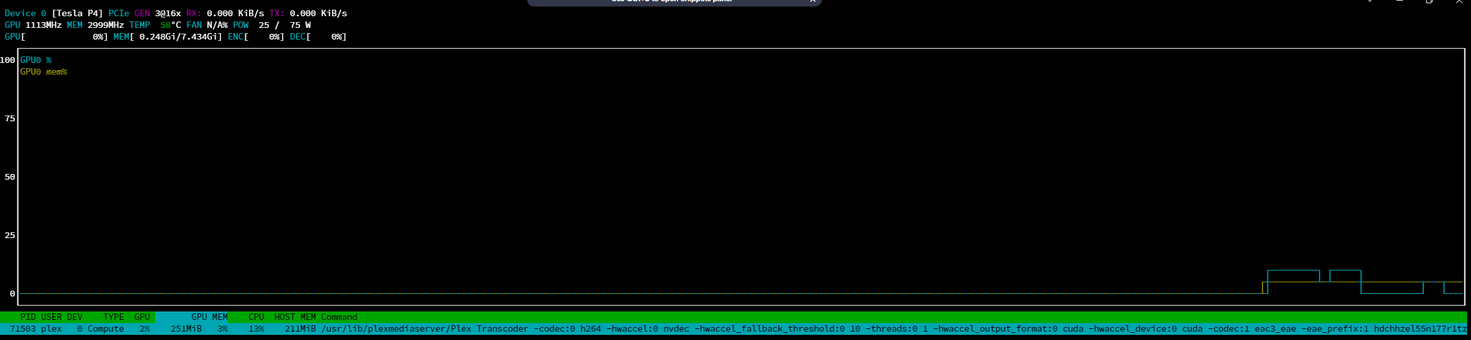
After realizing I was chasing a ghost and this error is somewhat expected, I tried hitting play and just waiting an extra 10 seconds for it to load and it did. I then visited NVTOP and I guess the library stats only show when it is in use as they appeared again.
I assume the delay I was chalking up to another failure is just PMS migrating from a raw/original quality stream to a transcoded one and should be expected. It really is only a delay of like 5 - 10 seconds but with all this troubleshooting the past few weeks, I am impatient.
==============================================================================
TL;DR; I am declaring this fixed, no errors are in the logs that are out of the ordinary and the decoding does work now when I select options other than original (it just takes a second to kick in).
Thank you for the help and for making me think through this more than brute-forcing it!