Server Version#: 1.32.8.nnn
OS: Ubuntu Server 22.04.3 LTS
I bought this box for running a dedicated Plex-server (no VM or Docker). I can’t find any ‘clean’ tutorials how to install the support for HW-transcoding (QuickSync / i915 / Iris Xe).
Any tips for a stepwise guide? What do I exactly need to install? Downloads from Intel? From repositories? Is Ubuntu Server 23.10 a better choice?
Right now I’m feeling lost and confused
Following because I was under the impression that currently all the needed drivers came with PMS and configuration was automagical.
PMS does not need anything special installed with it to work on a NUC with Ubuntu 22.04.3 LTS
Everything needed come with the PMS package.
The only thing you need to do:
https://plex.tv/downloads Download the 64-bit Ubuntu DEB package
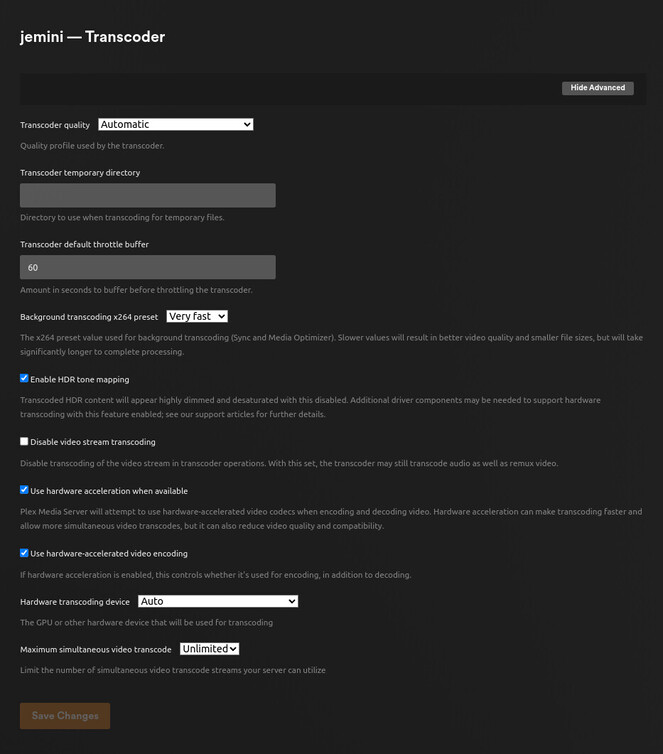
sudo dpkg -i package_name.debhttp://127.0.0.1:32400/web – to claim it and setup librariesWhile in the Plex/web interface, Settings -Transcoder - Show advanced confirm any special settings you want
May I see the server debug logs? ( Settings - Troubleshooting (lower left) - Download Logs) – Attach the zip it gives you
(here is my GeminiLake. It’s the same on all x86_64 intel machines)
chuck@jemini:~$ dpkg -l | grep -i plexm
ii  plexmediaserver                      1.32.5.7512-af1685cfe                   amd64        Plex organizes all of your personal media so you can easily access and enjoy it.
chuck@jemini:~$ grep 'model name' /proc/cpuinfo | uniq
model name	: Intel(R) Celeron(R) J4125 CPU @ 2.00GHz
chuck@jemini:~$ grep PRETTY /etc/os-release
PRETTY_NAME="Ubuntu 22.04.3 LTS"
chuck@jemini:~$
This is from another Plex-server I installed a couple of years ago (11th gen, 22.04 LTS). I don’t remember the details, but I had to install some .deb - files from Intel so PMS could find the i915 hardware (“Intel i915 Hardware: Found”). Do the HW transcoding work when PMS says “Intel i915 Hardware: Not Found” ??
@OptimusPlexUser
A few years ago – YES, we did have to install the additional intel tone mapping drivers.
Since that time, we’ve integrated those same drivers into the PMS DEB file you now install.
Those drivers silently install/update themselves as needed when PMS starts.
So the HW-transcoding will work properly even if the PMS-installation says Intel i915 Hardware: Not Found ?
@OptimusPlexUser
With the XE graphics, the test in the install script doesn’t always work because XE graphics doesn’t use the i915/i965 interface anymore.
When you look at /dev/dri, do you see card0 and renderD128?
I don’t use them as the test because any graphics card (AMD or Nvidia) can also show up as card0/renderD128
I would figure out a way to handle this if I had access to a machine so the report is accurate during installation.
This is the test I currently use.
[chuck@lizum Downloads.2007]$ ls /sys/module/i915
coresize  drivers/  holders/  initsize  initstate  notes/  parameters/  refcnt  sections/  srcversion  taint  uevent
[chuck@lizum Downloads.2008]$ ls /sys/module/i915/drivers
pci:i915@
[chuck@lizum Downloads.2009]$ ls /sys/module/i915/drivers/pci\:i915
/sys/module/i915/drivers/pci:i915@
[chuck@lizum Downloads.2010]$ ls /sys/module/i915/drivers/pci\:i915/
0000:00:02.0@  bind  module@  new_id  remove_id  uevent  unbind
[chuck@lizum Downloads.2011]$
Here’s an AlderLake with XE graphics showing the i915.
Graphics:
Device-1: Intel Alder Lake-P Integrated Graphics vendor: ASUSTeK driver: i915 v: kernel ports:
active: eDP-1 empty: DP-1, DP-2, DP-3, DP-4, HDMI-A-1 bus-ID: 0000:00:02.0 chip-ID: 8086:46a6
Device-2: IMC Networks USB2.0 HD UVC WebCam type: USB driver: uvcvideo bus-ID: 3-8:3
chip-ID: 13d3:5463
Display: x11 server: X.Org v: 1.21.1.4 driver: X: loaded: modesetting unloaded: fbdev,vesa
gpu: i915 display-ID: :0 screens: 1
Screen-1: 0 s-res: 1920x1200 s-dpi: 96
Monitor-1: eDP-1 model: Samsung res: 1920x1200 dpi: 161 diag: 356mm (14")
OpenGL: renderer: Mesa Intel Graphics (ADL GT2) v: 4.6 Mesa 23.0.4-0ubuntu1~22.04.1
direct render: Yes
OptimusPlexUser:
NUC13ANHi7
Is this what you purchased ?
https://ark.intel.com/content/www/us/en/ark/products/233099/intel-nuc-13-pro-kit-nuc13anhi7.html
if so, please do the following and show the results
grep 'model name' /proc/cpuinfo | uniq
A clean Ubuntu 22.04.3 LTS server install:
model name : 13th Gen Intel(R) Core™ i7-1360P
ls /sys/module/i915/drivers/pci:i915/
cd /dev/dri
ChuckPa
January 13, 2024, 7:25pm
10
-vs-
[chuck@lizum ~.2004]$ ls /sys/module/i915/drivers/pci:i915/
0000:00:02.0@  bind  module@  new_id  remove_id  uevent  unbind
[chuck@lizum ~.2005]$
This is from our 13th gen lab machine.
chuck@plexqa-av1:~$ ls -la /dev/dri
total 0
drwxr-xr-x   3 root root        140 Oct 19 23:07 .
drwxr-xr-x  19 root root       4900 Jan  4 15:17 ..
drwxr-xr-x   2 root root        120 Dec 12 03:14 by-path
crw-rw----+  1 root render 226,   0 Dec 12 03:14 card0
crw-rw----+  1 root render 226,   1 Dec 12 03:14 card1
crw-rw----+  1 root render 226, 128 Dec 12 03:14 renderD128
crw-rw----+  1 root render 226, 129 Dec 12 03:14 renderD129
chuck@plexqa-av1:~$ grep 'model name' /proc/cpuinfo | uniq
model name	: 13th Gen Intel(R) Core(TM) i5-13400
chuck@plexqa-av1:~$ ls /sys/module/i915/drivers/pci:i915/
0000:00:02.0  bind  module  new_id  remove_id  uevent  unbind
chuck@plexqa-av1:~$
/dev/dri exists because
the hardware (0000:00:02.0) is identified and enumerated by the kernel.
According to the Intel spec sheet for this CPUhttps://www.intel.com/content/www/us/en/products/sku/232155/intel-core-i71360p-processor-18m-cache-up-to-5-00-ghz/specifications.html
It can operate as XE or UHD graphics
Intel® Iris® Xe Graphics only: to use the Intel® Iris® Xe brand, the system must be populated with 128-bit (dual channel) memory. Otherwise, use the Intel® UHD brand.
How much memory is installed and how is it configured?
Please confirm for me – This is a genuine Intel “brand name” NUC which came in an Intel product box?
Do you have the Workstation sized or Mini PC sized ?
It’s this one, purchased from SimplyNUC.
32GB memory. I’ll check the configuration.
ChuckPa
January 13, 2024, 9:45pm
12
Thank you for the product spec.
https://www.intel.com/content/www/us/en/products/sku/233099/intel-nuc-13-pro-kit-nuc13anhi7/specifications.html
Unfortunately, that machine does NOT list QSV capability per the Intel product page.
Please compare and then contact SimplyNUC.
I am not familiar with that specific offering.
First things I would check:
Make certain the BIOS is up to date. These kits tend to be 12+ months behind.
Make certain the memory is properly installed
Make certain it’s not disabled in the BIOS
sudo dmidecode -t 17
It should respond with the memory installed and show both banks are installed and the same; similar to mine (Both banks seen active)
[chuck@lizum]$ sudo dmidecode -t 17
# dmidecode 3.2
Getting SMBIOS data from sysfs.
SMBIOS 3.1.1 present.

Handle 0x0030, DMI type 17, 40 bytes
Memory Device
	Array Handle: 0x002F
	Error Information Handle: Not Provided
	Total Width: 64 bits
	Data Width: 64 bits
	Size: 32 GB
	Form Factor: SODIMM
	Set: None
	Locator: ChannelA-DIMM0
	Bank Locator: BANK 0
	Type: DDR4
	Type Detail: Synchronous Unbuffered (Unregistered)
	Speed: 2667 MT/s
	Manufacturer: Samsung
	Serial Number: 0161034D
	Asset Tag: 9876543210
	Part Number: M471A4G43MB1-CTD
	Rank: 2
	Configured Memory Speed: 2667 MT/s
	Minimum Voltage: 1.2 V
	Maximum Voltage: 1.2 V
	Configured Voltage: 1.2 V

Handle 0x0031, DMI type 17, 40 bytes
Memory Device
	Array Handle: 0x002F
	Error Information Handle: Not Provided
	Total Width: 64 bits
	Data Width: 64 bits
	Size: 32 GB
	Form Factor: SODIMM
	Set: None
	Locator: ChannelB-DIMM0
	Bank Locator: BANK 2
	Type: DDR4
	Type Detail: Synchronous Unbuffered (Unregistered)
	Speed: 2667 MT/s
	Manufacturer: Samsung
	Serial Number: 01610349
	Asset Tag: 9876543210
	Part Number: M471A4G43MB1-CTD
	Rank: 2
	Configured Memory Speed: 2667 MT/s
	Minimum Voltage: 1.2 V
	Maximum Voltage: 1.2 V
	Configured Voltage: 1.2 V
( Both channels are listed)
The NUC product page doesn’t list Quick Sync but the linked processor product page does.
The memory restriction is odd but I guess it makes sense if you need more RAM speed for Xe features to work. But if UHD mode is the fallback, Quick Sync should still be available.
I can see how writing an installer to automagically detect all of this would be difficult.
Hopefully it’s a matter of flipping a switch in the BIOS.
Exactly @BanzaiInstitute .
Intel® Core™ i7-1360P Processor (18M Cache, up to 5.00 GHz) quick reference with specifications, features, and technologies.
Intel® Quick Sync Video : Yes
Getting SMBIOS data from sysfs.
Handle 0x0029, DMI type 17, 92 bytes
Handle 0x002A, DMI type 17, 92 bytes
ChuckPa
January 13, 2024, 11:18pm
15
This shows it’s not in dual channel mode.
Locator: Controller0-ChannelA-DIMM0
The best it can do is UHD mode.
There’s definitely something wrong with the BIOS or box.
Xe or UHD is non-essential for my HW-transcoding
I upgraded the BIOS, reinstalled 22.04 and installed some packages from Intel with no success.
A clean Ubuntu 23.10 server install made my day as expected:
ls -la /dev/dri
drwxr-xr-x 2 root root 80 Jan 14 00:08 by-path
Plex-install, found the i915:
PlexMediaServer install: Processor: 13th Gen Intel(R) Core(TM) i7-1360P
PlexMediaServer install: Intel i915 Hardware: Found
…and the HW-transcoding seems to work as a charm:
Video 1080p (H.264) (hw) 720P (H264)—Transcode (hw)
Video 4K HDR10 (HEVC Main 10) (hw) SD (H264)—Transcode (hw)
Verified GPU-activity with intel_gpu_top
ChuckPa
January 14, 2024, 4:06am
17
OptimusPlexUser:
I upgraded the BIOS, reinstalled 22.04 and installed some packages from Intel with no success.
A clean Ubuntu 23.10 server install made my day as expected:
``
That would make ANYONE’s day
The BIOS upgrade isn’t always immediate but does help.
I did not expect that and apologize. I’m making a note for future reference.
Thank you for sharing the solution.
(It would be very interesting to see the performance difference between UHD fallback and dual-channel Xe mode.)
system
April 13, 2024, 11:40pm
19
This topic was automatically closed 90 days after the last reply. New replies are no longer allowed.