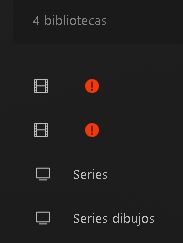
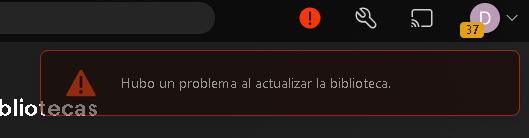
First sorry for my english, for days I have an error where I get a red light and some libraries stop working. I got a recommendation to update the agent faster…etc. The thing is that since then I’m like this. I attach images for a better understanding.
Thank you for your response. I have used .bat from Bdrepair but after that the error still comes up. I try to run Sqlite.exe but I can’t get my database repaired. Any other help please?
I have tried to create a new library and when this error comes back it also does it for that new folder. Should I delete the whole database and create it from scratch or uninstall Plex completely? Is there any way to keep the users and playback history? Thanks
Did you select a different agent than what was set as default?
If you did not, it may be indeed the database file corrupt beyond repair and the best way forward is the “nuclear option”.
on a windows system I would take the folder %LOCALAPPDATA%\Plex Media Server\Plug-in Support\Databases and rename it to Databases.old that should move any database corruption out of the way and allow you to recreate the server.
The only way would be to enable the syncing of their watched status to plex.tv. https://support.plex.tv/articles/sync-watch-state-and-ratings/
(And keep the server up and unchanged for a few days, to ensure complete synchronization.)
But that in turn would only work if you existing libraries would already use the modern metadata agents – which they do not.
But that is a feature which is under the control of each individual user. Some may disable it over data privacy concerns.
Once you set up your new libraries, you still have to edit each single one of these shared users and give them access to the newly created libraries. There is no way to transfer that over from the existing libraries
So unfortunately this is part of what I meant with
Thanks for your help. Last question, when I scan a movie that has an article in it, it does not have an article in the title. How can I configure it so that I don’t have to put it manually? For example, in The Batman, it only says Batman and not the “The”.
Where does it show the title without article?
Normally, it should look like this when you edit the movie in Plex:
“Title” has the article,
while “Sort Title” doesn’t.
Find out first if the movie has been matched. If you see “Unmatch” as a menu item, it has been indeed matched.
Then you need to find out where the title in plex has been coming from.
It could have come from an embedded “Title” meta tag in the file itself (only if it’s in mp4 format).
Whether Plex will use that meta tag depends on the status of the checkbox “Use local metatags”. You should keep that off, if you’re not keeping tight control over your embedded metatags.
Or, it could come from Plex’s metadata database. See if you can find your movie on https://watch.plex.tv/
See which title is used on there.
It also helps to look up your movie on IMDb.com, then open the Alternative Titles category and see if there is a version of the title without the article (which sometimes happens in non-English release countries).
Now see which metadata language you have selected for your library. See if IMDb is listing a title without article for that country/language.
Just double-click the unzipped .reg file.
Stop Plex server beforehand, using its task tray icon.
P.S.: if you mean “which registry branch”: the reg file inserts itself into the USER branch of the currently logged-in Windows user.
Which is the right thing for a default installation. You only need to care about that if you’re running Plex server as a System service under an own, dedicated user account.