Server Version#: 1.18.3.2156
Player Version#:1.4.1.940-574c2fa7
Does this at all happen to anyone else?
Example image of what is going on: 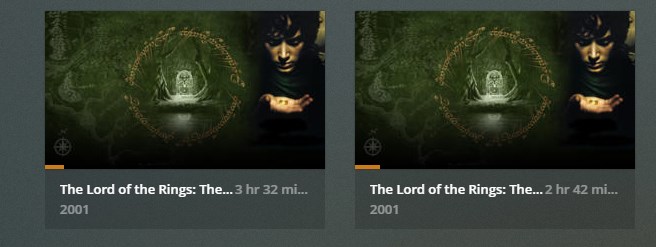
Server Version#: 1.18.3.2156
Player Version#:1.4.1.940-574c2fa7
Does this at all happen to anyone else?
Example image of what is going on:
Because for stupid reasons plex links multiple copies of the same video, even across libraries, with the same play state/history.
The only way to separate them is to match them with different metadata agent. Ie plex movies vs tmdb
How can such a flaw exist so long without being fixed? This is what I don’t understand.
Anyway, thank you for offering a work-around. It worked for me.
It’s not a flaw. It’s a “feature”…
… and if you have more than two versions of the same movies?
e.g. The Star Wars movies have multiple versions, (Theatrical, Extended,Remastered,Despecialized);
Terminator 2: Judgement Day (Theatrical, Special, Ultimate) to name only two very popular movies.
I am sorry, using multiple agents is not a solution and it is certainly not a viable workaround.
There must be someone at plex smart enough to fix it?
plex, please fix this woeful issue with your product.
I have movies, “Alita” for example, where I have the 1080, 4K and 3D versions in Plex. It lists all three of them in the “Continue Watching” section.
I wasn’t watching all three versions. I don’t want to see all three version in “Continue Watching”.
According to Plex this is a “feature” not a bug…
I implore you to remove the SOLVED status from this question. It is not solved, nor is it a reasonable workaround. WE need plex to fix this horrendous situation.
It is a feature, but it’s being used incorrectly here. What Plex is doing is synchronizing play state between different versions of the same movie. This is useful for when you have a movie encoded in different formats/codecs, so that, for instance, you can watch the version that’s optimized for Apple tablets, stop, and then continue watching the movie on your giant 4K TV in the living room using the high-res version. This works because it’s the same movie.
What you have here isn’t the same movie. It’s 2 different movies. I have the same thing with, say, the de-specialized versions of the original Star Wars trilogy, or the fan-edit of Dune. If your movie library Agent is finding that they’re the same movie, change the metadata by hand to differentiate them.
I was wrong  I just tried with Dune and Plex indeed shows me both editions as “in progress”. I can’t even figure out how it knows they’re related since, as I mentioned, they’re completely different movies on my server (different titles, different folders, different file names).
Plex broke this in the past few months or something, as it used to work fine.
It has NEVER worked ‘fine’.
It has ALWAYS worked like it’s working now. Not fine.
If you want to have two totally different movies - match one to Plex Movie and the other one to TMDB. If you have 3 ‘Versions’ - ur outta luck.
That doesn’t matter, as long as both files get matched against the same metadata agent – after which they are the same movie for Plex.
It was already mentioned in the first reply: After 'Split’ing, Perform ‘Fix Match’ on one of the items, pick ‘Search Options’ and select the other metadata agent (which is not the default agent for this library)
You can usually pick either ‘Plex Movie’ or ‘TheMovieDatabase’.
In some edge-cases you’ll have to use ‘Personal Media’ for additional “versions”, but this will then require you to enter all metadata yourself.
not really an edge case to have a 1080, 4k, and 3d version of a movie. (or theatrical/regular release/extended/directors/etc)
for which, one is as they say, ‘S’ ‘O’ ‘L’.
… for many, long, tedious years…
It used to, but I think it’s because it originally (a couple years ago) couldn’t match the Dune fan-edit to anything, so I had to enter the info by hand instead. Somehow it must have re-matched it using an Agent recently.
I just unmatched it and entered the info by hand and now it’s “working” again (the 2 movies are separate). I wonder if I renamed the file to something else than “Dune (Alternative Edition Redux)” (i.e. something else than “Title (Whatever)”) if that would help not match the same movie. I assume the Plex Scanner is taking the title from before the parentheses.
That just means that ‘Plex Brain’ thinks those two movies are matched - in the current database - with different agents.
The vast majority of Plex Users dealing with this - are victimized by it.
Yes…it’s a “feature” alright…a creature feature…
I’ve suggested many times that instead of having multiple versions appear in your hubs they should make a drop-down in the menu similar to “play version” which would then allow you to continue in a different version if that’s what you choose. My guess is the vast majority of users never switch versions midstream to begin with making this nothing but an annoyance.
I am sorry for taking so long to remove the “Solved” status. I’ve removed it now for everyone else being affected by this strange behavior.
This topic was automatically closed 90 days after the last reply. New replies are no longer allowed.
