Well I’ll be dipped in sh!* and rolled in breadcrumbs. I think I did it. You guys ROCK!!!
PS. I think I set up an additional server name by accident, but it doesn’t seem to effect anything… See image (no personal info this time, lol)

Well I’ll be dipped in sh!* and rolled in breadcrumbs. I think I did it. You guys ROCK!!!
PS. I think I set up an additional server name by accident, but it doesn’t seem to effect anything… See image (no personal info this time, lol)
Remove old and unused servers here: https://app.plex.tv/desktop/#!/settings/devices/pms
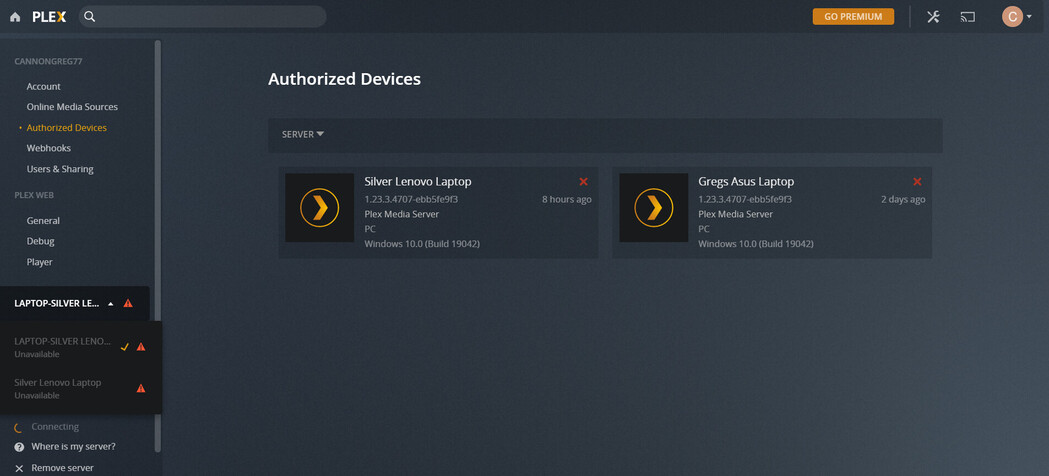
When I used the link you provided it took me to this image.
You can see a few listed under authorized devices and in the sidebar drop down box. One that I wanted to remove was my old dead laptop/server called Gregs Asus Laptop. The other one I wanted to remove was LAPTOP-SILVER LENOVO which I made during the server transfer but thought it didn’t take. So I restarted and made one called Silver Lenovo Laptop, which was the one I mentioned was working after the server transfer yesterday (or so I thought… ).
Notice that this one, that I am certain was available yesterday (Silver Lenovo Laptop), is no longer available (see sidebar drop down box). Also, I don’t understand why one of the ones I wanted to remove LAPTOP-SILVER LENOVO wasn’t listed under authorized devices to remove.
Regardless, as soon as I deleted my old/dead laptop/server Gregs Asus Latop it somehow deleted the other one I wanted to remove LAPTOP-SILVER LENOVO.I didn’t think these 2 were related at all, but whatever. So the 2 I wanted gone are gone!
My main issue now is how do I get my new server Silver Lenovo Laptop available again? I read the troubleshooting and tried various options
Also somewhere along the way I signed out of something and it deleted the way I had the app and web server setup, so it all looks different now.
Under normal operations, do not sign out of your server (Settings → Server_Name → General). This will leave your server in an unclaimed/unsecure state.
In Authorized Devices you have no servers listed, correct?
Ok, thank you for that. I think I thought that would help refresh everything to allow family to access my newly transferred server. I will avoid from signing out of my server.
You were correct, I did have to reclaim my server. My server now says nearby with a green locked symbol.
I did this before reading your reply and did not do it in incognito window. Initially it said playback error. But then I just closed that browser tab and reopened a new Plex Web App Client thingy and its playing the media.
So quick follow up question, the Plex Web app, Roku app etc… can NEVER play my specific media if my server isn’t up and running, right? I mean nothing in the cache or whatever would allow that, I am assuming? Sounds like a stupid question but just want to make sure. I feel like I have had it play for a while despite the server not being available, which makes things difficult to troubleshoot
Right. The only media that can be played when your server is not running is the free Movies and TV shows included with Plex, if enabled. None of your own media will be available.
This topic was automatically closed 90 days after the last reply. New replies are no longer allowed.