Hi,
Just wondering what people recommend for updating metadata on large music libraries. Is there such a thing as a program that will scan and catalogue all my music in one go. I know it’s unlikely haha
Cheers
Mick
Hi,
Just wondering what people recommend for updating metadata on large music libraries. Is there such a thing as a program that will scan and catalogue all my music in one go. I know it’s unlikely haha
Cheers
Mick
All of it I’m not sure.
Personally I use Mp3Tag which works pretty well and does check online though I quite never use that.
Just tag the Album Artist as the Artist you want Plex to display the albums of a band under and check the prefer embedded metadata in the library settings.
not super easy, no gui, but it’s very powerful and can mass-tag tons of music.
There’s also easier GUI-based taggers like mp3tag (Windows, Mac), Yate (Mac), Picard, kid3, puddletag, etc. Plenty to choose from.
However Plex doesn’t really read many metadata fields so it’s generally not that hard to keep your collection tagged.
MediaMonkey is good for managing large libraries as it uses a local database. It also has some scripts that will help find inconsistencies in tagging and can keep a perfectionist mp3 collector busy for a lifetime in the effort of improving the metadata quality of their collection. 
Cheers for the responses so far, should help me loads, with software ideas
I should probs mention as well that I use Blu OS mainly for my music, absolutely amazing system that Plex unfortunately doesn’t support.
I have tried media monkey and a few others and they don’t tak in the correct format, I’m sure it can be adjusted, but naming tracks like 01.- isn’t right to me, I want tracks named like 01 -
I’m sure most software can accommodate that, but not sure how
Also wondering how people catalogue CD’s with various artists? So, for example, I’m currently ripping some Westwood compilations but I hate the clutter in my artist categories when it says someone ft someone else, it looks so untidy
I’m fussy haha
MusicBrainz Picard.
Second MediaMonkey for large libraries. Mass edits are a breeze.
I like 2 different programs. Mp3tag allows me to easily drop any file into the program (or a folder or thousands of files/folders) and view everything in a large windows-style chart. All metadata is arranged in columns, with each file being a row. Select using click-shift-click to select and entire section, or ctrl-click individual files. Then apply a single metadata to entire columns at once. Add a new column of metadata you wish to view, or hide a column if you don’t care. Click any field to edit it instantly. Another great feature of this is the ability to quickly assign metadata tags from filenames, or filenames from tags, or tags from tags, etc etc. A great way to automate the transfer of data if you’re like me and have zero tags, but the song and artist are in the filename.
Then, if I want to get the proper metadata itself, I use MusicBrainz Picard. It has some kind of music detection capability which… somewhat works? I’m still scratching the surface of it, but a lot of my older audio files tend to be strange rips (youtube rips, or unknown source), so the detection doesn’t quite line up or is unsure of the accuracy. And it loves to include a lot of extra metadata I just don’t care about (album release, composers, comments, etc). But those fields can be excluded before applying the metadata to the files.
How would you rate its ability to pick the right genre? That’s one tag I could use help with.
I make the Album Artist only ever one name, and take care to make it consistent for any single artist. Then if there are multiple performers, I feel free to add multiple names to the Artist field.
With mp3tag (an incredible utility) you can put multiple values into fields which support it by using “\\” (null) as a separator. (Plex does NOT seem to understand this – see below.)
So, my metadata looks like this:
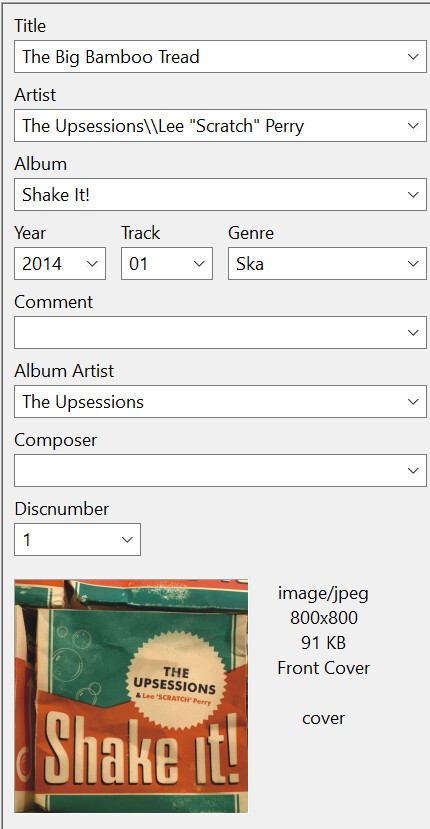
Yeah, get mp3tag. It is very powerful. You can rename your files exactly as you wish, using any of the tag data. You can even have it put them into folders.
My typical name string is this:
%discnumber%%track% - %albumartist% - %album% - %title%
(The tag standard allows multiple artists separated by nulls, though sadly Plex does not read this info at all… Artist shows as blank in Plex if you do this, so I have to rely on Album Artist. I keep doing it this way hoping they will catch up. Why do I keep doing it if Plex doesn’t get it, you ask? Well, whatever your convention is, if you stick to it, you can always change your mind. If I come up with a better way to do multiple Artists, mp3tag will let me bulk convert my files, somehow. But putting multiple Artists in the Artist field per the tag standard seems the most correct thing to do.)
I wouldn’t know. Personally, I do not like how Plex handles my disorganized audio library. I put music together that seems to fit my preferences, not any one genre. And so I use the genre tag with my own labels that may not quite match the actual song. I then make sure that Plex sure-as-f*** honors my own genre tags and local metadata. it’s barely tolerable this way, but I’m working on it (“it” being my reluctance to use proper metadata).
As for musicbranz handling genre, well… I assume it’s accurate? I mean, I guess I assumed they used some third party music identification/metadata database. I see references to AcoustID, but also for their own MusicBrainz ID labels on custom tags. I’d hope that it’s generally accepted what genre a particular song belongs to. It’s up to who you trust to tell you a song’s genre I suppose.
It worked very well for me. I was able to organize my 1200 albums in about 10 hours with MusicBrainz Picard. Most of my input was “acknowledging” the match because I’m an*l that way.
I’ll have to take it for a spin on some test files, I guess.
