That’s what I was missing. That feature is Plex Pass-only. So, nothing to worry about there. Sorry for the confusion.
You can try enabling the Win10 DLNA server.
When using Defender, enabling the DLNA server opens the firewall ports that I was going to have you enable manually. It might do so for AVG as well.
I do not think it will do any harm. If it doesn’t work, you can always turn it off.
If enabled, disable the Plex DLNA server (to avoid any conflicts).
In the Windows taskbar search box, type “Media Streaming Options.” That should open the control panel. Click the “Turn on media streaming” button. That will enable the Windows DLNA server. To turn it off, click on “Block All” and then “OK.”
If it works, the Plex clients should be able to see your Plex server.
Your PC will also be visible in VLC or other DLNA clients.
Well, just tried enabling the windows DLNA and I’m still not seeing anything on my laptop in VLC.
That got me thinking, so I opened up the network page in windows explorer, just to take a look at devices connected to the network. Looking at the pages on my server pc, it is listing all sorts of different devices than my client laptop. Here’s some pics:
This is a screenshot from my server PC:

And this is a screenshot from my client laptop:
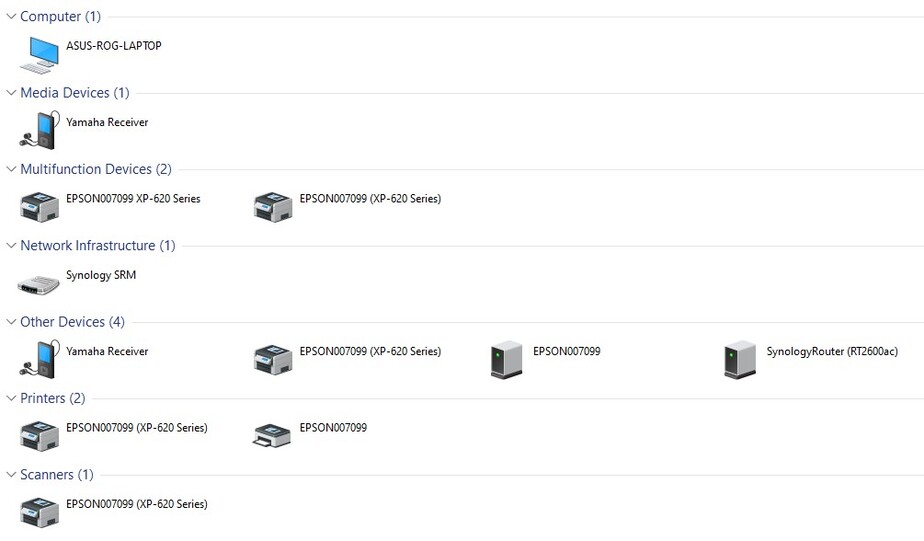
Should those two pages not look identical? Why can I only see my desktop on my server PC (The server PC IS the desktop) and I can only see my laptop on my laptop. Should I not be able to see each computer on the other?
Also, the Roku is only showing up on my Desktop. I don’t see it on the Laptop.
I don’t know, maybe this is nothing, but to me it seems a little odd. Thoughts?
HAHA!
I think I finally got it! WOOT!
I decided to hunt down the root cause of why my windows defender firewall wasn’t working. That just seemed really odd to me. I uninstalled all other antivirus software, and spent about an hour looking for windows firewall solutions, and why I was getting that error I posted about on July 3rd (the 10th post in this thread). After running a windows diagnostic tool, that actually found the problem, I restarted, and the firewall actually seemed to be up and running. I promptly went to plex to check it out, and sure enough, things SEEM to be working so far! Getting a direct stream on my local network, and not getting the “remote access error” any more!
Woo hoo! I’ll post back if anything else goes wrong in a few days, but hopefully I don’t have to! Thanks again for your help in pointing me in the right direction!
This topic was automatically closed 90 days after the last reply. New replies are no longer allowed.
