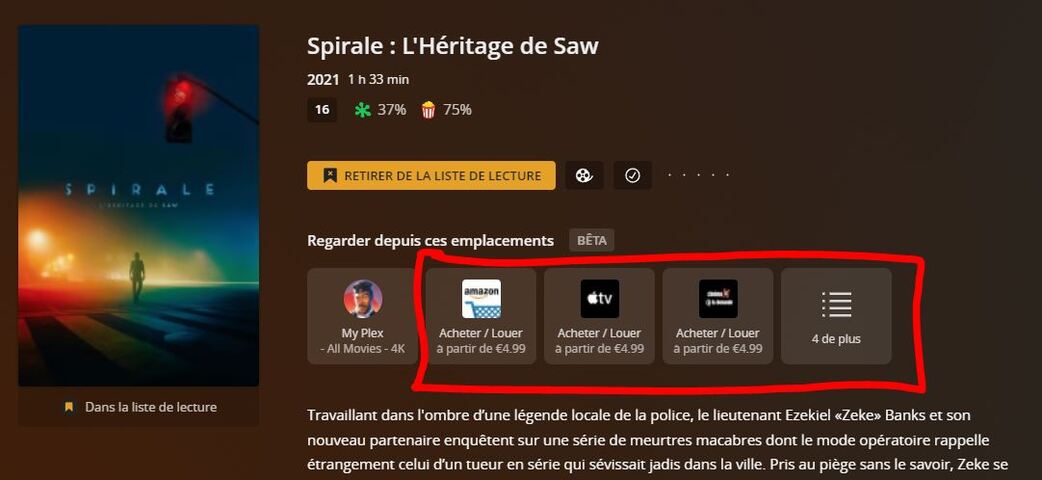
Have I missed something?
The checkbox for Discover perhaps?
I actually saw the same thing on the last Android beta earlier today.
Anyway hopefully like me you see no sign of streaming services in search results?
Have I missed something?
The checkbox for Discover perhaps?
I actually saw the same thing on the last Android beta earlier today.
Anyway hopefully like me you see no sign of streaming services in search results?
Looks like they are listening. Plex have pushed updates for some platforms already with the option to remove Discover from search. Now, how about returning the old search functions, I am not liking the drop down as being the only way to display search results. Give us an option in the setting to choose how we want search to function.
Did you get asked in the Android Beta after update when you opened it? I just updated and I can’t find/see it anywhere.
Is this also hiding the external streaming services advertising in the Watchlist ?
(I use android devices and they are not yet updated)
Unchecking that hides search results for streaming services in Global Search and the Streaming Services select option from the menu bar on the LHS is gone.
If you add an item to your watch list from streaming service with the button on and then turn off the button, the item still shows up in your watch list. There are no other item advertised in the watch list however. I thought disabling Ways To Watch would have hidden any streaming services added to the Watch List.
Discover is still there but can be unpinned.
This is on Plex HTPC which is the only client app I have updated so far.
TBH - the whole disable process is convoluted at least in Plex HTPC. Just put a disable button for Discover and More Ways To Watch on the LHS menu or in Global settings. Maybe I’m having a bad night but it is doing my head in this stuff.
Note that none of the content links for More Ways To Watch actually work in Plex HTPC.
Correct. Just a strange place to put the setting though and not in Global settings but OK.
As you say, Discover is still there but can be unpinned so effectively gone.
I side loaded the Android beta as it hadn’t hit the play store in my location at that time.
From there, on initial launch it offered a turn off/disable button (I can’t remember the exact wording)
From that point there is no trace of Discover as far as I can see. Search results also seems to now be restricted to my local servers.
Thank you for the update @JohnAlex
Nothing new on my Android devices, on the Windows app and on the Web App
They are also still showing the streaming advertising in the watchlist:
I think perhaps we see different things on our different clients.
Also I actually said after the update I see to trace of it. It’s definitely NOT in my face.
I have no doubt, especially with Plex HTPC which is a development project and why I made sure to mention that it was Plex HTPC I was looking at.
Edit - there is no way to disable Discover in Plex HTPC but once unpinned it is effectively gone. Only Ways To Watch can be disabled.
Yeah and I can confirm this.
I also have an Apple TV and on the latest TestFlight from a few hours ago, there is far more effort needed to get rid of discover than on Android.
PLEASE PLEASE PLEASE let’s have a way to opt out of this feature!
With the new toggle to disable More Ways To Watch, it effectively has been removed.
Once you toggle off More Ways To Watch and unpin Discover, you won’t get any search results for content that is not on your local server unless you specifically repin Discover etc.
Nearly everything I use has been updated with that new toggle. It’s great!
The only thing I use that hasn’t been updated yet is the web app at https://app.plex.tv
Edit: It’s now also available on the web app.
I have to say that having what I consider erroneous results removed from my searches has provided a lot of relief to my personal pain points here. The only leftovers are seeing additional ways to watch something for items in the Watchlist, but I can live with that. Seems that unpinning Discover would pretty much erase the update for me, but I think I may tinker with that a little bit.
I’m still going to leave my vote attached to this, as I hope it helps Plex learn about how to roll things like this out in the future.
This appears to either be an all in or all out approach. Why can’t we also have something in between?
It didn’t require a toggle in the search results to hide this extra content. The very fact that you don’t select any streaming services should have been enough. And for users like me who have selected a few services, that should be enough to only see those services in my results. But I still see results for all services.
The ‘More ways to watch’ is unnecessary. Feels like Plex want users to opt-out, rather than opt-in.
Hope they add this. Plex dev team, please listen!
That is why it is called a beta.
We all now have a way to disable it. I would assume over time the other aspects get fixed/improved.
I’m not making an excuse or apology for this ‘rollout’ as it wasn’t handled well but we do now have a way to disable it or enable it.
I would humbly suggest though that calling “a forced on everyone feature” a beta is just whacked and someone at Plex needs to do a software development beginners course.
It’s also the typical official Ninja type defensive input as evident in this thread.
Plex have been here before over the years.
Hopefully this time they will finally learn their lesson.
But that said and as you mentioned it seems relatively resolved so it’s all good.
You missed this part of my post  (noting that I was replying to a post about issues with the linking process, not the rollout itself)
I think we all agree it was a mess, including Plex themselves.
With that, I’m done on the topic.