Hi,
i have a TrueNAS box with plex instal on it and i tried to use the function “Import from iTunes”, but without success. i read that path file where often the problem when plex is not on the same box than itunes. So i decided to test the function by creating a plex server on my PC and basically add the library under the folder \music\itunes\ it added all the music, however no playlist, no rating… basically nothing more than if i wouln’t tick the “Import from iTunes” box
below is the log from when i added the library with the box tick to the end of the scan
Server Version#: 1.26.1.5772
debug.txt (11.1 MB)
Did you install iTunes on the PC? Did you also set the option in iTunes to generate an XML file? I believe this is off by default.
@anon18523487 yes of course itunes is installed on the PC and Yes the XML setting is checked in itunes
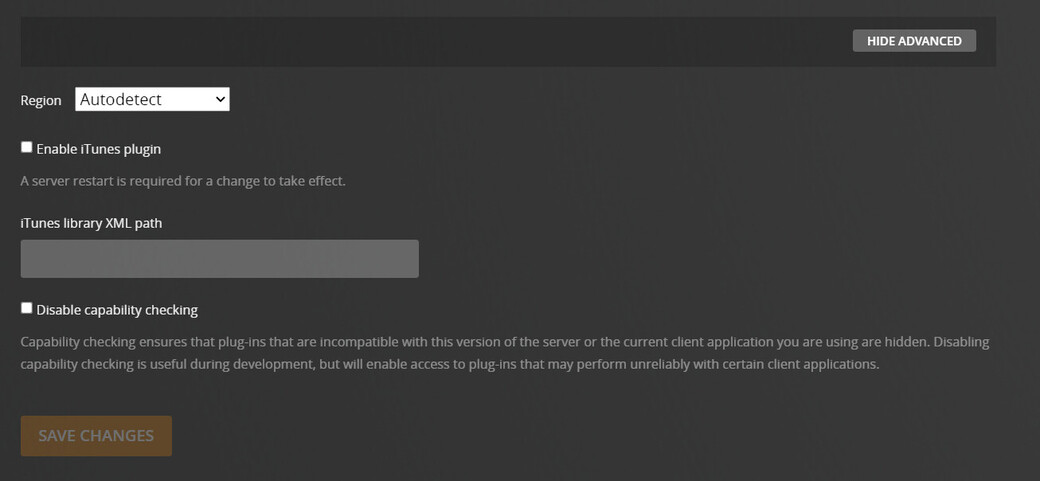
Did you also enable the iTunes plugin and set the path to that xml file?
@anon18523487 good catch, it wasn’t activated. So I did activated it and tried
Both path just in case and restart server each time just in case
D:\Users\Keven\Music\iTunes\iTunes Library.xml
And
D:\Users\Keven\Music\iTunes
However even after that when adding the library it doesn’t work 
I had a similar issues, so I downgraded iTunes to an older version (12.10.11.2), then it worked again.
Can you provide the PMS log from this newer attempt? The previous one didn’t mention the xml file, which gave me the idea to ask about it. I’d like to check if PMS is even looking for it.
@anon18523487 can you confirm what path should be correct between
D:\Users\Keven\Music\iTunes\iTunes Library.xml
And
D:\Users\Keven\Music\iTunes
i’ve tried the every way told in the 2 last post and no conclusive result.
Plex Media Server Logs_2022-05-09_13-31-36_dash_itunes_path.zip (5.7 MB)
Plex Media Server Logs_2022-05-09_14-24-00_itunes 12.10_iTunes_library.xml_path.zip (5.8 MB)
Plex Media Server Logs_2022-05-09_13-22-08_iTunes Library.xml_path.zip (5.8 MB)
PMS will look a few different ways so either should work. I just looked in the last log and it did find the file. Although it failed to find another one. I’m not sure if that second file is required for the playlist import to work.
May 09, 2022 13:09:28.371 [18572] DEBUG - Found a database file from preference location: D:\Users\Keven\Music\iTunes\iTunes Library.xml
May 09, 2022 13:09:28.371 [18572] DEBUG - Failed to find genres file at “C:\Program Files\iTunes\iTunes.Resources\genres.plist” (Le fichier spécifié est introuvable)
@anon18523487 i think it’s because itunes used to be 32bit and is now 64 so the file was in program file x86.
i have reinstall on the drive it used to be a couple years ago and then manually copy genres.plist from x86 to the 64bit program file. then add a new library with import from itunes checked and the plugin still active.
here is the result from the log i pulled right after the scan. Also it still didn’t work to import playlist, rating and play count…
Plex Media Server Logs_2022-05-16_11-12-54.zip (5.3 MB)
May 16, 2022 11:04:10.215 [10748] DEBUG - Found iTunes library at “D:\Users\Keven\Music\iTunes\iTunes Music Library.xml”
Your logs now show this for the xml file. This is different than what was listed before. Can you double check that folder and see the actual filename for the xml file you have? Can you PM me a zipped copy of that xml?
Your lays show it found the playlists. This is just the beginning.
May 16, 2022 11:04:10.474 [9664] INFO - iTunes: loading playlists…
May 16, 2022 11:04:10.477 [9664] DEBUG - iTunes: reading tracks from playlist Années 90
May 16, 2022 11:04:10.477 [9664] DEBUG - iTunes: read 36 tracks for playlist Années 90
May 16, 2022 11:04:10.477 [9664] DEBUG - iTunes: reading tracks from playlist Les 25 plus écoutés
May 16, 2022 11:04:10.478 [9664] DEBUG - iTunes: read 25 tracks for playlist Les 25 plus écoutés
Are these Smart playlists or dumb ones? If they are smart, can you open iTunes and show me the rule on how these 2 playlists were created?
What version of itunes are you using?