I’m running the latest version of Plex. Suddenly when I try to play back any of my content from my various streaming devices (apple tv & firestick) i’m getting an error message that says “Your connection to the server is not fast enough to stream this video”. My PMS has a direct ethernet connection. When I run a speed test I’m showing a download speed of nearly 1 Gbps, upload is ~115 Mpbs.
Is anyone else having this issue? How do I resolve this?
Sometimes the client can perceive a connection as slow if the server is slow to provide the stream packets because it cannot keep up while transcoding some aspect of that media item.
What information is showing in the “now playing” tile for that playback on the Plex server dashboard? Specifically… is this on a local, remote or indirect connection, and is there any transcoding going on?

https://support.plex.tv/articles/200871837-status-and-dashboard/
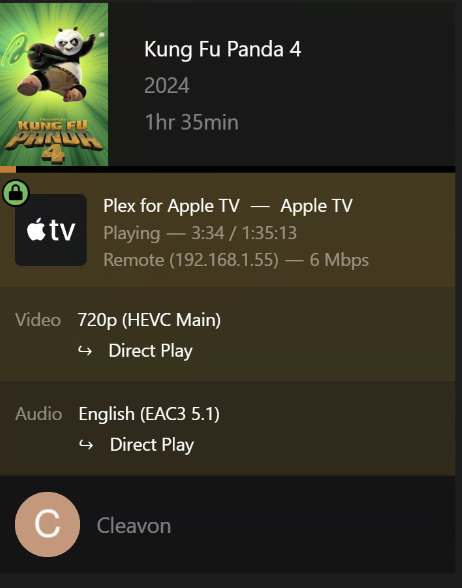
Please see attached screenshot. It’s showing as a remote connection. I don’t get why it says “remote”. The PMS server is in my house. I’m trying to watch this show on the AppleTV in my house. Shouldn’t this be a “local” connection?
Separately, how do I check if transcoding is going on?
That pic would have shown if there was. Direct Play indicates that the server is doing nothing to the file but sending it over the network to the client.
As to it being “remote”, this can happen if you have a segmented network (wireless routers most famous). Meaning if your client’s IP address is different than the server’s IP address, the server proclaims it as “remote”. This doesn’t effect much, but some settings in various places change things if the stream is “remote” vs “local”.
Are you getting any buffering, or is it just a message on the client that says “not fast enough”? I’ve gotten that with a 100% local network when my client (Nvidia Shield) was acting up. It froze a bit, probably dropped the video packets from the server. Then the client thought “huh, I am not getting the video very fast, it must not be fast enough!” and popped up the message.
My PMS is on it’s own vLAN. It’s the only device on that segment so that probably lends to the idea of why it’s showing as “remote”.
What happens for me when I push play on any file is the following…a black screen pops up with a white spinning circle (this can go on for several minutes). Finally when it does play it’ll do so for maybe 30 seconds, buffer / stop playback, then I’ll get the pop up that says “Your connection to the server is not fast enough to stream this video”. Ultimately I’m not able to play any file.
This wasn’t a problem previously. It’s just suddenly started to happen and I don’t know why. I’ve changed no settings. As I’ve mentioned before I’m running the latest version of the PMS
Then you need to add your other internal IP subnets you want to access your plex server in the server network settings under LAN Networks.
Are u talking about doing this the settings of the PMS? If so, please take a screenshot b/c I don’t know where you are referring
Settings (wrench or spanner in upper right corner in the web interface).
Scroll down on left side below your plex server - in settings you will see network. Open that.
Scroll down to LAN Networks - it will have an example of what you need to enter here.
It is pretty straightforward I think. Not where I can post a screenshot easily though.
Apply the changes but the problem still exists
Same problem meaning it is still stuttering, or same problem meaning it is still showing remote? Or both? Another option you may need to set is is the Treat WAN IP as LAN bandwidth (this should be checked). One other thing would be to see if your router has a dns rebind option. You may need to toggle that, but the Treat WAN IP thing should fix that in most cases I think.
Still buffering / stopping,
Treat WAN IP as LAN bandwidth is checked
But is it still showing remote?
Ok, I am not at all sure why it still thinks you are remote. I do not necessarily believe those things are related, but the remote thing is something you probably need to address.
I don’t think the client showing as “remote” has anything to do with this issue. Again, the only thing that matters for that is if on your client you restrict “remote” streams to a certain speed, or in server settings you can limit your overall “remote” speed to that of your ISP’s max upload. The former isn’t happening here because the user is getting direct-play to happen, where a forced “720p” transcode would likely happen if the client self-restricts its speed. The latter isn’t possibly happening here, as I believe the default setting if it wasn’t changed is “no limit”, and if it happened you’d see another forced transcode.
But… to make sure, let’s check server settings anyway. Can you verify if anything is set in the following location in settings?
I would like to know if you informed Plex of your ISP max upload speed (you do not need to fill this in if you never expect to max out your upload while travelling), and whether you have the bottom box set to “Original (No Limit)”
Otherwise, I don’t know what might be the cause of this. Such insane throttling here just starting out of nowhere is a quandary. Try a server reboot (should have been the first troubleshooting step, but I’ll suggest it here now). Did you fiddle with your network settings anywhere in the house any time around now? Could your routers be QOSing the streams? Any firewalls involved?
See attached screenshot. Looks similar to yours. I believe this is correct.
I’ve rebooted by PMS several times with no change. I haven’t touched any network settings, no firewalls & no QOSing
@Cleavon
Regarding remote vs local:
What is the IP address of your Plex server?
What do you have in Settings → Network → LAN Networks?
If the AppleTV and Plex server are on the same IP subnet, you need no entries.
If the AppleTV and Plex server are on different IP subnets, then you need to enter both.
Example: AppleTV = 192.168.1.55; PMS = 192.168.2.55
LAN Networks = 192.168.1.0/24,192.168.2.0/24 ← Note no space after comma.
When entering the info, have a second browser window open to Settings → Console. If entered correctly, you will see the “Request” and “Completed” entries in blue. If entered incorrectly, you will see the error entries in red.
Apple TV and Plex servers are on different IP subnets. I’ve added both to the LAN networks with the /24 range as u suggested
Still not change the playback. Takes too long to start, buffers when it does, eventually I get the “Your connection to the server is not fast enough to stream this video” error message.
In the Settings - Quality section…do u guys have “Automatically adjust quality” checked? What did u set your Internet Streaming: Video Quality to be?
How do you route between the subnets?
As a test, can you place the AppleTV on the same subnet as the Plex server?
I never turn on Auto Adjust Quality on local clients. Doing so can result in a video transcode (Plex must transcode to adjust quality).
Internet streaming is set to max/original. However, that doesn’t matter on my setup, as clients & server are on the same network.
Does your Settings - Quality options look similar to mine?
Switched it so my AppleTV is on the same subnet as my PMS. Same sequence of events occur before erroring out. Below screenshot shows as “local”
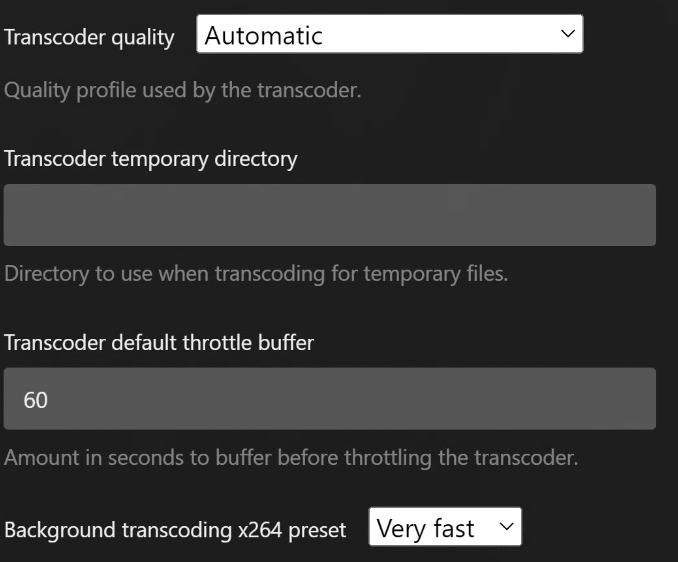
Lastly, these are my transcoder settings…
…are yours similar?
I ask this because I’m looking at the Technical Details of a show I’m trying to play back BUT it’s frozen. It says the following: “Transcode Reason - Not enough bandwidth for direct play of this item. Required bandwidh is 17720 kbps and only 4000 kbps is available.” I don’t get why it’s not getting enough considering my PMS is ethernet connected (1G/full) and as seen in my last screenshot this is local