Server Version#: Version 1.22.3.4523
Player Version#: Version 4.54.5
Server OS: Ubuntu Server 20.04 LTS
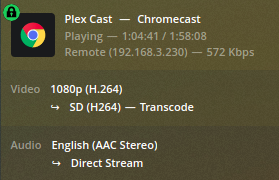
I have my chromecasts and plex server on separate VLAN’s with firewall rules allowing the appropriate traffic (casting videos from plex works - the videos play). However, every time I play a video, it transcodes, which ramps up the server CPU to 400%, which causes the video stream to constantly stutter and buffer. It does this remotely as well, when I’ve verified open ports and accessibility.
Somehow, casting to Chromecasts always transcodes video, which, as far as I can tell, is completely unnecessary.
I’ve watched the same video file in VLC and it never gets above 6 Mbps. When I test the connection speed between VLAN’s locally or even between my laptop and the Plex server remotely, it’s much better than 6 Mbps. So, there is no reason the Plex server can’t just send the video file raw. Still, it transcodes it into a 600 kbps stream (for apparently no reason) which then stutters like mad because the CPU is throttling at 400%.
How do I make the Plex server STOP transcoding unnecessarily?
Looking at your screenshot above, it is clear that Plex considers the client as ‘not local’.
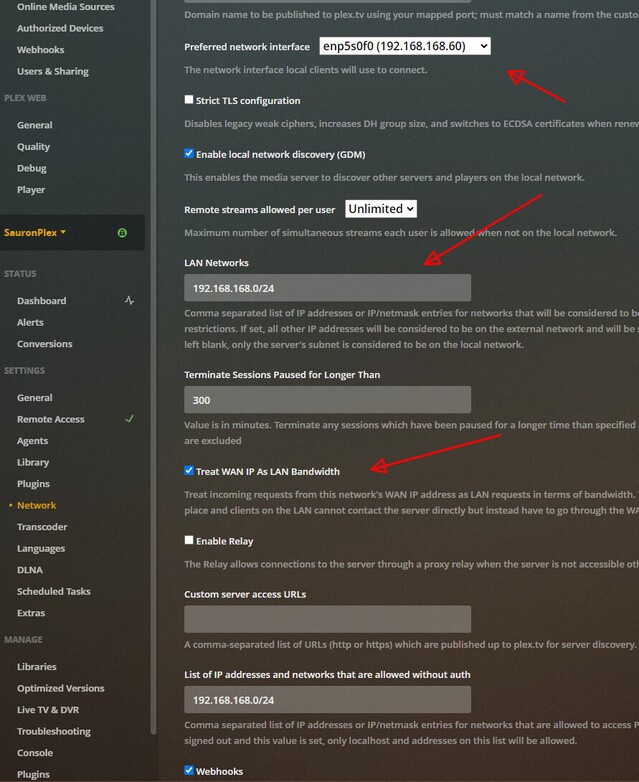
Settings - Server - Network - “Show Advanced” - “LAN Networks”
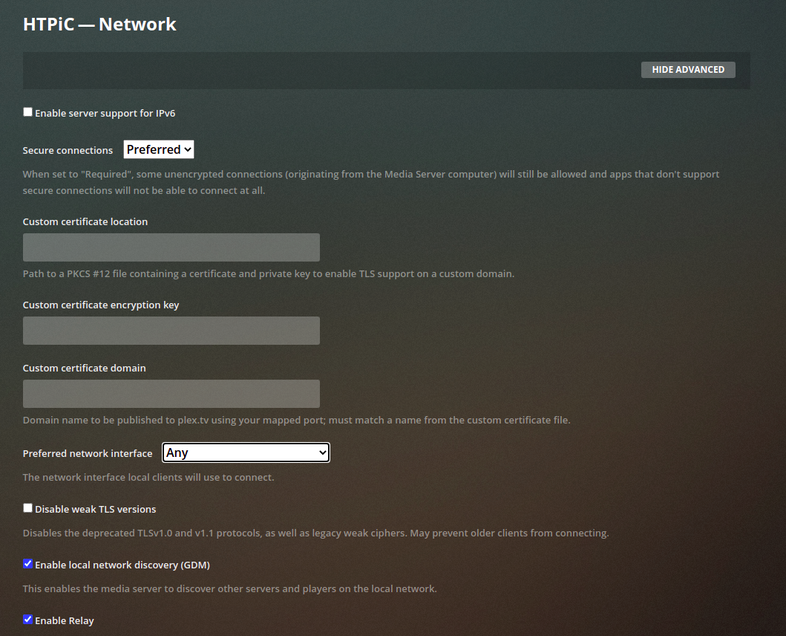
I don’t see a setting under “Show Advanced” for LAN Networks
I disabled video transcoding and it’s playing normally at 4Mbps. The real question is why it won’t choose this easier option on its own.
because you have separated the network, plex thinks that the CC is remote.
you can either put them on the same network (so they are local to each other), or you can find the setting that controls the REMOTE bandwidth settings (on both client and server).
if your server has multiple ips, in Otto’s screenshot, you could try setting the drop down for network interface to be the same as the CC, but then anything not on the CC network would be treated as remote as well.
some of these below may be ‘plex pass’ advanced features.
As above, I don’t have those options in my Network submenu.
are you using the Plex Web or your server ip directly ?
as I stated above, some of the advanced settings may be gated behind plex pass.
you could try a plex pass free trial (if available to you) or just pay for 1 month, to see if that would solve your issue.
Otherwise, the solution is as I mentioned, increase the REMOTE bandwidth on the client/server, or put them both on the same network so they are LOCAL to each other.
Yeah it’s local. So, those must be Plex Pass features. Although, honestly, I can’t see why these particular features would be paywalled.
Plex Web is not plex pass only, you can access your server from anywhere, as long as remote access is available and it is signed in to your plex account.
the ‘LAN Networks’ setting is a plex pass feature, which is a shame. Even with a VPN, unless the VPN client is on the same subnet as the host, direct play is not available. I am now looking
into alternatives to Plex…
Edit: Actually, im not sure on this. When streaming over VPN, my server dashboard shows the client as remote but also that Direct Play is being used. It shows 'remote (ip-address-of-client) - 128kbps when playing a FLAC song. I guess it is direct playing but restricting the bitrate?