Android TV: Whatever Nvidia Shield’s latest is
Chrome: 4.152.0
Plex For Windows: 1.110.0.351-4e48eb83
Server, Ubuntu Docker: 1.43.0.10231
Long story short, I am getting forced into Plex Relay within my local network, sometimes while in the middle of watching something on Plex.
This issue has come up within the last few weeks multiple times. On my Nvidia Shield, I was in the middle of watching a movie when it hung while rewinding the show a few seconds. This must have dumped my cache, so when it went to re-fetch the video data it was unavailable. From then on, I was unable to play the media, and the client claimed that my server was unavailable. After several minutes of closing the app, rebooting the shield, and restarting the server, the server was finally reachable by the client, but it was using the Plex Relay, and was transcoding the video to SD quality. After a few more minutes (and a switch reboot), it seemed to fix itself.
Last night (and right now), my Chrome client I use to manage (but not watch) the server is showing no connection. After a few seconds, it connects, but informs me that it is using a Plex Relay. Any media I attempt to play is transcoded due to the relay.

You can see that someone else within my household is able to play directly without issue.
The strange thing, is that I can load up Plex For Windows or Firefox, log in, and play the same file, and I am not indirect. So it appears to be a client issue where it failed to retrieve the IP of my server, and falls back on the Plex Relay. What might be causing this? It can even happen mid-stream, as happened yesterday to my Plex-For-Windows in the middle of watching something (fixed itself after server reboot), and earlier last week with the Shield (resolved after switch power cycle, or just time). As of right now, I haven’t been able to get the chrome client to fix itself, even if I close down Chrome entirely and reload it.
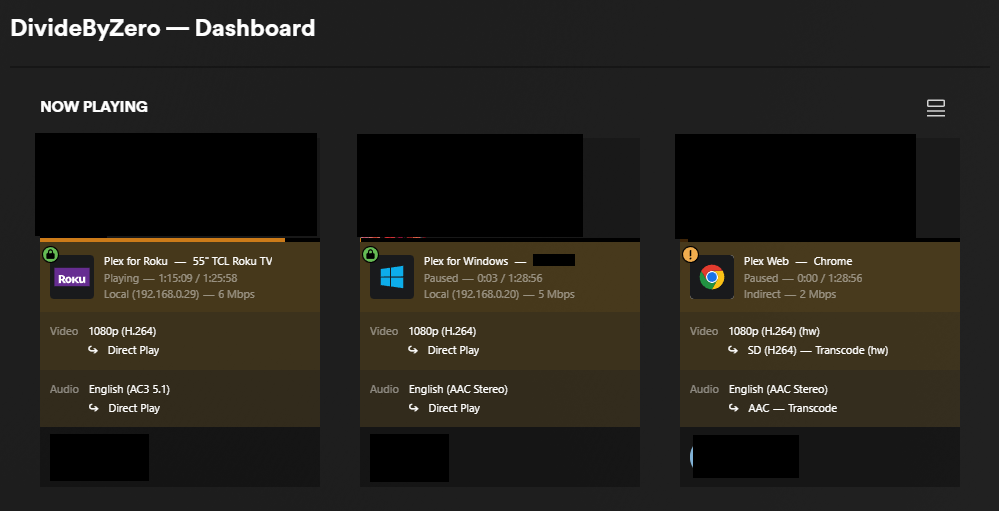
Here, I have the same movie loaded on my Windows player, and in chrome, while my family member is also playing just fine on Roku.
Solved Edit for Chrome issue:
Click the double bar next to the URL in your browser, and allow “Local Network Access” for this site and refresh. If you declined it, this slider bar will be off.


