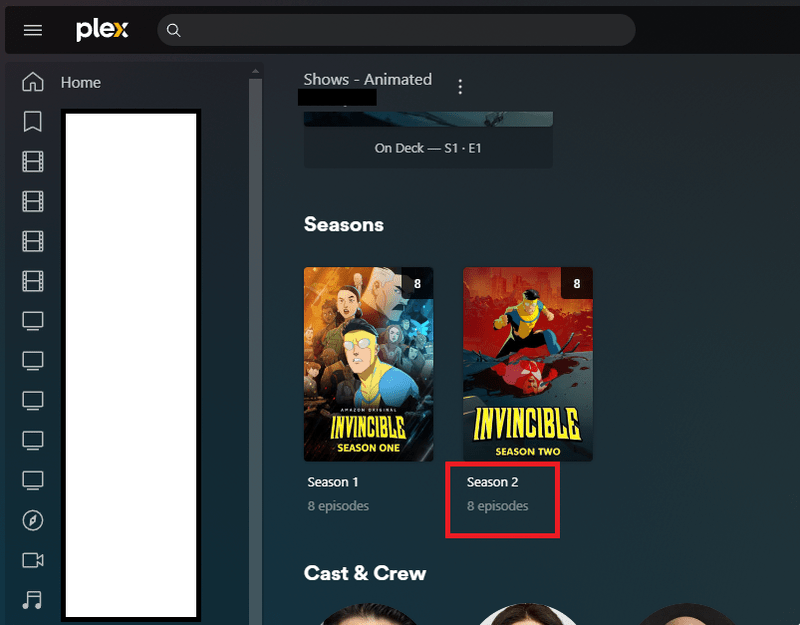
When you are in the TV show library Click on a Series and it has Seasons click a season click an Episode click the 3 dots and you can see the location of that episode and all the info Codec etc! including the location on Drive! and delete the option. That is GREAT!
Now backtrack to the Season Folder showing 7 episodes in the folder but when you open it there is only 6 episodes showing. We need the 3 dots for each Season folder also and we have it but it is missing (Get Info) to see what is going on. Question why is (Get Info) missing and you can only get that on an episode? Seeing the file structure for the season might help us figure why its only half scanning in.
When you say "Now backtrack to the Season Folder showing 7 episodes in the folder but when you open it there is only 6 episodes showing...", what do you mean? Are you referring to this number in my screenshot? (picture of a TV Show Season level view):
I ask, because I have never encountered a case where that number showed more items than the “folder” ever contained. If that displays “7”, but you only see 6 items when you click on the poster, then that is a pretty serious bug. This would not be a case of Plex listing the number of items in a “folder”, but only displaying 6, since Plex doesn’t really use “folders” as you would think of in file explorer. That should be the absolute number of items that Plex indexed in the actual folder, and it should then list all items it indexed once clicked.
Or do you mean that there are supposed to be 7 episodes, but Plex only lists and shows 6 of them? This would be much more likely, and is probably due to the way you named/numbered your episodes. This is a common issue that comes up here, so I’m leaning towards that as the issue until you provide more info to rule it out. Please take note of the Naming and Organizing Your TV Show Files guide from Plex, and try to follow the instructions, as Plex can be a bit picky when it comes to numbers.
Could you provide a screenshot of the folder view of your media in file explorer? That’d help me immediately know whether the latter case is the issue here. I just need to know the filenames, and the folder structure in the address bar (if applicable), anything else you can feel free to censor.
Here look at Season 3 showing 7 episodes and when you open Season 3 all you see is 6 Episodes
*whistles* Wow, that is… not good. I am totally stumped at this.
Well, let’s try changing around our view, just in case it’s a strange browser issue. Try shrinking these icons by selecting that bar in the upper right of the page and sliding it left. This ought to fit 3 items per row, or possibly 4 if your browser is wide enough. If that doesn’t reveal the final episode, click the 3x3 grid box to the right of the bar to change to details view and see if it shows up there.
If neither of these reveal a final episode, then I have no clue why Plex would list 7 episodes in the seasons view, but NOT all 7 in the single season view.
Do you have an episode “zero”, or an episode “1.5”? *mumbles to self* agh, but that wouldn’t leave you with an even number of episodes in the second view.
Not a browser when it shows like that on my Samsung Smart TV and other Fire Sticks. Its a PLEX flaw not allowing you to fix it. Wish they would allow nfo’s be easier. don’t get me started with PLEX on my Samsung Smart Phone using Live TV HDhomerun and it comes in Spanish! Have to change it TO SPANISH back to English to fix it. Thats been doing that since I started using PLEX long ago.