Server Version#: 1.29.1.6316
Player Version#: Try in version 2.05 ps4, LG webos plex last version and web browser directly
Hi,
I have an intel nuc 12 with i5 processor, intel Iris xe graphic card, 32gb 3600mhz and a m.2 2280 pci 4.0 . I am running Ubuntu 22.04 and installed the intel graphic card drivers by following the intel guide.
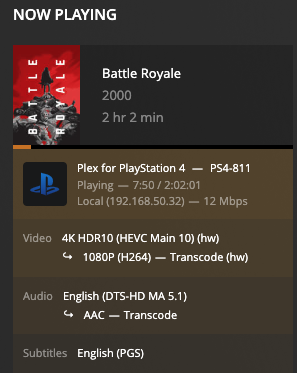
Hardware transcoding is up and running. However I tried to transcode to 1080 (20mbs) a copy of battle royal 4k with a bitrate of 87364kbps, video frame rate 24p, hdr and my transcoding speed is very very poor 0.5 , 0.6. Please see images attached, I believe that my machine should run multiple 4k in parallel but its struggle with only one transcoding :-S any ideas?
You’re burning PGS subtitles into the output images.
An i5 can’t keep up with that at 86 Mbps input rate
To confirm, disable subtitles and retest
As FYI, you’re using the SNAP package from the Ubuntu store.
This will have limitations as well.
Recommend you consider uninstalling and purging that package
then downloading from Plex.tv/downloads and installing 1.29.2 from there with dpkg -i filename.deb on the command line.
@ChuckPa So I have removed the snap version and installed the deb packaged fixed permissions and all for the plex user. Also tried with and without pgs burning and naturally there was a difference! With pgs burning I get a 0.6-0.8 speed and buffering; without pgs I get a speed between 1.6 - 3.4. Isn´t this still slow for the hardware I have “alder lake i5” (NUC12WSKI50Z) ?
I also tried other movies with similar results (matrix has a bitrate of 64Mbps). Another question is the HW transcoding on demand? I noticed that if I have pgs enable then is pushing HW acceleration but if I am not using pgs is not using HW. (see example of the matrix)
Install plex in a container passing the /dev/dri (but could be as suggest native deb package)
Upgrade to Ubuntu 22.10 (kernel 5.19.0-23-generic)
Install intel drivers as in the tutorial above (but do not change to kernel 5.17 that will give you problems with HW in these nuc 12)
PGS subtitles are a pain for very high bitrate - disable them and use srt or similar
I also install tautulli (helps with the details)
Finally I have all my services containerised so I leave the yaml file for the community. I use an external 3TB Western digital usb 3.0 for many years without failing and keep the container volumes there. Hence, if I reinstall my server from scratch it just takes me literally 10min to have everything up and running
The reason why I am using docker is just the easiest way to setup all my services quite speedy with all the pre defined configurations because the volumes are on an external drive. So I love the beauty of it plus easy to pull a new image an update plex (and all other services) in seconds. But I do appreciate your support
Yes I shared full docker composer file but I removed any token or sensitive information. Is just for the community if someone wants to copy the same strategy.
I have my media processing in a Linux Container (LXC) rather than a series of docker containers. I do that to make cross-app integration easier. All those apps need is internet and filesystem access so it made sense to put it together.
On my LAN, they appear as a stand-alone host (due to how the LXC is). that’s perfect for the job.
Doesn’t that make it heavier since is a full OS virtualization instead of just app virtualization? On the other hand, I need to try podman. I am not sure if it will be more efficient than docker but it eliminates the client / server and runs in a single process in unprivileged mode.
No. It isn’t a VM, it’s a containerized OS. It doesn’t run all the heavy things a normal OS does.
In a VM, you’re abstracting the hardware.
In a LXC, you’re abstracting the OS namespace. You can run multiple apps on the OS.
In a Docker, you’re abstracting the app only. You can run one app.
Here’s the full pid list of my LXC (which I can lighten even more should I want to)