Intermittent connectivity issues (local and remote)

[Fair warning I try to give as much detail as possible so the initial post is a little long]

Server Version#: 1.24.5.5173
Player Version#: Any (not player specific)

I’m running the Linuxserver.io Plex Docker container on a CentOS 7 host with Kernel 5.8.0-1.e17.elrepo.x86_64.

Logs (my zip file is too big to upload the forum because I made a change a while ago to the number of logs that are kept, so I uploaded it to my Google Drive): https://drive.google.com/file/d/1uWi6wkZ4Soc5etffhUwpKR290JmVLNE8/view?usp=sharing

So I’m experiencing an intermittent issue where I’ll lose connectivity to Plex and this will happen for both local and remote connections. I actually first noticed an issue because of Tautulli and the following errors in the Tautulli log.

Tautulli Pmsconnect :: Unable to parse XML for get_current_activity: 'NoneType' object has no attribute 'getElementsByTagName'.
Failed to access uri endpoint /status/sessions. Request timed out: HTTPConnectionPool(host='192.168.1.49', port=32400): Read timed out. (read timeout=15)
Unable to retrieve data for get_activity.

A note about Tautulli is that I am also running that via Docker using the official image and it is on the same host as Plex.

After I saw those errors I went to the dashboard for my Plex server and it was saying unable to load statistics and the bandwidth, CPU and RAM charts were all blank. I’m not quite sure when this might have started but I did run “yum update” the week of October 18th. I thought that maybe something within that update had maybe caused an issue (especially because I didn’t reboot the server after doing that). Because of that and noticing this issue yesterday, I ended up rebooting the server.

After I did that, I was still experiencing the issue and I remembered that my default Kernel was changed because the 3.x version was updated during the update. I then did another reboot making sure that I booted back to the 5.x version of the Kernel and it seemed to be working OK after that, so I thought maybe it was something with the 3.x version.

The issue ended up happening again tonight (10/29) and doing a reboot of the docker container temporarily restored it but I would lose the connectivity again. I did I believe 2 or 3 reboots of the docker container and then while I was finishing dinner, all of a sudden Tautulli started displaying activity again and when I went to the Plex dashboard it was working properly.

I took this screenshot showing what was happening prior to it starting to work.
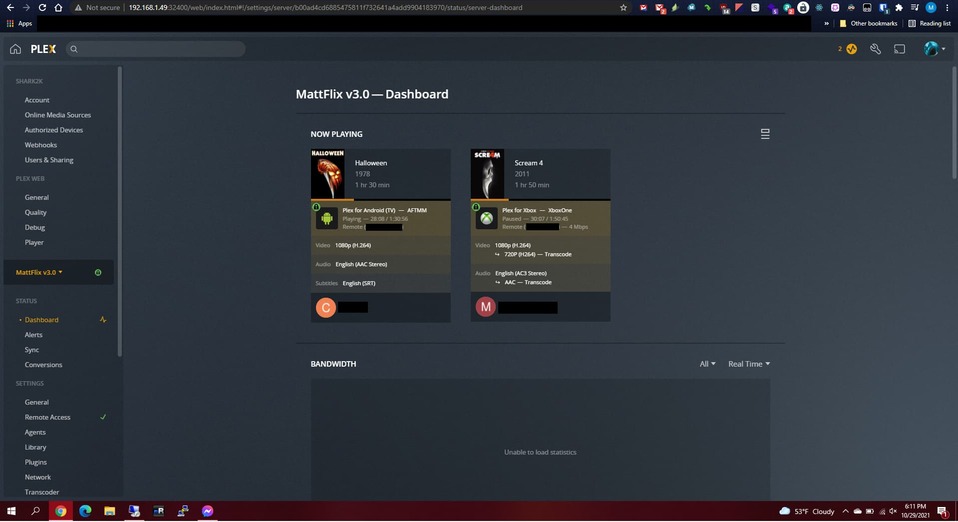
Regarding the logs, I downloaded the first logs on 10/29/2021 at 18:15:24 US EST after a reboot of the container (couldn’t download them from the Web GUI otherwise). I then downloaded the ones I shared 4 minutes later at 18:19:53 US EST which was seconds after the system started working again.

So for those that are familiar with the logs and are willing to take a look, I would say the timeframe to look at would be 17:30 - 18:30 on 10/29/2021 and that should be when the issue was occurring and then “resolved” itself.

The only other thing I can think of mentioning is that everything else on my server was working fine while this happened to Plex. I was able to access the SMB shares from my Windows machines that I normally access. Other applications on the machine that have web pages I was able to access and they were working fine. Even Tautulli was working fine with the exception of it not being able to query Plex.

Let me know if any other information is needed/required.
I’m hoping that the issue has decided to resolve itself but at the same time I would like to see if somebody familiar with the logs can find something that would seem to be related to the issue.

Thanks,
Shark2k

@ChuckPa any chance you (or somebody else from the team) can take a look at the provided logs and let me know if you see anything? Finger crossed it’s actually been stable the past few days since posting this, but if you could take a look and let me know if you see anything I’d appreciate that.

Thanks,
-Shark2k

@shark2k

Definitely have something intermittent at the host level → internet level.

[chuck@lizum user.2003]$ grep -i internet *.log | grep MyPlex
Plex Media Server.14.log:Oct 28, 2021 19:55:01.079 [0x7f264d876b38] DEBUG - [EventSourceClient/pubsub] MyPlex: We appear to have regained Internet connectivity.
Plex Media Server.14.log:Oct 28, 2021 19:56:52.813 [0x7f264d899b38] DEBUG - [EventSourceClient/pubsub] MyPlex: We appear to have lost Internet connectivity, resetting device URL cache.
Plex Media Server.14.log:Oct 28, 2021 19:57:08.219 [0x7f264d899b38] DEBUG - [EventSourceClient/pubsub] MyPlex: We appear to have regained Internet connectivity.
Plex Media Server.15.log:Oct 28, 2021 19:37:31.573 [0x7f3793256b38] DEBUG - [EventSourceClient/pubsub] MyPlex: We appear to have regained Internet connectivity.
Plex Media Server.16.log:Oct 28, 2021 19:30:32.757 [0x7fdec8c50b38] DEBUG - [EventSourceClient/pubsub] MyPlex: We appear to have regained Internet connectivity.
Plex Media Server.17.log:Oct 28, 2021 19:26:56.415 [0x7fe29c953b38] DEBUG - [EventSourceClient/pubsub] MyPlex: We appear to have regained Internet connectivity.
Plex Media Server.1.log:Oct 29, 2021 18:02:07.592 [0x7fe663425b38] DEBUG - [EventSourceClient/pubsub] MyPlex: We appear to have regained Internet connectivity.
Plex Media Server.27.log:Oct 28, 2021 00:28:21.409 [0x7febbc224b38] DEBUG - [EventSourceClient/pubsub] MyPlex: We appear to have regained Internet connectivity.
Plex Media Server.2.log:Oct 29, 2021 17:55:01.510 [0x7f7e0f3b5b38] DEBUG - [EventSourceClient/pubsub] MyPlex: We appear to have regained Internet connectivity.
Plex Media Server.30.log:Oct 27, 2021 20:30:27.395 [0x7febbc224b38] DEBUG - [EventSourceClient/pubsub] MyPlex: We appear to have regained Internet connectivity.
Plex Media Server.31.log:Oct 27, 2021 20:11:00.119 [0x7f0d6c2a1b38] DEBUG - [EventSourceClient/pubsub] MyPlex: We appear to have regained Internet connectivity.
Plex Media Server.44.log:Oct 26, 2021 18:12:01.582 [0x7f5155b64b38] DEBUG - [EventSourceClient/pubsub] MyPlex: We appear to have regained Internet connectivity.
Plex Media Server.log:Oct 29, 2021 18:14:57.926 [0x7f0fe2c4fb38] DEBUG - [EventSourceClient/pubsub] MyPlex: We appear to have regained Internet connectivity.
[chuck@lizum user.2004]$ 

With this being in a container, I would start looking at the host → outside first

Containers don’t fail like this unless you’re running then as NAT. ( Are you host or NAT ?)

@ChuckPa

Thanks for the response and looking through the logs.

Regarding the container, for Plex I am running it with network_mode: host in my .yml file.
The rest of my containers, with the exception of Tautulli I believe since I have a depends_on: - plex option for that, should be running in bridge mode as I am not specifying anything for network_mode.

I’ll admit, when it comes to the network side of stuff that is not my forte. I can get by with the basics but once you start going deeper I’m out of my element.

Also, like I said in my 2nd post, it appears to be stable (fingers crossed) since making my initial post. There might have been another recurrence the following day but it was much shorter and didn’t appear to really effect streaming.

That said, as I believe you are the Linux guy and also seem to be pretty good with networking, do you have any suggestions for any commands that I should run or anything specific to look for? Everything aside from Plex (and Tautulli) appeared to have no issues during the timeframe when it was occurring.

Again, thanks for looking at the provided logs and for responding (as I see you busy posting and helping in other threads).

-Shark2k

Let’s keep an eye on it for the next few days.

If you want to setup a task to look for connectivity issues being reported:
( edit this path root as appropriate whether to run inside or outside the container )

tail -F "/config/Library/Application Support/Plex Media Server/Logs/Plex Media Server.log" | grep -i "internet connectivity"

This, when run continuously, will keep reading the main log file, transitioning with it as it rotates (-F) looking for connectivity messages.

Thanks again @ChuckPa.

I’m also not the strongest with Linux (I’ve only really been using it the past 3 years since I’ve set this server up and have been able to get by up to this point).

I’m not sure if you are are referring to setting something up as a Cron job with the command you gave or if maybe you were suggesting something else.

The method I decided on was to open another SSH session and run that command so I can check on it every once in a while and see if anything appears.

Again (I know I’ve said it a bunch) but thanks for helping look into this.

-Shark2k

You don’t need a cron job. that’s kinda wasteful.

If you can keep a simple terminal session open and that command running in that session, it’ll be good enough.

If you’re worried about disconnecting then you can put it all in a script and use at (cron without adding to cron :slight_smile: ) so it will also stay running detached from your console… just remember to send the output to a file else it will be lost.

1 Like

Hey @ChuckPa,

So I’ve kept a terminal session open and have had that command running since the 4th.
Today, I had 3 hits from the command.

Here are the logs from today: Plex Media Server Logs_2021-11-07_21-21-57.zip - Google Drive

Timestamps (in US EST) for the mention of “Internet Connectivity”:

Nov 07, 2021 17:48:41.228 
Nov 07, 2021 19:42:27.434
Nov 07, 2021 21:19:34.692

I did restart the docker container as I was having some connectivity issue to my server (locally).

Do you have any suggestions for anything to look for either regarding the Docker container or from the Linux host itself?

Other than doing a yum update (and then going back to loading the 5.x version of the kernel) I really can’t recall anything that was changed on that server that would explain the sudden issues.
I do update Plex pretty regularly when the updates come out.

Thanks for any ideas you might have.

-Shark2k

@shark2k

Thanks for those. I learned a lot .

It’s not responding because the DB is painfully slow / fragmented / CPU overloaded.

Plex Media Server.9.log:Nov 07, 2021 19:30:09.002 [0x7f8afb929b38] WARN - SLOW QUERY: It took 380.000000 ms to retrieve 1 items.
Plex Media Server.9.log:Nov 07, 2021 19:30:09.004 [0x7f8afaed1b38] WARN - SLOW QUERY: It took 300.000000 ms to retrieve 3 items.
Plex Media Server.9.log:Nov 07, 2021 19:30:09.014 [0x7f8afa42fb38] WARN - SLOW QUERY: It took 260.000000 ms to retrieve 50 items.
Plex Media Server.9.log:Nov 07, 2021 19:30:09.016 [0x7f8afcd43b38] WARN - SLOW QUERY: It took 950.000000 ms to retrieve 12 items.
Plex Media Server.9.log:Nov 07, 2021 19:30:09.024 [0x7f8afa152b38] WARN - SLOW QUERY: It took 370.000000 ms to retrieve 1 items.
Plex Media Server.9.log:Nov 07, 2021 19:30:09.025 [0x7f8afd2e5b38] WARN - SLOW QUERY: It took 370.000000 ms to retrieve 1 items.
Plex Media Server.9.log:Nov 07, 2021 19:30:09.025 [0x7f8afc48cb38] WARN - SLOW QUERY: It took 370.000000 ms to retrieve 1 items.
Plex Media Server.9.log:Nov 07, 2021 19:30:09.025 [0x7f8afa72cb38] WARN - SLOW QUERY: It took 350.000000 ms to retrieve 1 items.
Plex Media Server.9.log:Nov 07, 2021 19:30:09.036 [0x7f8afc545b38] WARN - SLOW QUERY: It took 1250.000000 ms to retrieve 16 items.
Plex Media Server.9.log:Nov 07, 2021 19:30:09.073 [0x7f8afb929b38] WARN - SLOW QUERY: It took 450.000000 ms to retrieve 1 items.
Plex Media Server.9.log:Nov 07, 2021 19:30:09.075 [0x7f8afa42fb38] WARN - SLOW QUERY: It took 450.000000 ms to retrieve 1 items.
Plex Media Server.9.log:Nov 07, 2021 19:30:09.077 [0x7f8afd196b38] WARN - SLOW QUERY: It took 1800.000000 ms to retrieve 22 items.
Plex Media Server.9.log:Nov 07, 2021 19:30:09.082 [0x7f8afa051b38] WARN - SLOW QUERY: It took 470.000000 ms to retrieve 1 items.
Plex Media Server.9.log:Nov 07, 2021 19:30:09.085 [0x7f8afac5cb38] WARN - SLOW QUERY: It took 450.000000 ms to retrieve 1 items.
Plex Media Server.9.log:Nov 07, 2021 19:30:09.095 [0x7f8afae95b38] WARN - SLOW QUERY: It took 430.000000 ms to retrieve 1 items.
Plex Media Server.9.log:Nov 07, 2021 19:30:09.097 [0x7f8afa42fb38] WARN - SLOW QUERY: It took 310.000000 ms to retrieve 50 items.
Plex Media Server.9.log:Nov 07, 2021 19:30:09.101 [0x7f8afc469b38] WARN - SLOW QUERY: It took 480.000000 ms to retrieve 1 items.
Plex Media Server.9.log:Nov 07, 2021 19:30:09.102 [0x7f8afaed1b38] WARN - SLOW QUERY: It took 460.000000 ms to retrieve 1 items.
Plex Media Server.9.log:Nov 07, 2021 19:30:09.109 [0x7f8afcd43b38] WARN - SLOW QUERY: It took 440.000000 ms to retrieve 1 items.
Plex Media Server.9.log:Nov 07, 2021 19:30:09.141 [0x7f8afb5a8b38] WARN - SLOW QUERY: It took 450.000000 ms to retrieve 1 items.
Plex Media Server.9.log:Nov 07, 2021 19:30:09.155 [0x7f8afae2eb38] WARN - SLOW QUERY: It took 1110.000000 ms to retrieve 12 items.
Plex Media Server.9.log:Nov 07, 2021 19:30:09.158 [0x7f8afa42fb38] WARN - SLOW QUERY: It took 260.000000 ms to retrieve 2 items.
Plex Media Server.9.log:Nov 07, 2021 19:30:09.164 [0x7f8afb929b38] WARN - SLOW QUERY: It took 350.000000 ms to retrieve 4 items.

There are a ton of these in your logs. Query time for up to 50 should be no more than 10 ms.

  1. Automatic optimization set in Scheduled Tasks ?
  2. When is the last you’ve manually invoked it ?
  3. CPU loading on the host around this tine period ?

Independent of this, how large is the DB (com.plexapp.plugins.library.db) ?

I wonder if it’s loaded with the extra IVA records bug ?

Thanks again for the response @ChuckPa.

Here is the relevant info from the ls -l command of the database folder

598233088 Nov  8 21:15 com.plexapp.plugins.library.db

So, it’s about .5 GBs.
For information I have 2,035 movies and the following between my TV libraries:

TV - 952 series - 2909 seasons - 43014 episodes
Anime - 14 series - 21 seasons - 1041 episodes

(seasons and episodes info retrieved via Tautulli)

To answer your other questions:

  1. Yes, “Optimize database every week” is checked
  2. I actually manually invoked it last night after having retrieved the logs (and I believe before making the post)
  3. I don’t actually have a “good” answer for this (as in I don’t know what the usage was like). However, from a scale of 1-100 (I use Netdata and just updated it so that it should keep at least 7 days of history), depending on the number of people streaming it fluctuates between ~10 to 70 percent, but it’s not normally for long sustained periods of time. Sorry I can’t give better info then that.

Since I do keep so many logs, let me know if you want me to upload a new set as the period from after I optimized (and cleaned bundles, not that that probably matters) should be in there.

Thanks,
Shark2k

This topic was automatically closed 90 days after the last reply. New replies are no longer allowed.