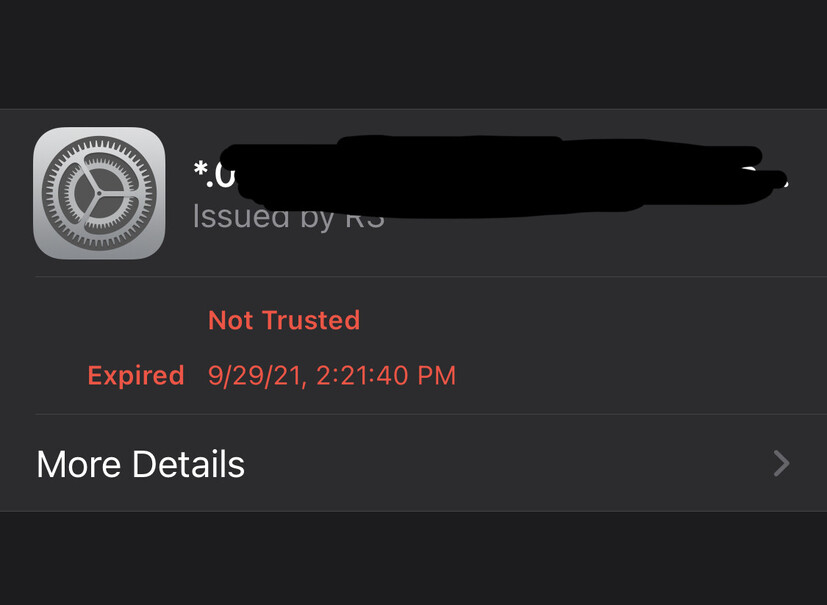
Server Version#: 1.18.3.2129
Player Version#: iOS 15 - Browser
A few days ago remote access stopped working on iOS and TVOS, local and my laptop via Chrome to app.plex.tv still works. When I use my iPhone (iOS 15 and Chrome browser) to access app.plex.tv it says it is unable to connect securely to my server. If I go to the {IP}.{Hash}.plex.direct URL on my iPhone I get a certificate error - NET::ERR_CERT_DATE_INVALID. If I go to the same URL on my laptop the certificate is valid. I get this error if I am on WiFi or on cellular. Is there an issue with iOS and plex.direct certificates?
Did you restart the server and the apps?
Yes, restarted them many times. I also removed the preferences file so it will remake it as well as logged the server out and back in.
When I visit on Safari I get more details, it says it expired on the 29th but the details says otherwise.
Look very carefully here
https://global.discourse-cdn.com/plex/optimized/3X/5/c/5c297c0f829b93fa6076bc85230926afb07c4bed_2_690x789.jpeg
NOT VALID BEFORE 10/2/21-11:31:40. It’s 10/2/21-20:52 where I live (US EAST)
The cert is active VALID.
This isn’t a Plex problem. See it? Safari is wrong.
AppleCare time
Correct the details say it is valid but the page before that said it expired on the 29th.
Could it be related to this:
Yes, very likely is.
It sounds like something in iOS 15 didn’t update.
As you can see, your cert is valid but iOS isn’t accepting it as such. That’s where the issue likely is.
What I don’t understand is that I have iOS 15 on my iPad and iPhone – both working normally without issue. That’s what I can’t figure out.
Using TLS Inspector I was able to confirm the issue is not with the Plex certificate but with the intermediate certificates. For some reason my devices will not fetch the new ISRG root certificate that Lets Encrypt has moved to. TLS Inspector is showing me it is still using the old R3 and DST Root CA X3 certificates that expired at the end of September.
@choeschen
Have you tried simply removing the app, restarting iOS, reinstalling, then relinking to the server ?
Yes and that didn’t help. I did a reset (factory restore) on the AppleTV and set it back up with the Plex app and that finally fixed it. It appears the certificate issue is an Apple device caching issue, it is caching the root CA and intermediary certificate and using those instead of the new ISRG certificates. I would assume the same would fix my iPhone but I’m not going to try that right now.
Hi, I have the same problem. I can use Plex on my Apple TV, web, and even use Plexamp on my iPhone and laptop, but the Plex app doesn’t work :(. I don’t know what to do, because I tried restarting and reinstalling, but nothing.
I’ll follow this thread.
I have tried clearing Safari’s cache, resetting the network settings, and installing the latest iOS update but none of these worked. So far the only thing that works is to factory reset the device. I only tested that on an AppleTV and not on an iPhone yet but I am guessing it will also work. I have an iPad that never accessed Plex before and when I tried that it did work which confirms the issue is with Apple caching the certificate and only using the cache version and not what is sent to it. Since the intermediary certificates are named the same (both the expired one and the new one is named R3) this might be tripping it up. My hunch is the OS sees the certificate is signed by a certificate named R3 and it has a certificate cached named R3 so it uses the cached version. So far there doesn’t seem to be any way to clear the certificate cache on an Apple device except by factory resetting it.
I recommend reaching out to AppleCare. I suspect there is a way to purge the certificate,
They know best how to deal with this situation and have a lot more resources to resolve it either way.
If any of you get an answer, please inform us. I can’t use my NAS on iOS plex apps or browser through my MacBook.
Update: I did create a post on Apple’s support forums but nobody has an answer.
I did notice today that my iPhone is working again but I didn’t wipe it. I use my iPhone as my test device. I tested it with iOS 15.0 and 15.0.1 but neither of them worked. When I updated it to 15.0.2 I didn’t test Plex right away. Perhaps that fixed this issue or perhaps something else did. The only other change I’ve made recently was to move Plex from my FreeNAS jail to a new Hyper-V VM running CentOS 7. I didn’t create a new Plex instance but moved my old server files over. My plex.direct URL didn’t change. Not only is my iOS plex app working but the web URL is working and TLS Inspector is also showing a valid certificate.