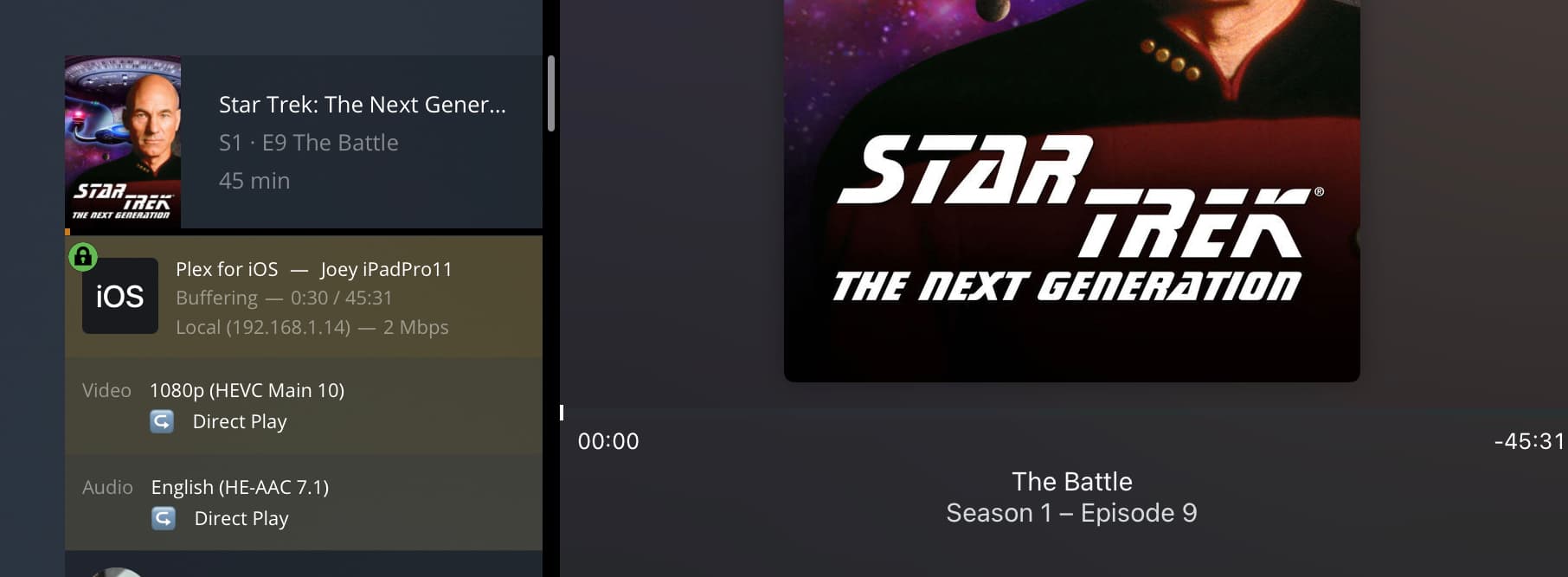
EDIT: with the latest iOS app update (7.28) and current server server version ( 1.25.4.5487), the issue is finally resolved (appears to be with a transcode that plays properly)!! Hooray!!!
Server Version#: 1.25.0.5282
Player Version#:7.25
Trying to play a particular TV series that are HEVC and HE-AAC 7.1 encoded video files on the iOS app (they work fine on the web client and my Roku players) always fails to play unless I set the quality below the 1.6mbps level to get a transcode to occur.
After about 10 seconds hitting play, I received a "Something went wrong playing your media. Please try again.
Attached are the server logs (with the restart before collection of the error) and iPad client log. This has been an issue for at least a year with
After reading through the logs I really can’t figure out what is causing the failure. I can see that for some reason the part being transcoded is the audio, but I don’t really understand why its doing that as my wife uses an iPad for all her viewing and has never had an issue with anything I have encoded in AAC multichannel audio. Do the episodes include another audio track by chance?
Unfortunately, that is the only audio track. I suspect the issue is the audio track as well, as all other HEVC videos plays fine (different audio however).
Well the logs show that the video is being copied and not transcoded but the audio is being transcoded. Does that episode play on everything else fine?
So I just tried to play this file again while watching the dashboard. It immediately shows it is going to direct play the audio, then it changes to transcode to MP3. Then it fails.
Still very weird to me. When I read the logs it almost looked like it couldn’t find the codec support for 7.1 channel AAC but I doubt that was the only thing you have with AAC multichannel audio and you didn’t say you were having issues with anything else.
Trying further things, the “use old video player” exhibits the same issue (video won’t play), no matter the Picture in Picture setting. If that setting is off and picture in picture is off, the videos play fine. As soon as I try Picture in Picture it fails. Must be something in the iPad specific handling of that function. Maybe PIP mode uses the “old video player?” I will change the subject of the topic for clarity
(Also with Picture in Picture mode on the iPad it’s annoying how it does not play the next episode, it closes when the episode completes).
This bothers me – NO TPU (transcoding hardware) found on a J3455 which does have the capability on DSM 6.
Dec 01, 2021 12:47:25.830 [0x7fedda24ab38] DEBUG - [Transcode/0AC8E8E3-97C1-4C0E-8F21-FA6D17C41CD8] Starting a transcode session 0AC8E8E3-97C1-4C0E-8F21-FA6D17C41CD8 at offset -1.0 (state=3)
Dec 01, 2021 12:47:25.831 [0x7fedda24ab38] DEBUG - [Transcode/0AC8E8E3-97C1-4C0E-8F21-FA6D17C41CD8] TPU: hardware transcoding: enabled, but no hardware decode accelerator found
Dec 01, 2021 12:47:25.831 [0x7fedda24ab38] DEBUG - [Transcode/0AC8E8E3-97C1-4C0E-8F21-FA6D17C41CD8] [Universal] Using local file path instead of URL: /volume1/video/Star Trek - The Next Generation (1987)/Star Trek The Next Generation Season 1  (1080p BD x265 10bit FS79 Joy)/Star Trek TNG S01E07 Lonely Among Us  (1080p x265 10bit Joy).mkv
Dec 01, 2021 12:47:25.831 [0x7fedda24ab38] DEBUG - [Transcode/0AC8E8E3-97C1-4C0E-8F21-FA6D17C41CD8] TPU: hardware transcoding: final decoder: , final encoder:
Dec 01, 2021 12:47:25.832 [0x7fedda24ab38] DEBUG - [Transcode/0AC8E8E3-97C1-4C0E-8F21-FA6D17C41CD8/JobRunner] Job running: FFMPEG_EXTERNAL_LIBS='/volume1/Plex/Library/Application\ Support/Plex\ Media\ Server/Codecs/fb9eae3-4185-linux-x86_64/' X_PLEX_TOKEN='xxxxxxxxxxxxxxxxxxxx' '/volume1/@appstore/Plex Media Server/Plex Transcoder' '-codec:0' 'hevc' '-codec:1' 'aac' '-noaccurate_seek' '-analyzeduration' '20000000' '-probesize' '20000000' '-i' '/volume1/video/Star Trek - The Next Generation (1987)/Star Trek The Next Generation Season 1  (1080p BD x265 10bit FS79 Joy)/Star Trek TNG S01E07 Lonely Among Us  (1080p x265 10bit Joy).mkv' '-map' '0:0' '-codec:0' 'copy' '-tag:0' 'hvc1' '-filter_complex' '[0:1] aresample=async=1:ocl='\''stereo'\'':rematrix_maxval=0.000000dB:osr=48000[0]' '-map' '[0]' '-metadata:s:1' 'language=eng' '-codec:1' 'libmp3lame' '-q:1' '0' '-segment_format' 'mp4' '-f' 'ssegment' '-individual_header_trailer' '0' '-flags' '+global_header' '-segment_format_options' 'output_ts_offset=10:movflags=frag_custom+dash+delay_moov+frag_discont:fragment_index=1' '-segment_header_filename' 'header' '-segment_time' '10' '-segment_start_number' '0' '-segment_copyts' '1' '-segment_time_delta' '0.0625' '-segment_list' 'http://127.0.0.1:32400/video/:/transcode/session/0AC8E8E3-97C1-4C0E-8F21-FA6D17C41CD8/7513b57f-85a7-48c0-a692-d60ec38a7a08/manifest?X-Plex-Http-Pipeline=infinite' '-segment_list_type' 'csv' '-segment_list_size' '5' '-segment_list_separate_stream_times' '1' '-segment_list_unfinished' '1' '-max_delay' '5000000' '-avoid_negative_ts' 'disabled' '-map_metadata' '-1' '-map_chapters' '-1' 'media-%05d.ts' '-start_at_zero' '-copyts' '-vsync' 'cfr' '-y' '-nostats' '-loglevel' 'quiet' '-loglevel_plex' 'error' '-progressurl' 'http://127.0.0.1:32400/video/:/transcode/session/0AC8E8E3-97C1-4C0E-8F21-FA6D17C41CD8/7513b57f-85a7-48c0-a692-d60ec38a7a08/progress'
Have any DSM 6 updates been installed since Plex was ?
If so, Uninstall and reinstall the app. DSM 6 updates often disable the hardware transcoding. The installer fixes that
Since the J3455 does also support HDR → SDR, This might be a case for me to modify my DSM 7 “DockerPlex” script for DSM 6 to provide HDR tone mapping until Engineering gets it done. Maybe ?
That is interesting you found that issue in the log, as I wouldn’t have expected that at all! It’s amazing to me how well the QuickSync transcoding works.
This particular problem has been an issue for at least a year, so many updates to DSM6 have been installed (on the latest version now) in that time (and many Plex updates, I updated Plex yesterday before starting this thread).
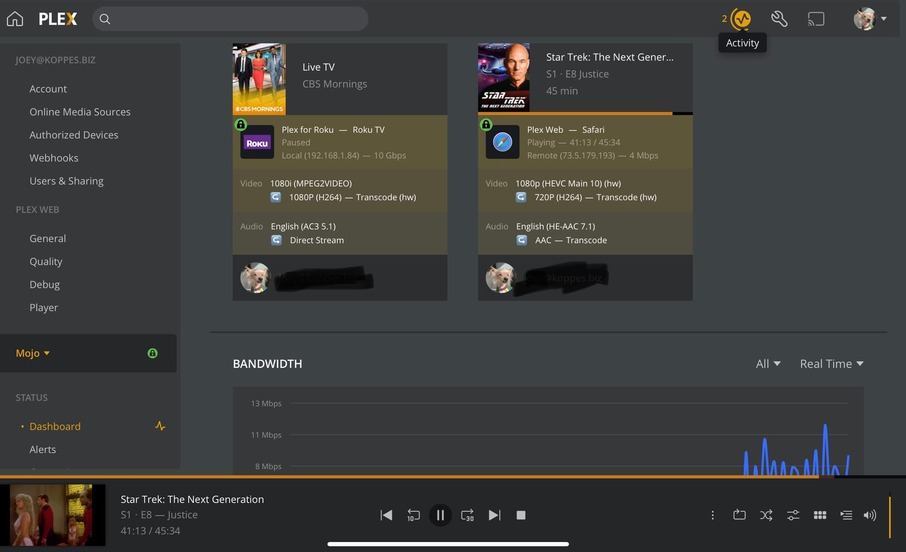
I assume hardware transcoding is working fine as most of my videos are HEVC and most of my Roku players do not support it, and I do see the (hw) transcode indication (as pictured) on the dashboard (and more importantly the cpu stays low during playback).
*I’ve never completely uninstalled plex app, as I would not assume that is safe to do! * I’ll wait for confirmation, before I uninstall (from package center) and reinstall the plex app.
Just be clear if I play other video files, the PiP works fine for me on the app.
For the tone mapping, that is interesting this processor supports that function, I do think this particular model synology 1019+ is a very popular unit.
From what I know about the Qnap center (edit I just realized you are on Synology, duh, I still think it should be fine though as long as the database is all backed up) uninstalling and reinstalling does nothing to affect the databases or anything like that. I think @ChuckPa even has a guide on how to back up those files if you are really concerned, I would keep backups anyway.
On a different note, I still think it is so weird that I have now encountered two separate scenarios on here, yours and another user, where inexplicably the Plex app on iPadOS has somehow lost its compatibility with mkv files as indicated in your logs, and this other user. Also I don’t really understand why PiP would cause a transcode on certain files and not others. I would expect PiP to have the same compatibility as full screen. Maybe I’m being dumb or maybe there is something deeper here @ChuckPa
On DSM 6, you can uninstall the Plex app without impacting your data. I designed it that way so you can safely downgrade to an older version (Synology rules about downgrading packages)
If you want to purge the server data, you have to delete the “Plex” shared folder.
On DSM 7, things are considerably different. I give you the ability to
keep your data (default action - mimmic DSM 6 behavior
reset the server credentials (account it’s connected to)
erase all the data
On iPadOS, I have the following
Are you talking about that tiny picture in the lower left corner ?
Not that little window on the left, PiP is more of a system multitasking function that allows you to keep playing video while in a different app. Please see attached image (the particular video I am playing in this example is a different file format that works fine).
On your WALL·E playing screen press the fourth button to the left of the stop X in the upper right hand corner, that should activate PiP mode for you.
Okay great, thanks for the clarification of the uninstalling the DSM6 plex package. I’ll do that now for testing. I’ll upgrade to dsm7 soon, plex was the primary reason I was waiting.
Removing and reinstalling Plex package from DSM did not resolve the issue, unfortunately.
(For some reason, I’ve always good at finding these odd bugs in software for decades, the plex DVR has an issue on Roku that has plagued me for over a year as well)
Ha! Yeah! I wish I could work around the DVR bug, when I try to play the morning news show that is presently recording it asks if I want to play live or at the start of the show, doesn’t matter which option I choose it will go back to a different news show that it recorded earlier in the morning by a random amount of time usually around 75 to 90 minutes earlier, so I have to fast forward (and in order for this to work I have to disable mpeg2 support) to get to the show I actually want to watch.
But that’s a different story for a different thread…
I will enable debug logs and reproduce the play failure in the iOS app! Thank you!
EDIT: Sorry, I have the debug logs posted above of the issue. Do you want the verbose logs by chance?