I’m running a Roku with the Plex “channel”. I have an iPhone SE (2020) and an Ipad (2019). Both of them can be used as a remote control for Plex on Roku. Has been working fine for years.
A few days ago I acquired an iPad Mini, the latest one. I installed Plex and connected it to the same wifi and Plex account as my other devices, but it cannot find the Plex app on Roku to control.
Has anyone here seen that before? Any idea why that happens or how to fix it?
You might have to manually turn on Local Network access in the settings, if you haven’t done so already. Just because you’re connected via WiFi doesn’t mean you gave the Plex App permission to access what Plex devices are locally connected to your network. Try that.
I just tried reinstalling the app. Doesn’t make a difference. I noticed I don’t have a toggle for notifications either so I went into the settings and into the notifications page. There I could tap a button to ask permission, and since then i do see it in the settings app. I cannot for the life of me find a button to ask permission for local network
Huh, ummm you just stumped me because I thought the apps were universal amongst iOS devices I’m on the BETA build of Plex for iOS 8.22 but the public version that’s on the Apple Store version 8.21 should have had those settings as well.
Additionally, the other thing is with Roku is that the Plex app on Roku must be open and signed into an account before it’s viewable from the cast selection from your iPad or iOS devices. So be sure to have the Plex app on Roku open first.
I figured it out. It seems Plex only asks this permission on the first install of the app on a brand new, factory reset device.
While I had reinstalled the app many times during the debug process, out of desperation I factory reset the iPad and then I got the question of allowing local network access.
I must’ve somehow skipped that when installing Plex the very first time but the fact that I can’t recover from that mistake without factory resetting the entire device seems like a bug. Whether it’s Plex or iPadOS that’s bugged, I don’t know.
Thanks for you help here, really appreciate you taking the time.

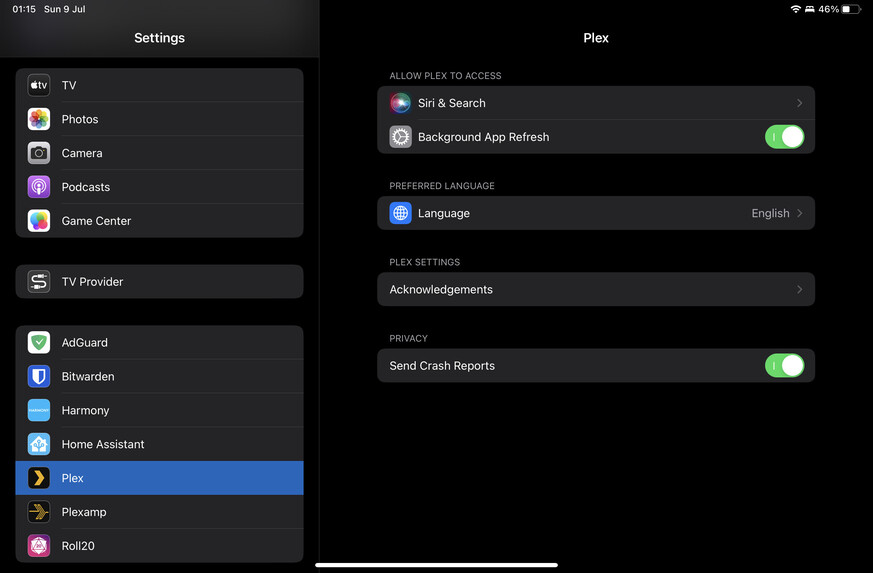
 I’m on the BETA build of Plex for iOS 8.22 but the public version that’s on the Apple Store version 8.21 should have had those settings as well.

