I can’t wait till we can turn on our plex and it’ll just work on all devices again it’ll be a magical day let’s do it guys we’re getting close they’re eventually going to put out a player update or something
ALL:
Using one of my rips, I’m creating a file which will either bracket this problem or eliminate several variables.
It’s going to take 4 1/2 hours to process.
I’m working on my NAS/AIO build today so will be busy with that while the video churns.
I’ll check back in later when the video is done.
2 Likes
Cheers, Chuck. Look forward to testing it out!
We’ll get this fixed guys I know and I can’t wait for bliss again
status guys.
I had hoped to complete my server build.
A few issues:
- I hurt – this thing is heavy and it’s a lot to build
- Memory slot bad - Advance RMA (pass each other in shipping) ready.
- Workstation imploded - needed to reinstall that in the middle of everything else.
Now that I’ve regained some sense of sanity ( )
)
I’ll get a file recreated this week and posted
Ok and I will try and do mine tomorrow I was a busy weekend daughter’s birthday getting everything done she didn’t have time and I will get these up it is important to me but obviously family is more important
hear ar some of my files it does it to if yolu neeed more let me know link below
I sent mine
Hi all, I had the same problem with the video freezing for 4-5 seconds while the audio played from the beginning. I resolved my problem by going into the Plex app settings and under Advanced, disabled Passthrough so my receiver does the decoding. All my video files that were doing this work fine now. Might not be the fix for everyone but this worked for me.
I don’t think that is working as you think it is. Disabling Passthrough means that Plex is decoding the audio stream to PCM/LPCM and then sending that to your receiver. Passthrough means that Plex is not touching the audio and is sending it as it is encoded in the file. Theoretically, both ways should sound identical.
Based on the support article here, https://support.plex.tv/articles/settings-android-tv/ it say:
Passthrough
The app will present video streams with multi-channel audio as-is.
It’s not the most informative sentence, but this support article for Plex Media Player gives a little more detail and confirmed what I thought.
https://support.plex.tv/articles/212072167-audio-configuration-guide-plex-media-player/
From that article, if you don’t use passthrough you won’t get the extended Atmos data and also the TrueHD and DTS-HD MA lights (and possibly the Dolby and DTS lights) on your receiver won’t light up.
As others have said in this thread, this used to not be an issue before a prior version and people even mentioned it during the beta, so it was definitely introduced by Plex. It should be something that is fixable so that we can use passthrough if that is how we want to have it setup.
So, while it’s fine that you found a way around this for you, it should just be a workaround until Plex actually gets this fixed and then you can go back to your previous setting.
It actually might also be a helpful hint/clue as to what to look at (i.e., something regarding the code that handles passing the audio as encoded in the file to the next component).
-Shark2k
Bugger…thanks for the reply, I didn’t check that. Oh well, switching back to Passthrough via HDMI and putting up with this until a proper fix is found!
1 Like
Come on guys we can do it we can fix this let’s keep praying
Hello,
I also have big problems with the Shield tube, audio and video jerks, films that do not launch with return to home, crashes sometimes during the film, impossible to leave the application … sometimes it was messing with my other devices but I disabled the hdr conversion and added the line VaapiDriver = i965 in the script file (I have a DS720 +) from locally it works extremely well on all devices except the Shield yet I thought it was supposed to only touch remote playback but pairing no, absolutely all devices are connected in gigabit ethernet by cable and I have fiber for the internet but who cares nothing to do, even with your competitor Kodi it does not work of course the Shield is as if it is not powerful enough, even my LG Oled B7 from 2017 with the integrated app works perfectly and it does not play the NAS processor unlike the Shield, the following devices work perfectly : oled b7 2017, 2 mi box s and LG 86UN85006 2020 and do not make the transcoder work, a remote friend uses an amazon fire stick and his samsung tv app works very well and makes the transcoder work 10 times less than the Shield, for sure there is a big problem with the Shield, it would be really good to find a solution and for your information I tried everything in terms of the settings in the Shield absolutely everything from the settings of the shield and plex settings, sorry for my English if it is poorly translated, I am French, have a good Sunday. Vincent
Hey @ChuckPa - do you have a sample file for us to test?
Thanks
I sent you guys mind just wanted to make sure you got it
Here we go.
Sorry for the delay. I have a lot going on here. Keeping this test nice and clean , starting with the basics. NO problems should occur here.
I think you’ll all approve of the genre and quality 
This test file contains enough to also test the entire Home Theater system so don’t be shy.
A 2160p test file, also direct from the disc.
LIke the other, there should be no issues.
I’ve verified both here.
Did you testify files out no offense but have your files work or not worry about your files I’m just pissed off having to recreating or redoing my files every time because new update comes out well you should have this format on the work before I shouldn’t have to worry every time something changes that my files may not work again then I have to redo them all again
Both of these files work.
If you cannot take these files,
Place them in an “Other Videos” type library created just for this testing purpose.
And play them,
The we have a solid reproducible starting point with known good media from retail master copy.
While I understand your frustration, venting at me isn’t going to help.
To be candid, I don’t control what or how you curate your media.
So, can you play my files without issue? Yes or No.

As further information,
I have taken BOTH of your files.
NEITHER is a problem playing. Steve Carell’s stairs gag is funny.
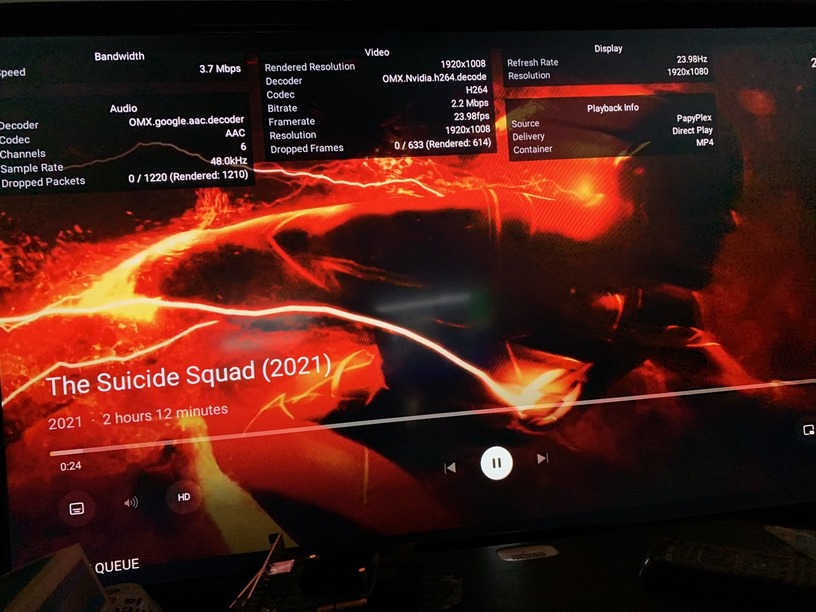
Therefore, if both have Nvidia Shield Pro 2019 and both are using the same file, and both have DirectPlay,
I submit to you the problem is the networking.
I am willing to help you diagnose it.
