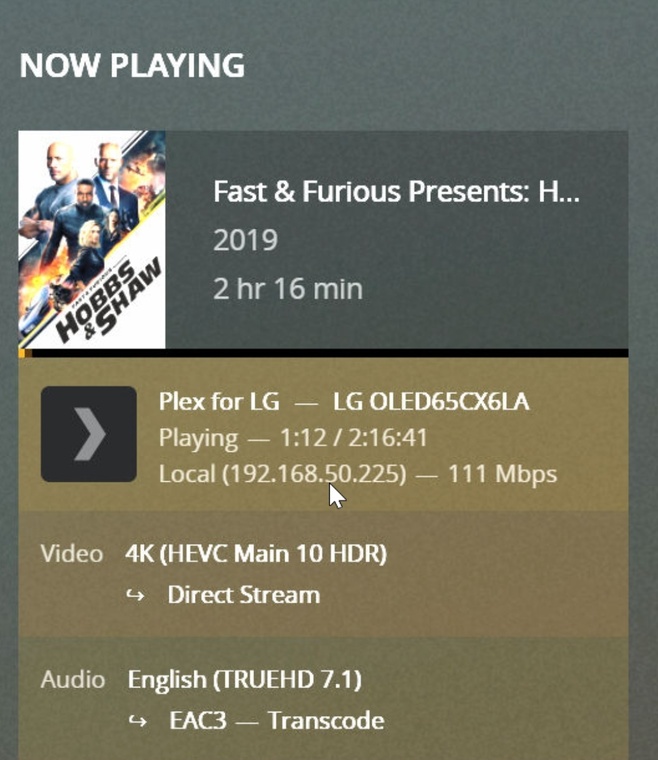
Server Version#: 1.23.2.4656
Player Version#: 5.17.0
Hey guys,
I’m new to Plex.
I tried to fix this buffering problem on my LG Cx TV.
I setup a gt-ax11000 and Intel ax200 PCIe adapters for both PCs.
Did not fix my issue.
I got an Asustor LOCKERSTOR 4 to have the media connected to the router and use it as a plex server instead of PC.
Did not fix my issue.
I found out that I was getting only 20mb speed on LG Cx TV and managed to change some settings on my router and I get 150mb. ISP speed is 1000mb.
Now I checked and I see that it needs 295mb/s?!!
It should be a 67mb 4K HDR video STREAM.
Why is Plex transcoding and not direct play?
It happens on 4K HDR with TrueHD/Atmos movies.
Turn off the subtitles. That should stop the video from transcoding. What happens then?
LG TVs do not support TrueHD audio, therefore Plex has to transcode it to a supported format. If subtitles are enabled when the audio is transcoding, it forces a video transcode.
This is how the Plex LG app behaves with subtitles:
Enabling image based subtitles, PGS or VOBSUB, results in a video transcode.
If audio is transcoding, enabling any subtitle results in a video transcode.
If audio is direct playing, text subtitles, SRT & VTT, direct play.
For ASS/SSA subtitles:
If Burn Subtitles = Automatic in the Plex LG app, enabling ASS/SSA subtitles results in a video transcode.
If Burn Subtitles = Only Image Formats, ASS/SSA subtitles, direct play, but formatting information (color, location, etc) may be lost.
Two other issues to be aware of: HDR to SDR Tonemapping and Burning Subtitles.
You should avoid transcoding HDR media due to tonemapping issues.
The Celeron J4125 can transcode 4K video when using hardware acceleration.
However, HDR to SDR tonemapping is currently performed in software, and the J4125 is not strong enough to do that in real time.
So, if you’re transcoding HDR media and have tonemapping enabled (settings → transcoder), you will most likely max out the CPU and experience buffering. You can disable tonemapping to reduce the CPU load, but the colors will appear washed out.
The second issue to be aware of is burning subtitles into the video stream. It will cause buffering.
On Linux based systems, burning subtitles occurs in software, even if hardware transcoding is enabled (a limitation of the Intel video driver). Furthermore, the process is single threaded, so it can only use one core on the CPU.
Celeron CPUs have low single core processing power. They struggle with burning subtitles into a video stream in real time. It is very common to experience buffering when burning subtitles on systems with a Celeron CPU running Linux.
LgTv should passthrough Audio to Sonos Arc connected on eArc HDMI, which supports True HD. LG CX TV also supports Dolby Atmos.
It passes DTS-HD or DTS-X which gives me no audio on the soundbar as is not supported, but then it transcodes TrueHD which it is supported.
I need to find an alternative where I can have Atmos and subtitle on 4K HDR, as my wife won’t watch movies without subtitles.
I tested and no buffering if I turn off subtitle, but it still transcodes Audio and is direct stream, not direct play.
The TV does not support TrueHD audio. Look at the tech specs. You won’t see it listed.
The Plex app cannot pass TrueHD audio to connected audio equipment via HDMI-eARC. It is a LG restriction and applies to all apps, not just Plex. No known TV from any manufacturer permits apps to pass lossless audio via HDMI-eARC.
The TV can pass lossless audio via HDMI-eARC for devices attached to HDMI inputs (streaming devices, blu-ray players, etc).
There are two forms of Atmos: Streaming Atmos & Blu-ray Atmos. The LG supports Streaming Atmos, which is Dolby Digital Plus + Atmos, which is used by Netflix, etc. The LG does not support Blu-ray Atmos, which is TrueHD + Atmos.
This is expected behavior.
To avoid all transcoding, choose a supported audio format such as Dolby Digital (AC3). Choosing a supported audio format will let the video direct play. You can then enable SRT subtitles as well.
What it boils down to is you are running into the limitations of a) Plex Smart TV apps, b) LG TVs, c) running Plex on a NAS, and d) Sonos soundbars.
If you want TrueHD & TrueHD Atmos audio, you’ll need to acquire a Nvidia Shield Pro and attach it to one of the HDMI inputs on the TV. The Shield will pass TrueHD to the TV, which will then pass it to the Sonos via HDMI-eARC. You can disable dts support in the Shield (a Shield, not Plex setting). dts will then be transcoded to a supported format.
An additional advantage of using the Shield is that it direct plays PGS/VOBSUB & SRT/VTT subtitles even if the audio or video is transcoding (a Plex Android TV app feature).
Additional comments:
The Plex Xbox app can also pass TrueHD audio (announcement). I do not know how it handles Atmos audio or subtitles.
I have a PC as media which can pass through TrueHD Atmos through TV connected with HDMI 2.1 ports and cable, but the video quality I get from streaming 4K or 1080p through Plex on TV is better than what I get from PC playing through Potplayer or MPC-BE using MadVR.
That is why I’m trying to fix this and use Plex.
My PC has:
Intel i7 8700K
32Gb RAM DDR4
RTX 3060 12GB
I’ll try to use Plex Player on PC and passthrough hdmi to TV and Soundbar
I tried it and Plex for Windows direct plays TrueHD Video and Audio. The problem is PfW did not passthrough Audio and was giving me Dolby Multichannel PCM 5.1.
I found the settings to enable PASSTHROUGH ON PfW.
So my main issue was solved. I can experience TrueHD and Atmos on LG + Sonos Soundbar by using PfW on PC.
I really appreciate the help and tips.