I have read so many posts tonight, but none quite cover my question..
I understand there is now a plan to pay for to remote watch things from my media server. I have been running it for years, and love the whole eco system..
To put something on my TV, i start the stream on my android, then cast it to the TV.
until this week!
when i hit play on the mobile, it says i need to get the watch pass to remote view anything.. this is when i am at home, and within my own network..
To answer your question no. Wifi is still local network. I suspect there is something going on in your end that is forcing it to connect via mobile data (maybe).
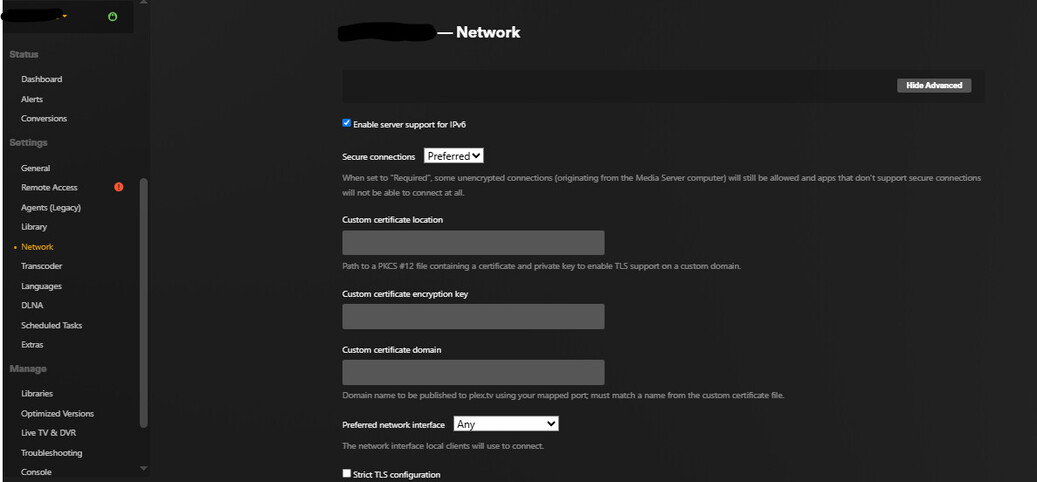
In the network settings check your LAN Network settings.
Thankyou.. you pointed me the direction, and i found the issue.
it was something more silly than the subnet..
I run a VPN on the machine the media server is on.. when i did an ipconfig i spotted the second network.. the disadvantage of using my main machine as the media server.
Thanks for taking me through the steps!! truly appreciated.
I am troubleshooting the same issue but I cannot find that exact “LAN Networks” setting in any of my PMS menu. Can you share a wider screenshot showing where it is ?
But I’m sure it probably has nothing to do with how Plex detects “remote” play in terms of Plex Pass as someone could just type in a web IP to override the PP requirement, lol.
Is your NAS now employing containers? If so, the container with PMS in it can still be on a different subnet, because by default Docker is inserting a NAT layer between the machine’s network (i.e. the NAS’s) and the container.
Look for a checkbox to set the container to use the “host network”, thus removing the additional NAT layer between the PLex server and your local network.