so I moved from a home that had a single wireless router to a home that has mesh internet, that is the only change. my Plex server is still hardwired into the same internet that I’m connecting to by Wi-Fi, but in my old home, it automatically recognized that we were on the same network and so, for example, would play original quality all the time.
I haven’t set to convert to 720p when I’m remote streaming, and it’s constantly doing that as if it thinks I’m remote streaming, even though I’m connected to the same network as my Plex server. yes there’s a VPN on my phone but I have Plex set through split tunneling, but I have the same thing going at my old place. literally the only thing that’s changed is the type of Wi-Fi I have.
Would you mind to expand on your setup?
I’m not sure I follow which part of your network is hardwired and where you’re using the WLAN.
If configured accordingly, those WLAN access points could end up creating their own subnets instead of expanding the local network established by your (main) router. That way, Plex might consider devices connected on one of those subnets to be remote.
In Windows, verify the network is considered private, not public. Windows sometimes changes the setting if you connect to a new router. Restart the PC if you change the setting.
Windows Settings → Network & Internet → Properties.
If streaming to your phone, please disable the VPN. It will mean one less variable while testing. Once streaming is working without the VPN, it can be re-enabled to make sure split-tunneling is working correctly.
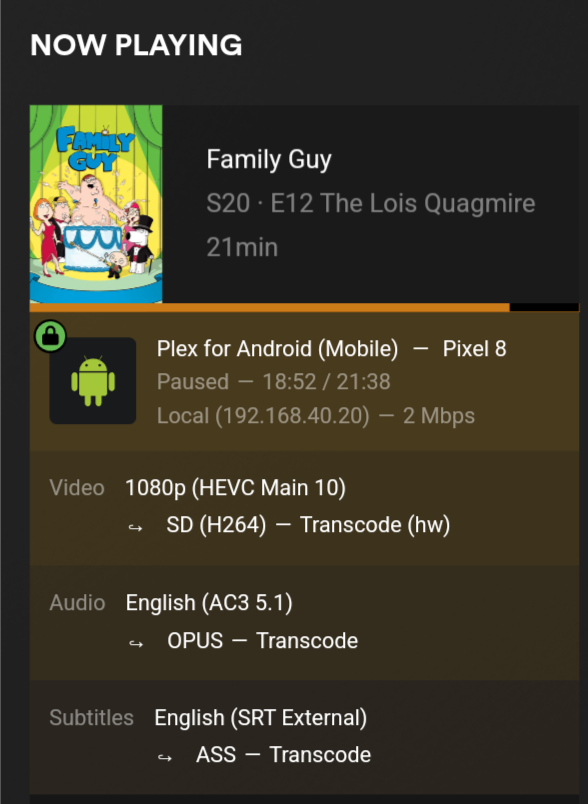
Please post a screenshot of Plex Dashboard → Now Playing + Expanded View. This will show if Plex considers the connection local, remote, or indirect. Please do not mask any local addresses. They are not routed to the Internet and it is not a security risk to post them.
to answer Tom’s part, the modem connects to one of the mesh routers with an ethernet cable, giving Wi-Fi to the rest of the house. I have my Plex server hardwired into that first router. all of my streaming devices are on wi-fi, part of the same home network. this is the same setup I had previously, except they didn’t have mesh, I just had a single router that the computer was hardwired too and my streaming devices were wifi’d to.
my laptop does seem to think that the Wi-Fi is public, I have switched it to private and am rebooting now.
switching it from public to private got it to act like we were on the same network or about an hour, but now it’s back to what it was doing before. here’s the screenshot requested, it does the same thing VPN on or off.