PMP is running a very old UI revision. The Windows and Linux builds you’re running should have the same UI revision. So, safe to expect what works for one would probably work for the other.
Look into the app logs on Linux. I believe you’ll see logging around communication failures. Likewise when running Linux look at the PMS logs. You should see requests from Linux to PMS.
It sounds like you may be able to navigate the server’s content from PMP Linux but not play. If so, this is a harder issue to sort out. Check out the PMP Linux logs for that specifically.
It’s not a lot of help but hopefully logs will help describe what’s up.
Request: [10.220.0.179:50580] rejected because secure connections are required
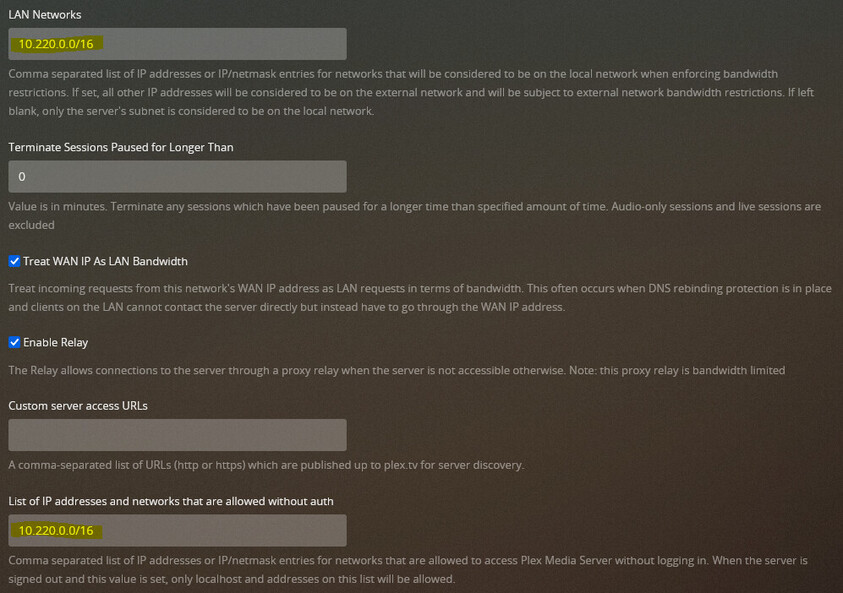
I’ve had this enabled since day one to require secure connections because to my knowledge there is no way to have it not require secure connections for only local access so it’s all or nothing.
I am not sure why the port is 50580 rather than 32400. Since this is on the same LAN, a secure connection should not be required which is why the subnet was added to both the “LAN Networks” & “List of IP addresses/networks that are allowed without auth” which doesn’t seem to be working either (on Linux).
As far as the PMS logs go for Windows PMP vs Linux PMP, the Windows ones have the LAN client IP while the Linux ones have 127.0.0.1 instead:
Win32 (still see rejected due to secure but then it passes): Request: [10.220.0.67:49514] rejected because secure connections are required Request: [10.220.0.67:49515 (Allowed Network (Subnet))] GET /media/providers?includePreferences=1 (7 live) TLS GZIP Signed-in Token (Guest)
This is in the PMP Linux log:
2021-06-23 10:33:31 [ INFO  ] JS: [Connections] Testing connection for plex.tv at https://plex.tv/monitoring/health
2021-06-23 10:33:31 [ INFO  ] JS: [Connections] Testing connection for 10.220.0.145 at http://10.220.0.145:32400/media/providers
2021-06-23 10:33:31 [ INFO  ] JS: [Connections] Testing legacy connection for 10.220.0.145 at http://10.220.0.145:32400
2021-06-23 10:33:31 [ INFO  ] JS: [Connections] Testing connection for [Loopback] at http://127.0.0.1:32400/media/providers
2021-06-23 10:33:31 [ INFO  ] JS: [Connections] Testing legacy connection for [Loopback] at http://127.0.0.1:32400
2021-06-23 10:33:31 [ INFO  ] JS: [Connections] 10.220.0.145 is unavailable at http://10.220.0.145:32400/media/providers (Status 0)
2021-06-23 10:33:31 [ INFO  ] JS: [Connections] 10.220.0.145 is unavailable at http://10.220.0.145:32400/media/providers (Status 0)
2021-06-23 10:33:31 [ INFO  ] JS: [Connections] All connections to 10.220.0.145 failed
2021-06-23 10:33:31 [ INFO  ] JS: [Servers] Waiting for initial servers = [Loopback], plex.tv
2021-06-23 10:33:31 [ INFO  ] JS: [Companion] No companion found
@OttoKerner Why would it be unavailable? Shouldn’t the LAN IP be accessible to other devices on the LAN?
The more I look into this the more strange things I am uncovering…
localhost (127.0.0.1) is somehow being forced to remote. I am literally logged in directly to the server on the server machine and it still can’t play it locally??