Seriously, can we stop adding features no one wanted or asked for and fix the stuff crippling the intended use of this app?
It has been eons and the app atill goes into cardiac arrest if you try and access your downloads and have little to no data signal. IF YOU NEED A DATA SIGNAL, THEN I DONT NEED DOWNLOADS. Can someone put us in touch with the head developer so we can explai. How this works? Order of operations should be for the app to open immediteatly to the main screen, and then the ability to open your download menus, followed by navigating that library and playing items…none of this should be contigent or be effected by the apps ability to reach the server. This is beyond ridiculous this has gone on this long. You finally get it to work and clicking a show sits while it is trying to talk to the server…for what!!! The info and media is already downloaded!
This is the major one, but issues like scrolling snapping back to the top of the media list and subtitles not working if you have to keave the app to check your email or such have lingered forver also.
START WORKING ON THE REAL ISSUES and stop fixing crap no one has complained about and stop working on features no one has asked for nor wants.
AGAIN, TELL THE DEVELOPER TO CONTACT ME. He seems to be confused as to how the app is suppose to work and obviously has never used his/her/it/cat own product.
P.S. Half the time you try and skip back 10 seconds on a DOWNLOADED video, the app starts cycling the rolling circle icon while it tries and connects to the server again…ENOUGH OF THE SERVER ALREADY. Also, blietooth controls have worked since Obama was in office…but hank god for the discovery feauture no one asked for or uses. You are a personal media server and personal media streaming service; you are not and never will be Netflix.
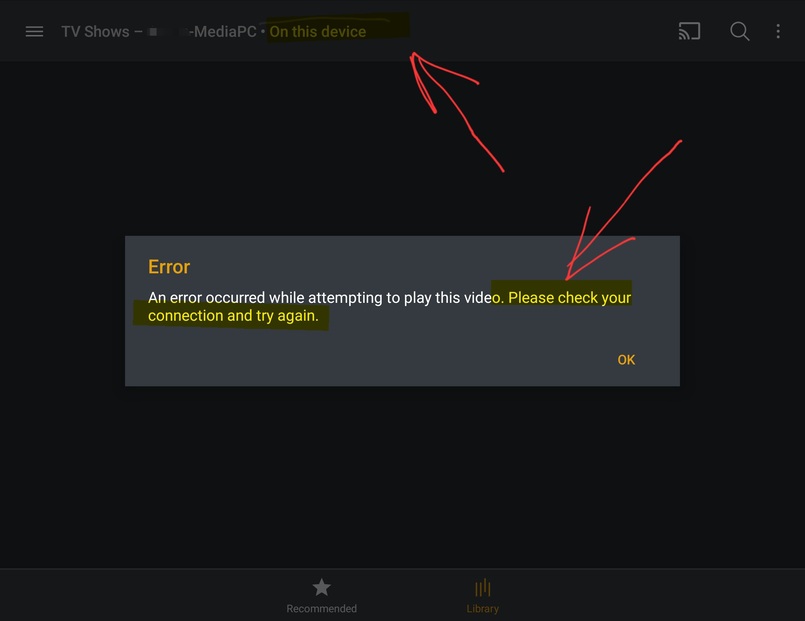
Here we go. Watching a downloaded episode and i keep getting network errors. Why it is dealing with my server while i am watching a downloaded video is anyones guess…but then the video stops and gives me an error saying the video cant be played and to check my connection. I have been checking the episode info because of these issues and it said this was a direct play from my device, but i get issues like this, as well as the videos buffering if i skip forward 30 seconds or go back 30 seconds. I know the moderators here have told the developer about this forever now. Either the devlopers dont care or dont know to fix it. Either way, sounds like it is time to get a new developer.
Now when checking my downloaded content library, it hangs and hangs as it tries and connects to my server before coming back and telling me i have nothing on my phone, but if i move somewhere closer to outside and getting a signal, all of a sudden my download library is availabke. Seriously, years of this going back into the synced days. The developer needs to fix this immediately or step down. Go look at how the netflix app works. No matter how poor your signal is, you can do anything you want with your downloads without having to wait. Fix it or quit already. I feel bad for the developers having to collect all this stuff time and time again for the developers to literally do NOTHING with it.
Now when checking my downloaded content library, it hangs and hangs as it tries and connects to my server before coming back and telling me i have nothing on my phone, but if i move somewhere closer to outside and getting a signal, all of a sudden my download library is availabke. Seriously, years of this going back into the synced days. The developer needs to fix this immediately or step down. Go look at how the netflix app works. No matter how poor your signal is, you can do anything you want with your downloads without having to wait. Fix it or quit already. I feel bad for the developers who have to collect this stuff over an a over, and waych the developers literally do nothing with it or about it.
Yes, i know and i get what you are saying, but often yiu have enough of a signal to get phone calls, texts and emails, but not enough to get all your infor from the server. Should not have to turn on airplane mode to use downloads. Go look how netflix handles it…no airplane mode and can get to my downloads and use them with ease.
Still having on/off issues with the 2 hour stretch/chop, and now this latest update has completely broken subtitles on all our android devices, yet the web interface has no such issues.
My subtitles work, but if i get a text or email, go read them, come back to plex, and start the episode, the subtitle doesnt work. I have to cpletely shut the video down and restart it…and if it is a download, i deal with all the issues above. Someone give us acontacr info for these developers so someone can oush them to start doing their jobs.
P.S. also getting since the laat uodate, ehen i do the keave the app and coming back to it as i explained above, the audio gets out of sync.
Now i cant rewind if i have poor data, because, again, the app starts trying to connect to the server. I get the rotating circle and a connection error. Somone tell the developers that proority goes to DOWNLOADED ON DEVICE CONTENT OVER CONNECTING TO THE DAMN SERVER ALREADY.
For the love of god…someone get the developers to look at this and respond why this has been going on for years. I have supplied so many logs its ridiculous. Why in all hell am i getting connection errors when trying to access my downloaded content? If the developer of this app cant fix this same issues year after year, it is really time to look at firing uin from their position and bringinf someone new in. Plex is suppose to be a leadinf company in this field and the app has become so amateurish that it is borderline unusable. Have them fix this asap, quit, or fire them.
‐Bluetooth controls no longer work
-Audio goes out of sync if you switch apps temporarly
-To fix the audio sync issue you can minimize and remaximize the video, but it then wipes out your video que, essentially killing the “next up” at the end of the episode
-Library scroll bar still snaps to the top when let go
-Library items become unselectabke if you scroll until you rotate the device to landscape and back
-on and on
But on a good note, we got an update to fix items and issues NO ONE IS COMPLAINING ABOUT NOR KNOWS ABOUT. What is going on with the developers? Major issues they refuse to work on and give fixes to vague and often unknown issues. GET YOUR **** IN GEAR ALREADY.
Downloads work perfectly on my S21+ and my windows laptop… But Samsung A8 tablet I get either check your connection or can’t access external storage errors - and presumably because the player defaults to downloads where they exist, downloaded episodes can also not be streamed until I delete the download.
I wish I could reproduce you guys issues, but I can’t seem to.
I’m on iOS (14.4.4) on my iPhone. This isn’t a feature I’ve ever used so it took me about 10 minutes to convert a TV show episode to a downloaded version. After it finished, I opened and played it, skipped around with the slider (jumped forward about 40 minutes, then back about 30 minutes, forward and back a few more times) and it played no problem. I then turned on airplane mode and closed the app. Reloaded the app and it was in “Offline” mode as expected. Naturally the only section available was the Downloads folder where my episode was saved. The app gave me the option to resume or start over. I chose to resume. Played perfectly. Skipped forward and back, no problems at all. I turned Airplane mode off again and checked everything once again. Quite flawless, actually.
I hope you all are able to get sorted. I was hoping to add a similar account for ya, but yea zero problems. I saw someone on iOS mentioning they had an issue but they haven’t commented in 2 weeks so I wonder if they resolved their issue. Otherwise, best of luck to you Android users.