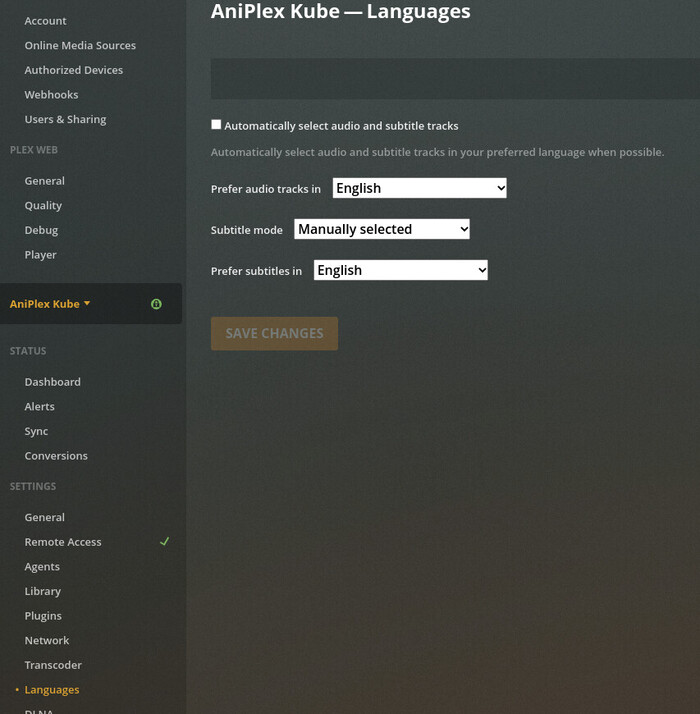
I recently set up a second Plex instance, because I got fed up with the constant fighting with languages. The idea was that there is a language setting under the server settings, which would then apply to that single server only.
Now that the setup is done, I can’t change language settings per server. Any settings I change, seem to be applied to all servers at the same time (or maybe the web client is reading the settings from one of the servers, I’m not sure).
To reproduce, you need 2 servers added to plex. Under the server settings, you can select “Languages”, which will take you to language settings. At the top of the page it states the server that you are trying to update:
But after making a change here, and selecting another server and going to language settings, those settings are now identical to the ones selected. Updating settings there, will change the original server too.
Server Version#: 1.22.3.4392
Player Version#: 4.56.4 (web plex)
If your priority is to have a second entry point with a different language preference… have you considered creating yourself a managed user within your own server and simply apply a different language preference for that managed user?
I’m aware that language settings are also in language settings, but these settings are clearly per server settings.
What I’m looking for is something like this: if a transcode runs on the server on an episode which doesn’t have manual configuration, that transcode should use the server settings for languages.
Currently if I want to optimize for mobile, the transcode will almost always run with wrong language settings. When playing directly from a server, this is not a big issue and you can relatively easily just switch the language settings while playing, but lets say the media is synced to mobile for offline playback, the only way to fix the issue is to delete the transcoded file, change the settings, transcode and sync again.
With the 2 server solution, I can with ease have the media divided to 2 separate pools, which would behave as expected if the language settings were per server (as indicated by the UI)
I can see how the idea of having multiple managed users would work, but that quickly becomes tedious when I need to recreate accounts for family members too.
Not only will the optimized/transcoded versions be unpredictable no matter what I do, but the settings page is a misnomer as well. If the settings apply to the server in the exceptional case where it’s not attached to an account, which I don’t see how it could happen given that the server is automatically linked to an account on first access, this setting shouldn’t be under the server settings. As it stands it is misleading.
As for fixing the transcoding, if I have 2 users attached to a single server. Both users have different settings. One if the users now decides to optimize the files. The files are now bound to their language settings. I think the audio nowadays is included as multiple channels, but subtitles are burned to the stream regardless. So the result is going to be unpredictable and most likely wrong to the other user.
Ok, that makes me slightly happier that I went through the trouble of rebuilding my setup, since optimized versions were the only way to watch certain media since the NAS wasn’t able to keep up with transcoding on the fly.
It also explains why optimizing has always fallen to me, but yeah… That’s a different story.
In any case. I guess my only option now is to start creating duplicate accounts. I’m just glad that I only need 2 language profiles per user, most of the third language pair don’t come with multiple audio tracks or subtitles, so i don’t have to create a third account for everyone…
That is a reference to an earlier option I was suggested here:
My goal is to have a setup where I can watch content with the language pair of Japanese audio and English subtitles (common for anime) and English audio without subtitles (for most other content consumed). Currently I either have to disable English subtitles on everything else than Anime, or manually turn on subtitles and Japanese audio on anime that is dual audio (which is surprisingly common). I also want to be able to sync both of these content to my portable devices for consuming when commuting. Previously I also needed to Optimize the content for TV, since live transcoding was out of the question.
There are feature requests for more granular language selections, but I was trying to work with the system to make things happen.