Ah, okay, I only just recently turned on the setting while looking for the setting you linked me to. So it was not on when I collected that first set of logs. I will do it again and PM them to you.
Yes you can easily rollback. You’ll need to find an earlier release, Plex does not provide older versions. Check your Plex data folder on your Mac. If you’ve used the autoupdate feature, it should have saved the last few versions there.
- shut down PMS
- unzip update package
- drag file to application folder
- restart PMS
Great, thanks. I will experiment with this tonight (I’m currently at work).
Okay, I have found my old server versions and am familiar with how to revert the server app. I was trying to remember when the problem first occurred, and based on a show I watch, and when I think I remember that show changing to being displayed full screen, I think it happened after the 12/8 episode, and before the 12/15 episode. And I see a sever version from 12/13, so I’d almost be willing to bet that 12/13 version is where this bug occurred. I will start by rolling back to the oldest version I have though, just to verify that that fixes this issue. Will report back when I get a chance to do that.
Got the new log. Sorry, didn’t catch that you were using the old version of the Smart TV app. The logs show the file is direct playing, which shouldn’t be possible.
Something odd is going on. The version of the app you have 4.29.9 does not support 4k, hevc, or HDR. Yet, it is trying to direct play the file.
Regardless, the TV is getting the file directly from the server intact. The app is analyzing the file and sees this.
videoResolution: 2560
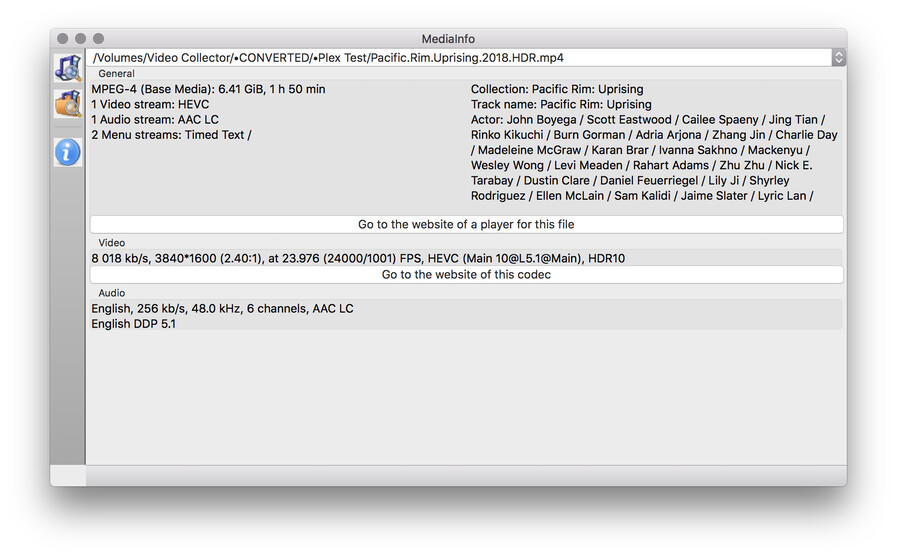
That’s why it’s getting stretched. I don’t know why the app is seeing this. Do you have MediaInfo installed or know how to use FFProbe? If not, I’ll need a sample so I can look at the info in the file.
Actually they do still provide the older versions, they just don’t publicly list the URL to them.
You can get the most recent URL which is for version 1.30.0.6486-629d58034 :
https://downloads.plex.tv/plex-media-server-new/1.30.0.6486-629d58034/macos/PlexMediaServer-1.30.0.6486-629d58034-universal.zip
And if you have the older version number like 1.29.1.6316-f4cdfea9c, you can replace everywhere it occurs to get the older file.
https://downloads.plex.tv/plex-media-server-new/1.29.1.6316-f4cdfea9c/macos/PlexMediaServer-1.29.1.6316-f4cdfea9c-universal.zip
Or:
1.28.2.6106-44a5bbd28
1.27.2.5929-a806c5905
1.26.2.5797-5bd057d2b
Weird, cause one of the only reasons I’m still using the TV app is that it is one of the only ways I can get HDR on this old TV. Plex and Netflix are the only apps that provide HDR and it has been working for as long as I can remember.
I just rolled back to the oldest server version I have, and it did NOT fix the issue, so I’m completely lost now. I have no idea how this could’ve changed… if the app hasn’t been updated, and nothing on my TV (webOS or firmware) has been updated, how did this change!? I’m so confused…
I am 100% certain that movies or shows that used to display just fine now display stretched, so I don’t see how it could have anything to do with the files themselves.
Here is a screen shot of the MediaInfo from the movie I was just testing with. The movie plays, HDR turns on, etc, etc, but it is stretched to fill the entire screen.
If I watch this same file with my Apple TV Plex app, it displays correctly as far as aspect ratio goes, but I cannot get HDR through my Apple TV since my TV doesn’t have the proper HDMI ports to support it.
I confirmed with the team that 4.29.9 should not be able to direct play that file. Can you look in your PMS application data folder and see if you have a Profiles folder? If so, is there an “HTML TV App.xml” file? This is overriding what the default as provided by Plex is. YMMV for any of that working.
Well it can and has for as long as HEVC and HDR became popular. heh
Here are the contents of that Profile file:
<?xml version="1.0" encoding="utf-8"?>
<Client name="HTML TV App">
  <!--
   Author: Plex Inc.
   History:
    0.9.12.0:  First release. Included HLS and DASH MusicProfile with videoCodec.
    0.9.12.2:  HTTP protocol support added for VideoProfile and MusicProfile with videoCodec.
  -->
  <TranscodeTargets>
    <VideoProfile protocol="hls" container="mpegts" videoCodec="h264" audioCodec="aac" context="streaming">
      <Setting name="BreakNonKeyframes" value="true" />
    </VideoProfile>
    <VideoProfile protocol="dash" container="mp4" videoCodec="h264" audioCodec="aac" context="streaming" />
    <VideoProfile protocol="http" container="mkv" codec="h264" audioCodec="aac" context="streaming" />

    <MusicProfile protocol="hls" container="mpegts" videoCodec="h264" audioCodec="aac" context="streaming" />
    <MusicProfile protocol="dash" container="mp4" videoCodec="h264" audioCodec="aac" context="streaming" />
    <MusicProfile protocol="http" container="mkv" videoCodec="h264" audioCodec="aac" context="streaming" />

    <PhotoProfile container="jpeg" />
  </TranscodeTargets>
  <CodecProfiles>
    <VideoCodec name="*">
      <Limitations>
        <UpperBound name="video.width" value="1920" isRequired="true" />
        <UpperBound name="video.height" value="1080" isRequired="true" />
        <UpperBound name="video.bitDepth" value="8" />
      </Limitations>
    </VideoCodec>
  </CodecProfiles>
</Client>
I don’t know how it worked for you but it should not have. Version 4 and below used an old SDK that did not support these features, which is why we switched to Version 5 using all new code that does support these. And why version 4 was deprecated. HEVC may have just worked, but definitely not HDR. The default is a limitation to 8-bit video. If this direct plays for you, then there is some override, but I don’t see it in the profile so not sure where it’s coming from.
Regardless, that is not the issue right now. Somehow the app is seeing the video as having a height of 2560 instead of 1600. Are you seeing this with all videos or just this one? Let’s try another video. Please provide the xml info and new server logs trying to play something else.
This topic was automatically closed 90 days after the last reply. New replies are no longer allowed.
