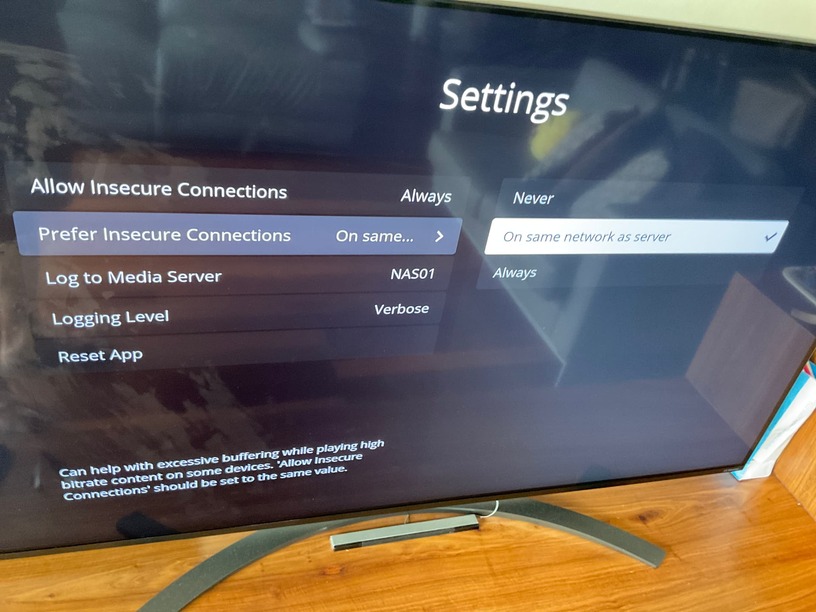
My TV is a OLED55B8 and runs WebOS 4.4. However, using the built in browser, I can successfully access any website that uses Let’s Encrypt, including my self hosted services.
Why the built in browser is able to do so, but Plex not?
Exactly, i did few test and seems it is not LG fault, other apps able too access plex server. It plex and they refuse to at least answer this. If this is LG issue we can target LG for fix. BUT for now all proof shows it is PLEX issue.
Update: LG Web Browser unable to load letencrpyt cert page. So this is likely LG fault but PLEX can easily fix it like other browser to embed root cert into the plex.
Indeed. LG is still actively updating 2018 OLED TVs, I received an update the last month.
I’m sure there is something more behind this story, and I’m also sure there’s a real fix.
Does anyone else have the issue whereby Changing the Secure Connection to Disabled in the Plex server results in IOS devices not being able to connect to the Server.
Thanks in Advance
This didn’t work for me. the Plex app on my OLED55E6V (AKA: the E6) won’t connect to my PMS I set the server and app settings to allow insecure connections but that had no effect.
What else can I do? I’ve added my comments to the LG Web OS forum. I imagine it will fall on deaf ears. Seems crazy, and it’s infuriating, that these things happen to relatively new devices that cost £1000’s. Smacks of built-in obsolescence. This should be illegal.
I verified the issue is cause but the letsencrypt cert expired. Check LG other team and confirm the cert on LG Webos 3.5 Cert expired. Yes, we are 100% sure it is cert expired issue.
I contacted LG customer service - reply. We will forward the issue to the relevant department
I contacted LG developers - reply. Plex need to embed the cert bundle in their app. I posted the link in another post.
As for now, we don’t have any clear solution, nobody wants to make effort.
Who wanna start class action sue LG for not updating OS less that 2 years old?
I would say start reporting to LG in your country and demand a fix.
I’ve tried the “unsecured server” solution, as suggested pr the email, but it still doesn’t work for me. Can’t connect to the server at all. Every other device in my home is fine, it’s just the LG TV.
I guess I can’t really blame Plex for this. It’s LG who decided to let their security certificates lapse, just because they don’t want to support “old” (3 year old) TVs.
After well over an hour of back and forth, this is what they said (after I suggested they seemed not to want to support these TV’s any more):
That is not the case, no, we do still provide updates to our older models and they are still supported. The C8 that you have will not be upgraded to a later Web OS version as these are built into the mainboard of the TV and cannot be changed. As for the certificate, speaking with my Technical Team, they have advised that this is something we suggest raising feedback about as we have not been informed of any issues related to this. If you would like, I can raise a VOC (Voice of Customer) to my Head Office regarding this issue for you. This will be an internal process that submits feedback regarding any issue with either products or services that you may have. This will not receive a response unless we require more information from you.
I’m pushing them to escalate this internally, as they (the Aftersales Team) are in the dark (or so they are saying).
Might help of a few more people get on their case?
Simple Solution, get an Cert from Zerossl, convert it to pfx install your own pfx in Plex
and enjoy secured Connections. Valid Domain required, no DynDns. It works
Web0s 4.0 tested and confirmed working
Web0s 4.5 tested and confirmed working