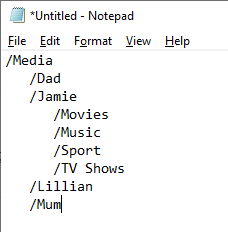
I have added my base Media folder but the player lists my hundreds of files in one long alphabetical list, rather than structuring them in the sub-folders like they are on the server.
Please don’t tell me I have to add each folder and create the structure myself.
/Media
  /Movie  <-- Movies library points here
    /movie_name
      /move_name (year).ext
  /TV Shows  <-- TV library points here
    /show_name
      /Season 01
        /show_name - s01e01.ext
You can have variations. For example, separate libraries for “Movies” and “Movies-4K,” or “Movies-Action,” “Movies-Drama,” etc. But they must be in separate directory structures.
You can also have a library point to multiple locations. For example, you can have a library, “Movies” that points to multiple directories, /movies A-K, /movies L-S, /movies T-Z.
Plex is very picky with TV shows. It is highly recommended you follow the Plex naming and organization. Things might work if you don’t, but you’re basically getting lucky.
If you wish your media sub folders to be separate Libraries you will need to create them one by one.
TV Shows, Movies, Home Videos, Photo’s and Music must be in unique Libraries. So If Jamie Sub Folder has a mixture of forms of content you will need to separate.
Example: Jamie Music, Jamie Photo’s, Jamie’s TV shows etc. You will also have to separate content types in your sub folders so you can link to the Plex Libraries required.
Example:
Jamie/
/Jamie’s Music
/Jamie’s Photo’s
/ Home’s video
/ Jamie’s Movies
/Jamie’s TV Shows
Jamie’s Libraries in Plex can have a unique names.
With that in mind you can create Home users with their Libraries only and restricted access to sensitive content.
You could also have the Home’s Big screen with all or only some Libraries as well as different users with a need to login to their content with a given PIN.