If I move my library folders on my NAS and set the new path on Plex, will all my history be erased so I can no longer see what I’ve already watched and where? Will everything be imported and marked as “new”?
Nobody should be streaming from the server while you move the files. If you move the file they are streaming, it will interrupt the stream.
Step 1: Enable Sync Watch State & Ratings on your account. Not specifically required, but helps protect watched/unwatched status.
Step 2: Go to Settings → Server_Name → Library.
Disable the following and save changes:
- Empty trash automatically after every scan
- Scan my library automatically
- Run a partial scan when changes are detected
- Scan my library periodically
Step 3: Move your media files to the desired location
Step 4: Update Plex Media Server library
- DO NOT delete the old location from the library
- Add the new location to the library.
- Scan the library.
- Plex will show duplicate locations for each media file - the old and new location. You can see this by looking at the Get Info for a movie, episode, etc.
- Edit each library again, removing the old locations.
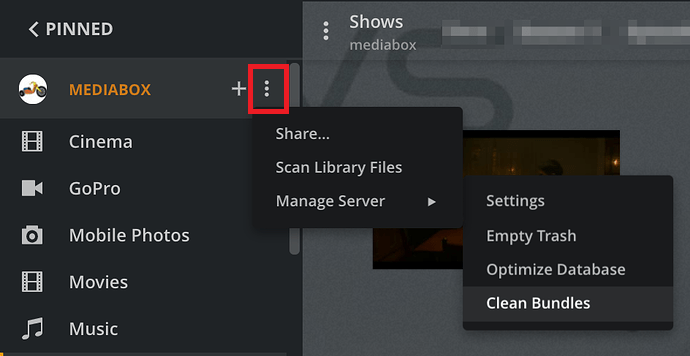
- Scan the library, empty trash, clean bundles. Plex will now show only the new location for the media files.
- Repeat for each library.
Step 5: After you’ve updated all the libraries
- Restore any settings you changed above
- One last Scan Libraries, Empty Trash, Clean Bundles, Optimize Database.
Additional Information
User Plex (DSM 6) or PlexMediaServer (DSM 7) must have at least read only access to the media files. If you need to set permissions for the new file locations, see FAQ 19: Setting permissions to allow Plex access to media files.
Individual Library: Edit / Scan / Empty Trash

All Libraries: Scan / Empty Trash / Clean Bundles / Optimize Database
I’m not going to move any files while it’s being watched. I just want to put the movies and series folders in different main folders. I can’t copy the files; I have to move them because I don’t have enough space to have duplicate movies and series.
It SHOULD be okay to move them. Doing a copy then move is the safest method, but you can skip the copy and do a move right off.
- Disable trash collection
- Move the files.
- Edit the library and add the new location of the files to the library’s “Add Folders” section. --DO NOT REMOVE THE OLD LOCATION YET. –
- If it doesn’t scan when you apply the new folder location, do so now.
- Wait for scan to finish. Verify you can watch a file by attempting to play. –You may get an “unavailable” error, because it may try to play the file in the old location. You can play a “different version” of the file to see if it found the file in the new location.–
- If the file plays, you can keep checking more files, but most likely if one works, then they all work.
- Edit library, remove old location.
- Scan again.
- Enable trash collection.
This should preserve all custom metadata you might have had, any specifically selected posters, and any in-progress watches. If your biggest worry is losing out on if you “Watched” a movie or not, I think that is saved in your account profile, and will always be marked as watched anywhere on your own server no matter which library the media is in, or even if you remove the movie and add it in later.
Why does trash collection need to be disabled? What does that mean? By “don’t throw away the old location yet,” do you mean the empty file folder?
So Plex will not mark things as new.
See my reply above. Specifically, the “Update Plex Media Server Library” part.
You want Plex to think you have duplicate files, in both the old and new locations. This will (a) keep Plex from marking them as new, and (b) keep custom poster selections, collections, etc.
Once Plex has scanned the new locations, you then go back and delete the old ones, since they no longer exist.
Trash Collection is where Plex - When it notices a file is no longer there - will DELETE the metadata for the movie from its internal database. If you are moving your files and you have trash colelction on, you select the old and the new location for your library source. If you MOVE your file, Plex might scan the OLD location first, find the movie gone, and deletes the entry. Then, it scans the new location, sees the file, and adds it back in. However, it’s a “new” entry. Your server might mark it as watched, but all metadata for it or custom folder selection will be gone.
This is easy to test.
Disable the settings listed in Step 2 of my first reply.
Add a new location to your movie library.
Move one movie to the new location
Scan the library and sort for duplicates. You’ll see the movie listed.
Empty Trash (either at library or server level) and the duplicate will be removed.
Did you mean copy?
@Daantje266 mentions there is not enough room to copy all the files to the new location due to space restrictions.
Moving the files will be OK as long as Empty Trash Automatically is disabled.
great I will do that soon thank you very much
