Library Scans are Taking Multiple Times Longer with build 1.40.3.8502

Server Version#: 1.40.3.8502
Player Version#: n/a

Both manually scanning a Library or Scheduled Scans are taking many multiple times longer than before the update to the latest PMS beta build 1.40.3.8502.

I have large libraries and they normally take a long time, but now a single scan of 1 library takes longer than scanning my 4 other libraries combined!!!

A guesstimate of 3hr ++ just to scan ONE library videos.

These scans typically took 40–60 minutes and could complete before the 4-hour interval. Now, the system never stops scanning and newly added videos aren’t added to the libraries by Plex until hours after they have been added to the appropriate folder.

My Plex data folders are stored on their own 4TB NVMe 4.0 SSD.

Each of my Libraries are on their own separate paths, 2 are local, 3 are on a NAS with 10gb Ethernet, so these aren’t the bottlenecks.

Windows 11 x64
64GB RAM
Ryzen 7 7700X
Intel A380
Separate SSDs for Windows/System and Plex Data folders.

Windows PC has no other task than host Plex Media Server - ie. minimal background tasks, etc.

Has anyone else been experiencing this slowdown since upgrading to this latest build?
Plex Media Server Logs_2024-05-30_20-54-33

Yep, thanks for the report. I think we’ve tracked this down and will get it fixed up in the next patch.

1 Like

THANK YOU!!!

I have a movie I added to plex 6.5 hours ago, and it still hasn’t been added because it’s still scanning my other libraries.

*****’
update:

The movie was finally added to my Library about 45 minutes after the above post.

These ‘forever scans’ was just taking way too long to update my libaries I reverted to Build 1.40.2.8395.

I’m looking forward to updating again with the patch.

I didn’t grab logs when I saw this, but could this be the same issue that I’m seeing with the Credits Detection holding database transactions open for too long and stalling concurrent scans?

I was seeing this issue with this beta build as well and wasn’t seeing it before – so I personally think this and several other posts specifically about this build are all related.

Experiencing so many issues related to scanning makes me think the fixes will take a while.

That’s why I went back the previous build (found in the \Updates\ folder until this is resolved.

** PS. if you do go back a build, don’t do what I did which was to install the old build on top of the beta build, because it seems to be carrying over some of the scanning issues which I didn’t experience before. Uninstall PMS first, then install old build.

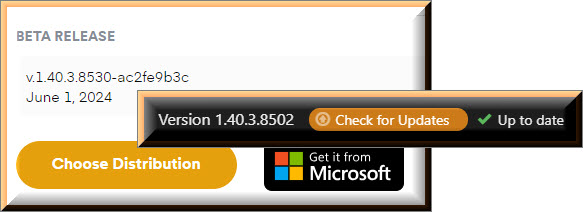
An updated beta has been released, the update might not show up immediately for everyone though.

The first scan after installing this beta will probably show the same long scan behaviour, but should be rectified on subsequent scans.

4 Likes

If Version 1.40.3.8530 is available for download two days ago, why does the PMS still say that Version 1.40.3.8502 is “Up to date”?
Late Update

You might wanna check that again. It was only released a few hours ago.

2 Likes

This topic was automatically closed 90 days after the last reply. New replies are no longer allowed.
