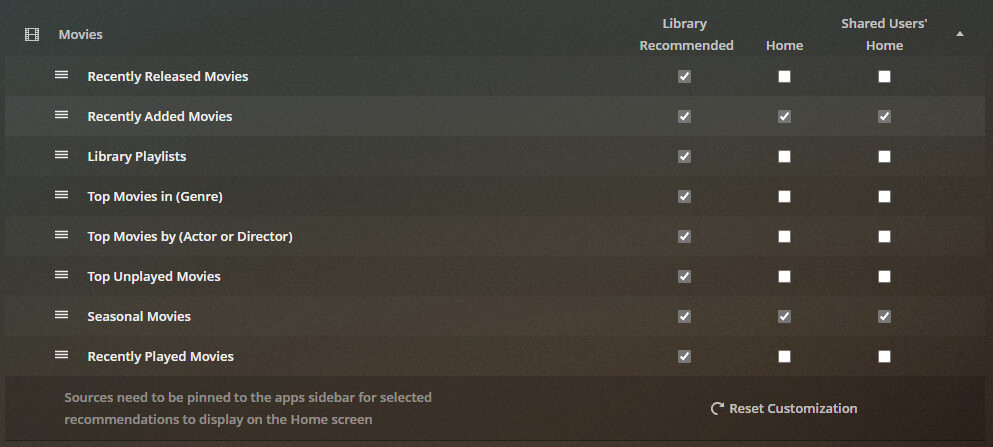
Then un-pin it from your left hand side bar.
Your other users can pin it to their own side bars, should they desire so.
Then un-pin it from your left hand side bar.
Your other users can pin it to their own side bars, should they desire so.
Some of us considered the sidebar and the home screen separate things. Seems that Plex isn’t for the future. It’s a big shift for some of us.
I have Kids Movies and Kids TV as libraries pinned to the sidebar for example. But they are hidden from the Home screen so that they don’t clutter it up. Seems that April 22 I’ll be unpinning six out of eleven libraries from the sidebar. This just makes things more inconvenient for me to manage my server. It again adds steps to do things (like look at something in the Kids Movie library).
I think it actually is an unintended result that has caused the confusion. I can immediately correct the problem (i.e., have the PMS respect my choices of what can be recommended on the home screen and what cannot) without un-pinning the library I don’t want to appear on the home screen. I haven’t bothered to see if anyone already pointed this out in a different post but by editing the library and changing one setting solves the problem somehow.
Setting → Libraries → [The library I don’t want showing up on my home screen] → Edit Library → Advanced → Search and change to ‘Exclude from global search’ from the previous setting I had selected ‘Include in global search’ and once the PMS scans through the library and I refresh the home screen the library in question has scurried off into the shadows.
Reversing the selection back to ‘Include in global search’ causes the library in question to leap back out of the shadows right back onto the home screen.
I’m guessing that this is not the intended result but most days I struggle with even turning my computer on much less coding or whatever is required to design the PMS so idk.
I am currently on Version 1.22.2.4282 which is an update since last I posted.
We use to be able to have a library pinned and be able to not have it’s content displayed on the Home Screen
But in the New World, that is replaced with unfinished functionality that, even when finished, doesn’t look like it will accomplish the same thing?
The choice now seems to be, to not have it pinned and hope that someday a Merger Recently Added check box will be made available.
But that function, based on text description, will not help in merging similar items in Continue Watching, if it ever makes it to us
that doesn’t address the issues of multiple versions of a film/show being displayed in Continue Watching
If I have a film in a library called Movies and the film also exists in a separate folder that is seen in a library called Movies 4k
And I watch one of them, but don’t finish it -
You will see 2 copies of the film in Continue Watching
Now I know Plex wants us to have just one Library, and keep 1080p and 4K in the same library. But that’s just not possible until Plex does a better job of picking which version to play