I have set my Plex Media Server to update any Library folder that has changed. I deleted one of the folders included in a Movie Library. All the movies in that deleted folder immediately changed to show a red trashcan icon on the poster for that movie, yet the Library folder did not update and these deleted “trash can” movies are still there. What have I done incorrectly?
I’ve read the support article on Trash in a specific Library folder. My question is about emptying the trash…where do the deleted files go? Are they removed just from the Plex Media Server or do they also get deleted from the source folder? How can you empty the Plex Library folder trash and only get the unwanted item out of Plex while it will remain in the source folder?
to be clear the trash can is related to the item in the database missing, not the actual video file.
it is to prevent accidental deletion of things from database. I’m guessing you do not have “empty trash automatically after every scan” enabled in library settings.
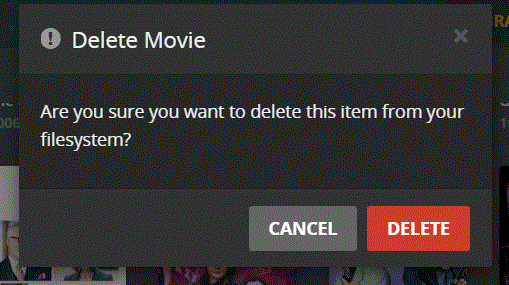
Thanks for the reply, Big Wheel. The attached screenshots show my problem. I want to delete “The Highwaymen” from my Library folder. I’ve shown you my video file before the delete and again after. As you can see, the file is gone from the Library…but it’s also gone from the video folder as well! What exactly does your term “filesystem” mean on the delete confirmation screen?
I’d recommend against doing this. If you don’t want Plex to discover a file and add it to the Library, your best bet is to not put the file in a Library source folder.
That said, it is possible to create a .plexignore file and exclude specific files or directories.
Good Morning, Big Wheel. As you can tell by now, I am not a techie, so some of your terminology is confusing me. Let me see if I can give you more specific information.
The movie I wanted to delete was originally in F:\K drive movies\Kevin Costner\The Highwaymen
The Plex Library folder is here C:\User\weyb\AppData\Local\Plex\Plex Media Server
The Library folder I created was called F: drive movies and I wanted to add the Kevin Costner movie file JFK into this library, so I edited the Library to include the Kevin Costner folder.I had forgotten that doing so would bring all the Kevin Costner files along, too. My intent was to isolate JFK so my wife could find it easily, so I decided to undo the added Kevin Costner folder from the the Library by editing the folders included in the Library. When I did that, all the Kevin Costner movie files got the red trash icon.
I then created a new Library “JFK”, created a new sub-folder in the Kevin Costner F:\K drive movies\Kevin Costner folder just to hold the JFK movie, and used that newly created folder as the only folder in the newly created Library “JFK.” That successfully created a new Library as I wanted.
At this point I wanted to remove all the remaining Kevin Costner movies from the F: drive movies Library…but certainly not remove them from the original Kevin Costner source folder.
Sorry for rambling on, but I hope you can follow my actions, odd as they may have been. But now I need to remove the KC movie files from the F:\ movie Library and restore them to the F:\K drive movies\Kevin Costner source folder. The new JFK Library with only the JFK movie in it would remain.
Thank you, Volts, for your reply and this information. As you can tell from my reply to Big Wheel that was my intent…to isolate JFK from the source folder and then undo my earlier mistake.
Yes, Volts, if I follow your descriptions correctly, that is what I’ve done. I didn’t know about COLLECTIONS…I’ll read up on that. But, now that it’s already done, how do I fix it? In the attached screenshot, how do I get Draft Day out of its current Library and not delete it from the source folder?
Update… I’ve gotten things straightened out using your suggested guidelines. I created a new root folder and copied all of the original source file there. Then I manually deleted all the trash files in the library, letting them delete from the original source file. Once that was done I “reloaded” the original source file. Now everything is where it should be. Lesson learned. Thanks for all comments.