I am writing to express my frustration with the current state of Plex.
I purchased Plex Pass because I believed it would provide a more reliable and polished experience. Instead, my experience has become noticeably worse.
The issues I am currently experiencing include:
Libraries frequently take an excessive amount of time to load.
Subtitles that previously worked no longer appear consistently.
General performance has degraded compared to what I experienced before.
Overall reliability has become unpredictable, making Plex frustrating to use.
What concerns me most is that these problems became more noticeable after I paid for Plex Pass. As a paying customer, I expected increased functionality and stability—not a decline in usability.
I have invested both a significant amount of money and countless hours organizing my media library. When core features such as browsing libraries and displaying subtitles become unreliable, it undermines confidence in the platform.
I would appreciate clear answers to the following:
Are these known issues?
Is there an official fix or workaround?
If these are known bugs, what is the expected timeline for resolving them?
I am not looking for generic troubleshooting steps unless they are directly related to these specific problems. I would like acknowledgment of these issues and meaningful assistance in resolving them.
I chose Plex because of its reputation and because I wanted to support the platform. At the moment, however, I am finding it significantly more difficult to use than before becoming a paying customer, and that is extremely disappointing.
I hope someone can investigate these issues and provide a concrete path toward a solution.
Thank you for your time.
Provide details of your system specs (OS and HW) as well as any steps you’ve taken, besides restarting your system, to troubleshoot so far.
Did you recently get Plex Pass? Do you see the yellow status indicator spinning all the time in the top menu of Plex Web? With the new pass maybe your system is detecting intros/credits all the time since that is now enabled with the Plex Pass. (Just a guess)
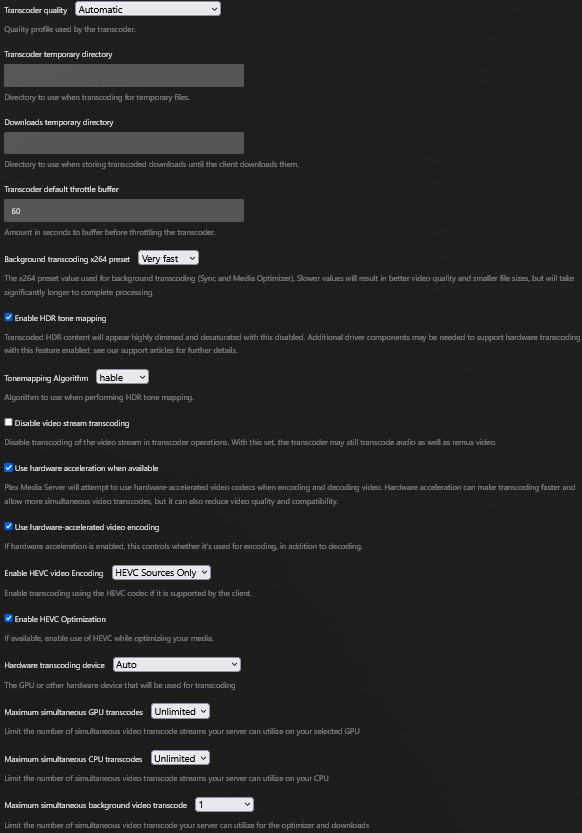
What settings do you have set on the Transcoder settings page? Screenshot and share that.
I did just get Plex Pass, but that was because my server was supposedly not working because it was “streaming.”
I only ever stream from the house, never on the road. The way it was worded I had to do this to get it to play on my devices (even TV). It worked right away, but now it is problem after problem after problem.
If I missed anything, let me know and I will get it to you.
I just find it strange that right before it is set to increase the price by nearly $500, my stuff started acting funny. Then I paid for it to work and it did for the night, but since then it has been a struggle.
If you were getting the remote watch/plex prompt on your local network, it was a config issue that needed to be resolved. Local playback does not require a plex pass or remote watch pass. What device(s) were you getting the prompt on? Make sure the network connection type is set to private on your windows system, public will send plex remote and trigger the pass prompt. If it was dns rebind protection being triggered, you would need to change the dns servers on the device(s) giving the prompt or change it on your router, if it allows them to be changed.
If you don’t use remote access, disable it in the plex settings and also uncheck enable relay on the plex network settings.
Start playback of something and screenshot the plex dashboard, fully expanded, and share it.
In your Transcoder setting, set your Transcoder device to the nvidia, don’t leave it on auto.
Hopefully someone can take a look at your logs to see if there are any issues that standout..