Hi All,
Long time user / first time poster.
I have tried a lot of things before posting including the usual steps of uninstalling and reinstalling Plex Server, changing Bitrate limits, logging out of and back into my account.
As described every time I stream from my server via IOS app, and friends as well on other devices like android tv’s etc, the limit remote stream bitrate does not limit the stream. The only way I can change the stream limit is by reducing the stream rate via the apps Settings>Video & Audio>Cellular Quality
From what I have read on the forums the bitrate should be capped at 4mbps as shown below as I have a PlexPass. Think I bought the sub when it was $99.
Thanks for your help in advance.
Have had PlexPass Lifetime for 6+ years
Server Version#: Version 1.41.8.9834
Player Version#: Plex for iOS - 2025.19.0 (1132)
Device: iPhone
Windows 11 64bit
Steps to reproduce:
- Set the limit remote stream bitrate to 4Mbps (720p)
- Open the plex app on the device change the Video & Audio>Cellular Quality to maximum
- Stream a movie I know is 4K
Expected:
Transcode to 4Mbps (720p)
Actual:
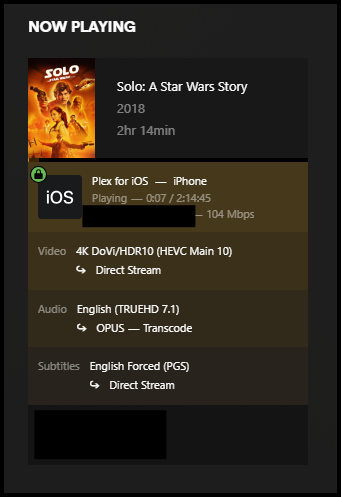
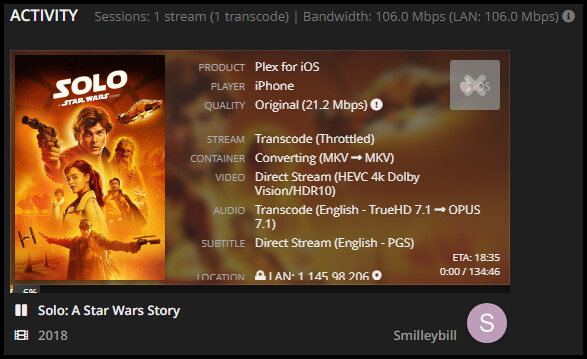
Note the stream is Direct Stream with no transcoding.
Steps to reproduce:
- Keep the limit remote stream bit rate at 4Mbps (720p)
- Open the plex app on the device change the Video & Audio>Cellular Quality to 1080p HD
- Stream a movie I know is 4K
Expected:
Transcode to 4Mbps (720p)
Actual:
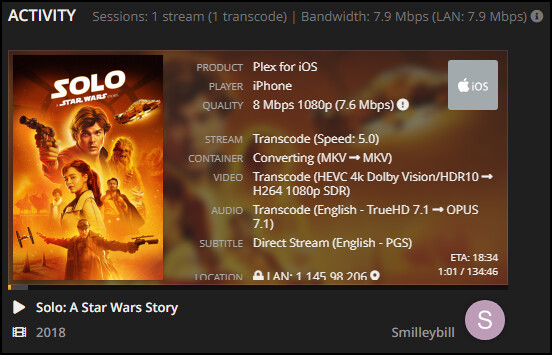
Note the stream is transcoded to 1080p
Logs:
Jul 09, 2025 213658.233 [19148] Debug.txt (669.1 KB)
What is the bitrate of the original video? Transcoding only kicks in if the bitrate of the video exceeds your setting.
Hi MovieFan,
Thanks for the reply.
The bitrates are below.
1080p
4K
Those are the bandwidth, not the bitrate. Please provide the xml info.
Those screenshots are indicating that the streaming device is being detected as being on the LAN.
That would explain why the restriction isn’t working as that’s only for remote connections. Check your network configuration and make sure the device is being detected as remote.
Hi MovieFan,
Thanks for the reply again.
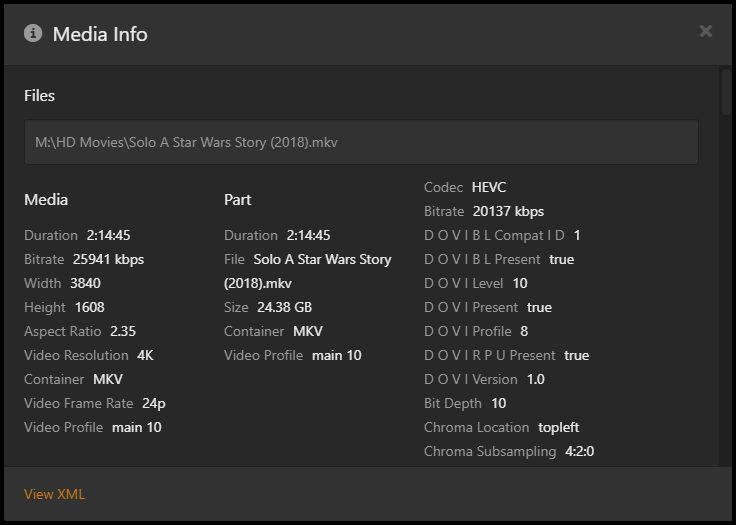
Bitrate is as follows.
Hi drzoidberg33,
Thanks for the reply.
Thats is really strange then. I disconnect my phone from the WIFI when I am doing these tests.
It’s also another way I check my server is visible remotely when I am at home besides checking on the workstation. Disconnect the WiFi and see if my library is visible. Another thing it could be is WiFi Assist. Will check that is off too.
Really strange.
Do you have any VPN in the mix here? Also make sure you don’t have anything weird in Settings → Network → LAN Networks on your server.
Also check to see how Settings → [Select Server] → Network → Treat WAN IP As LAN Bandwidth is configured:

Hi drzoidberg33,
Apologies. You are right I have left that vital piece of information out.
I have a VPN with a dedicated IP address to get aroundmy ISP’s port blocking.
Do I need to add IP range to Settings → Network → LAN Networks?
192.168.50.0/24 or 255.255.255.0?
Thanks for your continued help
Thanks, pshanew
Yes, the check box is ticked.
Maybe it is more to do with my VPN.
Hi ChristianKent,
Thanks for your help.
All of the “Remote” connections show as being Local when I go back through Tautulli and look them up. None of them are ever limited unless the remote clients have already applied different settings. Most of my media is 1080p. Except the 4K stuff.
Yes, they do change when you lower the client settings.
Hi All,
I added the network/mask for giggles and the Remote / Local started to work on the file streamed to my phone with WiFi disabled then enabled.
The next problem. Might be a clue. Now the local files are being stream limited as well after the change.
Thanks Christian,
You are right. I don’t fully understand what the VPN is doing. Never knew the VPN put the WAN onto my LAN. Understand the connection partially now and how it might affect the ability of PLEX to see the difference.
I’m in Aus. My current ISP is Superloop with an NBN fibre to the premises with BYOD.
At our old house we had fibre to the node with Optus. They definitely blocked ports with their supplied router. We ditched the Optus router and used a VDSL ASUS router which was successfully configured for port forwarding. It worked perfectly.
Our interim house had Starlink which did need the VPN as they do use CGNAT. The connection was great. I guess I never noticed the local / remote thing during this 12-month period and never put any time into it.
With this new connection I would not have thought there was the need for a VPN either. There must still be something not right.
Thanks for your help on this.
Hi Christian,
Thanks again. I will have to mess around with the list then to try and get it to work properly.
Thanks for helping to pinpoint and confirm the issue.