English
Hello
Is it possible to change the content and order of the lists contained in “Home”, for example :
List 1: “Recently added in Films”.
List 2: “Recently added in Series”.
etc…
or else
List 1: “Recently released films”.
List 2: “Best Science Fiction Movies”
etc…
If it is possible, is it possible to do it at the server level to have a default presentation, and then possibly modify it at the user level?
French
Bonjour
Est-il possible de changer le contenu et l’ordre des listes contenues dans “Accueil”, par exemples :
Liste 1 : “Récemment ajoutés dans Films”
Liste 2 : “Récemment ajoutés dans Séries”
etc…
ou alors
Liste 1 : “Films sortis récemment”
Liste 2 : “Meilleurs films de Science-Fiction”
etc…
Si c’est possible, est-il possible de le faire au niveau du serveur pour avoir une présentation par défaut, puis ensuit, éventuellement la modifier au niveau de l’utilisateur ?
The order of recommendation rows is based on the order of the pinned libraries.
Info on how to arrange the rows with a library’s group of can be found here. https://support.plex.tv/articles/manage-recommendations/
As Bigwheel said, the order of rows in the “Home” menu is based on the order in which you pinned items to the left-hand side.
After that, it displays content from each library based on a menu shown here:
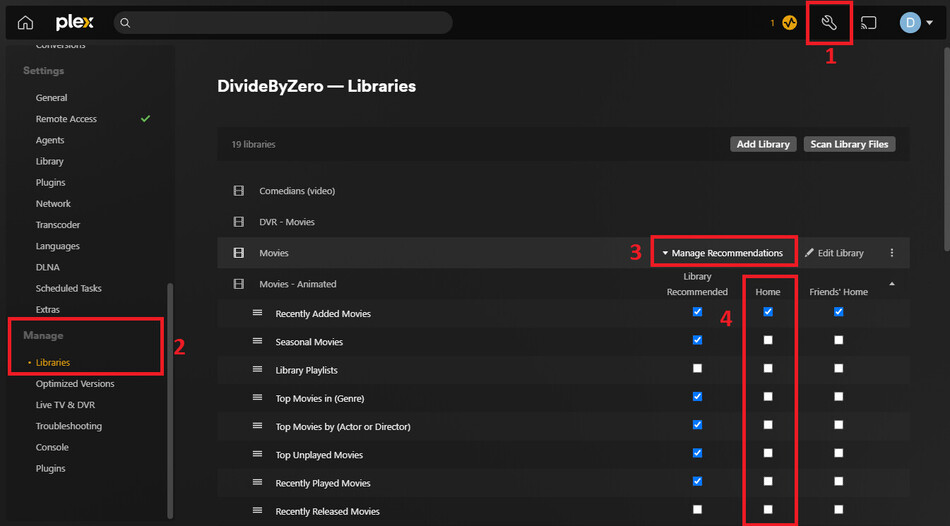
- Click the wrench icon
- Click “Libraries” under the “Manage” menu, NOT the “Settings” menu
- Point at one of your libraries to have “Manage Recommendations” appear
- Click “Manage Recommendations”
This menu can be a little confusing, but the first column is for hubs that appear when you specifically select that Library on the left-hand side. Ignore that column.
The second column (that I highlighted) is whether any of these hubs appear in your own “Home” menu. If you have a library pinned to the main left-hand menu, it will show any of these hubs that you enable, in order from top to bottom.
So in my example, I enable a LOT of hubs for random content when I view each library itself, but when I am on the “Home” the only hubs that appear for each library is the “recently added” hub.
Thanks a lot “BigWheel” and “Divideb0”.
I will try this solution.
Have a nice day (or night… i’m living in France…  )
)