TLDR: Casting Live TV to 3rd Gen Chromecast causes the chromecast to restart, all other media playback via Chromecast works fine
Main issue:
Playing Live TV or Recorded Content to Chromecast causes chromecast to restart within 5 minutes of playback. Casting any other type of content from Plex (via direct stream) works flawlessly, it is only when there is hardware transcoding for the stream that the chromecast crashes.
I have tested initiating the cast/stream from a MacBook Pro (via Chrome browser that is up to date on macOS 10.15.5), iPhone XR, iPad 7th Gen, iPhone SE, iPhone SE 2020 (all iOS device software and Plex apps are up to date) and a Windows 10 Laptop (via Chrome browser that is up to date on latest Windows version). I also have a 1st generation chromecast I am trying to phase out of my media setup for unrelated reasons and casting Live TV from Plex to that device does not cause it to crash.
Other notes:
When I first got my Synology server setup with Plex I was able to stream Live TV from an iOS device to a 3rd gen chromecast without any issues (I am fairly certain anyway, this was about a month ago now). This was when I was still getting the system set up so I was still playing around with some settings. I do not know what I might have changed that would cause it to stop working but I have done troubleshooting with several different configurations since then to try to get functionality back. There have also been various software updates to Plex and DSM in between the initial period where it was working and now. Casting any movie or TV show from Plex to chromecast has no issues. I believe this would be similar for the DVR feature (as in casting a “direct stream” instead of casting media that requires transcoding) but I have not had much time to test the DVR since I cannot get Live TV working. Playing Live TV via Plex Web or through the Plex app works with no problems on all the devices mentioned above, it is only when I try to play it on a TV over chromecast that I run into this issue. All chromecast devices are plugged in directly to a wall outlet or power strip and not the TV.
A more specific description of the problem:
TV is on and set to chromecast input, I open Plex app on my iPhone (or Macbook) and connect to chromecast, I select a channel from the Live TV guide menu, the show will play anywhere from 3 seconds to maybe 5 minutes (I have not timed it so this is just from memory) and then the chromecast will turn off without warning. The TV screen goes black because the chromecast has restarted and the Plex Dashboard shows the show as still being played (for a short period of time, again I have not timed this but it shows in the dashboard long enough for the chromecast to complete the boot process for me to test again). I am able to select the Stop Playback option for the stream but after selecting this it still show in the Now Playing section of the dashboard, it also shows up again after refreshing the dashboard in my web browser for a short period of time before disappearing. As soon as the chromecast crashes the Bandwidth graph on the Dashboard page drops to 0kbps. When streaming from Plex Web as soon as the chromecast crashes a message comes up asking if I would like to continue playback here. Once the chromecast restarts I am able to connect to it again and play media from the app. There are no error messages that appear on the iOS device. All other media streaming to chromecast works fine, music, movies, TV etc.
What I’ve tried:
Deleting the DVR from the Manage section of the settings page and reinitializing it
Resetting all Plex Web settings
Setting “Terminate Sessions Paused for Longer Than” value to 0 as mentioned in other forum posts as a potential solution
Restarting PMS, NAS, HDHomeRun tuner and all chromecasts
Trying a variety of setting configurations from the Transcoder page in Plex settings, my current configuration is listed below
Setup:
Chromecast 3rd Generation (tested on 3 different devices, all brand new and factory reset)
HDHomeRun Connect DUO (Hardware Model HDHR5-2US, Software Version 20200521)
Synology DS218+ NAS (DSM 6.2.3-25426 with Plex package 1.19.4.2935-79e214ead)
Mohu Curve 50 Antenna (MH-110567); antenna signal from HDHomeRun app on MacBook shows signal strength >65% most of the time, usually around ~85% so I don’t believe the antenna is part of the problem.
Logs:
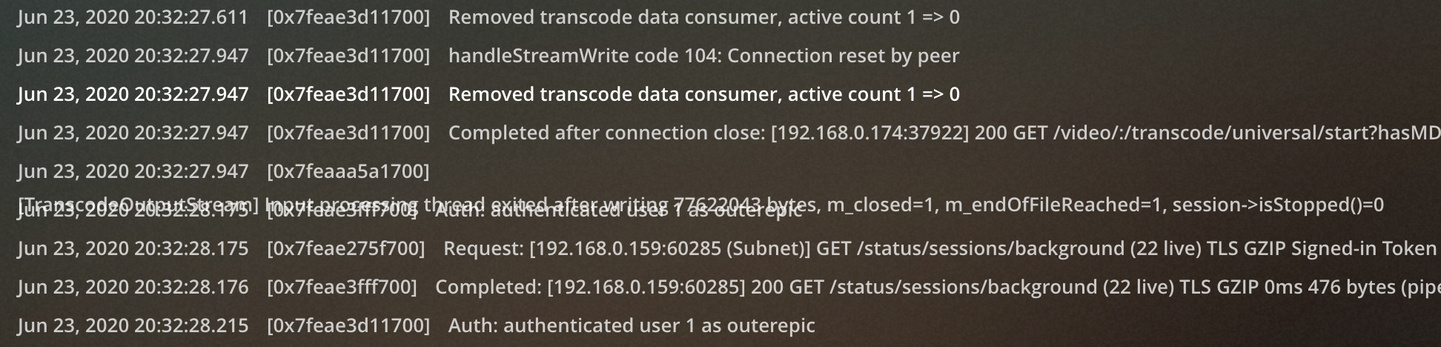
I have tried to use the console in the browser to see what it says when the chromecast restarts and the only thing I have noticed across several different instances is a line that is out of place and doesn’t seem to occur anywhere else in the logs. I attached a picture and the line states: [TranscodeOutputStream] Input processing thread exited after writing 77622043 bytes, m_closed=1, m_endOfFileReached=1, session->isStopped()=0
I have downloaded the logs zip file and uploaded the “Plex Media Server.log” file below. There are many different .log files and I can upload any of these as well if they would be of assistance.
I don’t know if this will help but most of the testing I did when writing this was done on a chromecast with IP address 192.168.0.174 and the firmware version is 1.42.172094, the other main chromecast I use has the same firmware version and the IP is 143 instead of 174.
Transcoder Settings:
Transcoder quality - Automatic (have tried Prefer Higher Speed Encoding)
Transcoder temporary directory - has always been blank
Transcovder default throttle buffer - has always been 60
Background transcoding x264 preset - currently on Medium, have tried multiple options
Disable video stream transcoding - has always been unchecked
Use hardware acceleration when available - has always been checked
Use hardware-accelerated video encoding - has always been checked
Maximum simultaneous video transcode - I think I changed this to 5 at one point and then put it back to Unlimited after reading something saying this could cause problems
Final words:
I am really trying to completely transition to Plex for my home media setup and this is the biggest hangup. I have been unable to find other forums with this exact problem mentioned and I have tried various different solutions from reddit, plex & Synology forums. I hope it is just a few settings I need to change that I am missing to get this working properly. I would prefer not to reset my plex library completely, I recently got all my music transferred over and do not want to do this again. If you have any suggestions or need any more information from my end please let me know! Thank you for taking the time to try to help me solve this issue.
Plex Media Server.log (2.0 MB)
Server Version#: 1.19.4.2935-79e214ead
Player Version#: 4.36.1
Tuner Make/Model: HDHomeRun Connect DUO (Hardware Model HDHR5-2US, Software Version 20200521)
Guide/Lineup name: Is this needed? I would prefer not to reveal my location
Using XMLTV?: I don’t know what this is
Channel number/Name: All channels
