Server Version#: 1.14.1.5488
Player Version#: na
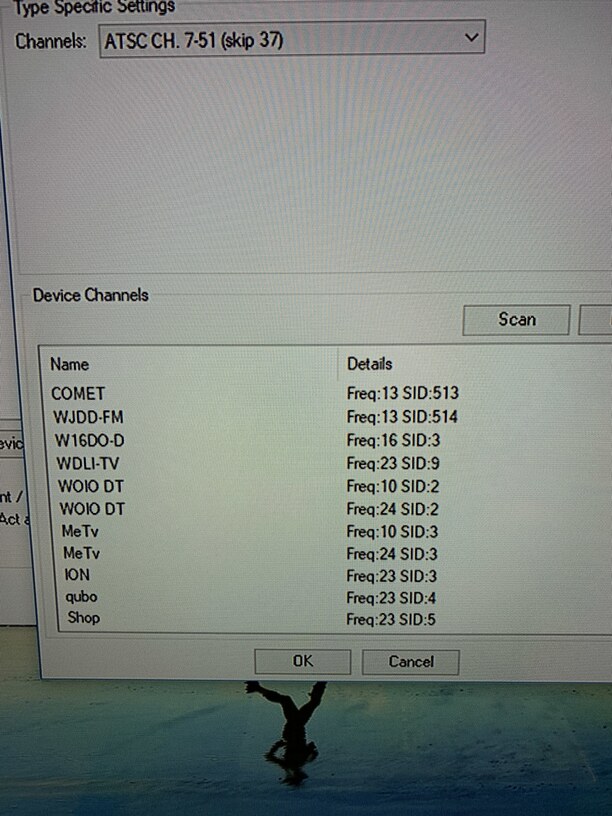
I am having trouble with one channel. WOIO 19.1 this channel is real channel 10 and 24. Plex is not merging them like my tv does and I am only getting the very weak real channel 10. I would love them to merge but even if I could just put it on 24 only that would be fine too. The signal on real 24 is very good.
My hvr-2250 tuner shows them both with next pvr channel scan. Here is a screenshot.
Sorry, maybe mapping was the wrong word. I need to change the source for 19.1 ?
The option you pointed out only shows 19.1 one time and it is already assigned correctly I am just not picking up real channel 24 to get the stronger signal.
Cleveland huh? I used to have a lot of trouble with this channel but haven’t noticed a problem lately. Maybe try fixing this from the HDhomerun side. Go to my.hdhomerun.com, scan channels, then disable the one you don’t want.
I am using a wintv hvr-2250 with a PC. Woio is a low power channel on real channel 10.
WOIO operates a digital fill-in which began operating on August 12, 2011. The translator serves the south-central portion of the Cleveland market where viewers lost WOIO’s signal after the June 2009 digital transition.
The translator is on real channel 24. My tuner picks it up as a separate channel on the pc. Regular tv tuners and my firetv recast automatically merge them. Plex does not, so if I could associate 19.1 with real channel 24 I think I would be good to go.
I have a wintv quadhd tuner on the way. I’m hoping it will automatically merge the two transponders.