Live TV & DVR

Plex desktop app on Windows 11 with HDHomeRun Flex 4K (four tuners)

DVR only records about 1 to 8 minutes of a program. Hard drive has 300 Gig available out of 600 Gig storage space for recordings. I’ve reset the DVR in Plex several times. I’ve reset the DVR programming. I’ve updated the program guide. I’ve updated the Plex desktop app.

I can’t think of anything else to do. Any suggestions?

Michael

If you try regularly tuning channels without recording, do you experience the same results?

Actually, the only time I experience this issue is when recording.

Permissions
Network
Lack of space ie using a RamDisk
Corrupt DB

Post the Server Logs and find out.

20250630.log (47.8 KB)

The “Sever Logs” was a clickable link to a support article on how to download the Plex Media Server Logs which is what I was looking for. The HDHR logs say you are trying to access the DVR feature without a license.

You are trying to record through the HDHomeRun and have Plex see the files? That won’t work well.

If you are trying to schedule things in Plex then you are probably getting a conflict from the HDHR software yanking the tuner away.
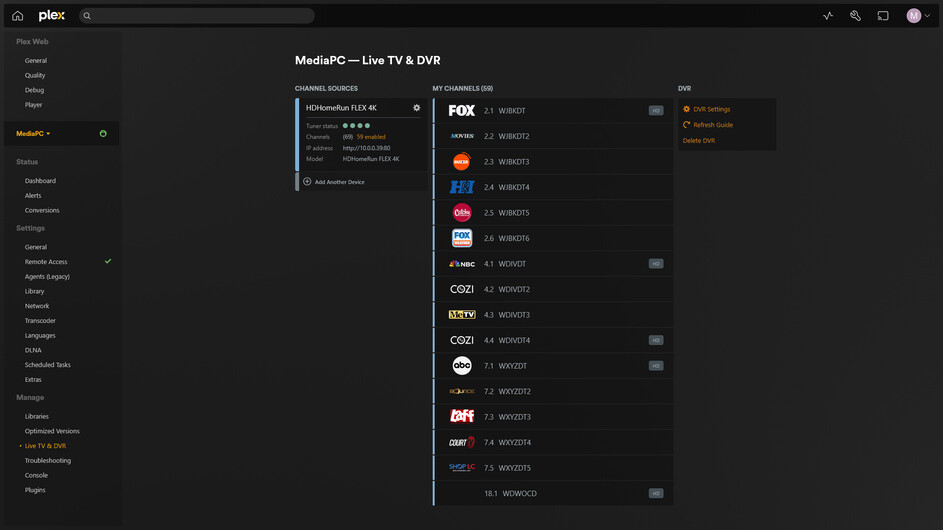

Is it possible to have Plex do the recording WITHOUT a conflict from the HDHomeRun? In other words, did I make a mistake in configuring my Plex DVR?

Yes it is entirely possible.

Did you originally try or use the HDHR DVR?

In a browser, bring up the Plex Desktop https://app.plex.tv/desktop/#!/ and hit the wrench, go to Live TV & DVR make a screenshot and post it here.

Plex Media Server Logs_2025-07-01_08-53-27.zip (4.1 MB)

It is showing up as “intentional termination”.

What Anti-Virus are you using?

If it isn’t the AV killing it, then it is a user inadvertently killing it.

The anti virus in use is Microsoft windows security anti virus and threat protection.

This topic was automatically closed 90 days after the last reply. New replies are no longer allowed.