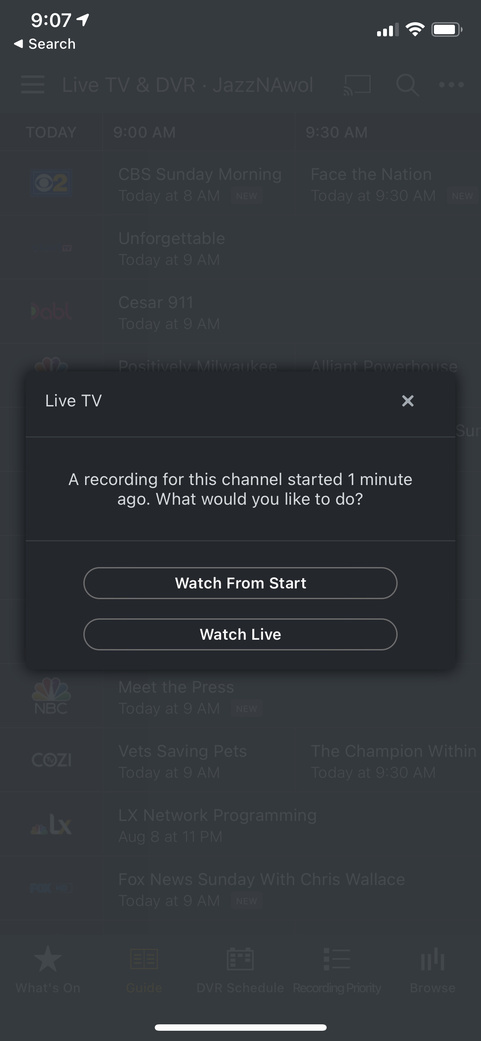
Live TV recording pop up for every channel

I recently added an HDHomeRun duo to my Plex on Synology. Every time I select a live tv channel, I get a pop up saying “A recording for this channel started 1 minute ago. What would you like to do?” I currently don’t have any shows set to record. This occurs on Apple TV, iOS, and web client. Any idea what might be causing this?

Update: The behavior in the web player is slightly different. When selecting the play icon highlighted in green, I don’t get a prompt, it just plays the channel. When I select the play icon highlighted in red, I get the prompt. The iOS and tvOS apps don’t have the two different play buttons to choose from.

image

Plex Server version: 1.20.0.3133
Plex Web version: 4.34.4
iOS version: 7.3.1
tvOS version: 7.3.1
Tuner make/model: HDHomeRun connect duo

Plex Media Server Logs_2020-07-30_08-53-45.zip (3.2 MB)

Are there any employees from Plex that monitor this forum? Just curious the best way to get help troubleshooting this.

Bueller? Bueller?

I think it is the recording so you can live rewind but looking into it. Does it allow you to view the channel?

It does allow me to view the channel. Here is a screenshot of what pops up. It does say watch from start (started 1 min ago) even if the show started 10 or 20 minutes ago.

which device / plex app / plex app version does this appear on and what screen you are on when it pops up?

and which device / plex app / plex app version did you start the Live TV airing on ?

You could get screenshot that shows the time (full screenshot) and get logs from the plex app running on that device where the pop up appears

@sa2000 Please see my original post which should have all the info you need. This occurs across any device (iPhone, Apple TV, web browser)

Here is screenshot from iPhone and associated debug info.

PlexDebugInfo-JazzNAwol-7.4-21322 (2020-08-09 09.10.11 -0500).zip (1.2 MB)

Let me know if you need anything else.

@sa2000 @BigWheel Any thoughts or help on my reply above? This issue is still occurring .

I am having the same issue and have not come any closer to a solution. Were you able to find a fix? It’s been happening for a few weeks now. Help!

@Victor_K For me it was resolved after I applied Plex server update 1.20.1.3252. I didn’t see anything in the release notes about a fix specific to this so not sure if the update actually fixed it or not.

Also, right before I updated. I removed and re-added my HDHomeRun device from Plex. That may have helped as well.

Wish I could tell you for sure what fixed it.

This topic was automatically closed 90 days after the last reply. New replies are no longer allowed.