Ok, I’m gonna throw my linux noob best at this! If you’re talking about the “wa” output when I use “top” in the terminal, then it’s running between 2.5 and 3.5. I’ve seen it as high as 5.1 once. From what I gather in some quick google-fu, that’s probably not good. Is that waiting on RAM or swap (maybe due to low cache as you said)? I have an swap on an SSD (though both SSD and RAM might be slow due to their age/specs. They’re just as old as the CPU and RAM is only DDR3.
For learning’s sake, next I’m trying to figure out how to look into read/write activity to disk and see if that will give me any insight (probably not, but I also want to know how to see if Plex buffer is going onto SSD or HDD.)
I’m also going to look into better drivers. I just watched something recorded in WMC on the windows side on VLC in linux and it was jumpy too. I suspect maybe you’re right about display drivers.
Obviously the limited CPU is a huge problem, and I’ll fix that soon, but learning a lot on the way. I really appreciate both of your input! You’ve shown me a lot!!
Good research! Yes, I was referencing the “wa” output. Sorry, rereading I was too Linux-y and not enough English-y. IMHO the CPU wait you are seeing isn’t excessive and you aren’t likely to get much gain for your research effort. (Except learning of course, which is very valuable!) CPU wait is one of those things where opinions abound. CPUs are faster than disks, so what I’ve seen is on most home systems some small wait isn’t unusual and is likely normal disk reads. To get a little more detail you can press “1” while in top to get the stats by CPU. Also in top, under the line where you found the wait statistic, are two lines that show memory usage and swap usage. If you are showing little or no memory free and a lot of swap used then you want to look at what is using your memory and you would benefit some from having more memory - but your swap on SSD is going to be fairly fast.
VLC being jumpy in Linux is a great find. If VLC can’t play smoothly as a standalone client then Plex running both client and server on the same system isn’t likely to be a good experience.
Since you are thinking of a new Linux based system and are coming from Win, I have a few thoughts in this post. I feel like a dweeb linking my own post, but some people found it useful and I’m also lazy. So I’m a lazy dweeb. I own that.
Thanks for even the Linux-y responses. You’ve taught me a lot! I haven’t had a chance to check that added detail by CPU (been out of town). But when I’ve looked at RAM and Swap in the system monitor, Swap is pegged at 0.
This week I want to try proprietary drivers for the AMD iGPU. It won’t solve all, but I suspect it will help. That said, I read the start of their install instructions for Linux (link) and my eyes started to glaze after about 2 pages! Kind of makes me rethink if I should do it. I was hoping it was a little more like a few terminal commands and done. Maybe its not as scary as it looks though. Worst case, I have timeshift setup, I guess. Just have to figure out how to roll back.
Haha, thanks for sharing that post! I’ll read through that whole thread for good tips. I’ve got a similar setup to you with root on SSD and /home on HDD. I have been trying to find how to make sure Plex is writing the Live TV buffer to the HDD. Nothing I found has been satisfying (directing the transcode folder to somewhere on /home). Seems counter-intuitive that the live buffer would go to the transcode folder if it is not transcoding (which mine never is during live tv). I tried to use some of my new-found monitoring skills to see what disk was being written to during live TV watching. I couldn’t see much difference between the 2, so I can’t tell where live buffer is going.
Once I figure that out, I want to research how to make sure Linux isn’t putting a lot of unnecessary writes on the SSD. When I first built this HTPC, I had to disable or change the directory of a LOT of things in windows. I assume Linux is similar, but maybe it’s better about putting EVERYTHING but the OS somewhere in /home.
One last bit of good news: I ordered the hardware for my upgrades last night! I was really tired, so I hope everything is right and plays nice together!
The upgrade is definitely more zippy than the 6 year old hardware! I got a Ryzen 5 1600 and a Zotac GTX 1650 GPU. Haven’t messed too much with anything other than initial setup. I had permission issues I couldn’t solve on Linux even after following the guide to the T, I couldn’t record live TV because it said it didn’t have permission. Every folder and subfolder did though. So I scrubbed and installed Win 10 and its been going great (minus the “Get Office” crap that pops over Plex every day or two and prevents the remote control from working). I still get noticeable judder when a scene pans though. Not sure if its settings, cause I would think this hardware should handle simultaneous client/server duties just fine. I might try overclocking CPU & GPU to see if it helps.
You thinking of making hardware upgrades, or just curious?
Just wanted to put my experience out here. I have the same issue and on top of that my audio is a solid 1-2 seconds later than the video pretty commonly. I have a 8th gen I5 16gb ram and SSD for my PMS to run on. I also use a 2gb quadro 4000 for hw decoding/encoding. Oh and I have a HDHomeRun connect duo
I have the same video stuttering issue running HDHomeRun Quattro on a Synology 412+. The issue is visible on the AppleTV as well as a web browser running Plex. I have been running this setup for about 4 months with zero issues. Movie playback from the NAS has no issues.
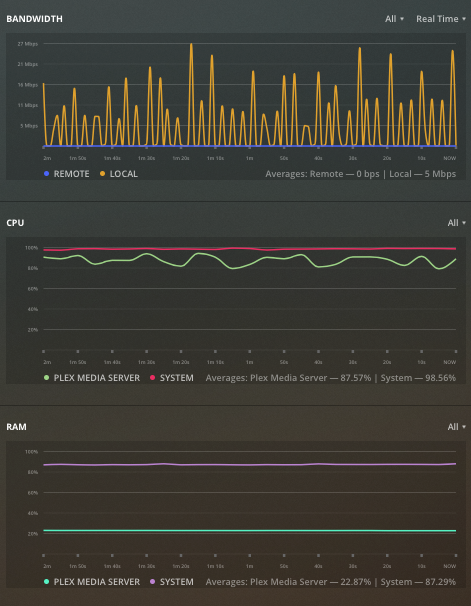
Last week this started. Normally my CPU usage was around 20-40% watching live TV, now it is at 100%. I downgraded Plex to version 1.18.5.2309-f5213a238 from the most recent version and that has not helped.
Playback live TV direct to my iPhone using the HDHomerun app streams perfectly so I feel like this points back to Plex or the NAS.
Screenshot of the settings page attached. I’m at a loss to explain why this is an issue now and wasn’t before.
UPDATE: I downgraded Plex tried things out - same problems, then upgraded to latest version with continuing issue. Also I noticed that when the Plex server is idle, it uses over 70% of RAM. I wonder if this is related to a memory leak issue with the DVR I’ve been reading about: Memory leak since 1.15.x on 300+ Plex Server Instances
UPDATE #2:FIXED. So I found my issue and I hope it helps others. I had enabled the transcode feature - I believe I did this trying to improve remote connections and inadvertently changed a setting for streaming over my LAN. I went to the AppleTV Plex App / Settings / Advanced and changed the setting to original quality. Because I have a Plex Pass, I watched the graphs displaying processor power drop from 100% to less than 10% and the stuttering stopped instantly. RAM usage lowered somewhat as well.
(This is now running great again on a Synology DS412+).
I came to this thread because I had been experiencing the exact same symptoms. HDHomeRun Live TV stream stutters frequently when running in Plex, but not at all using HDHomeRun app, on the same device or TV. My signals are strong, and the cures suggested here seemed pretty complex… then I stumbled into what I think is a simple solution, at least for me.
I simply paused and restarted the Live TV stream in Plex… for a very short period, one second or even less. Presto: the stuttering disappeared, and didn’t come back. To confirm, I exited out of the Live TV stream in Plex, and then came back to it anew. Hello, stutters. The pause/restart trick fixed them again… so it seems very repeatable.
Hope that helps someone, and maybe suggests a fix to the developers.