Playback of LiveTV/DVR/OTA of 1080i channels is not at 60fps.
If I choose the default video player, the server will send the raw 1080i/MPEG2 stream to the AppleTV but the AppleTV de-interlaces it to 30fps. It makes live sports broadcasts look lousy.
If I choose the “old” video player in the settings, the Plex server will transcode to H264 but not before also de-interlacing it to 30fps.
This isn’t really broken behavior. A 1080i broadcast may be 60fps, but once it is deinterlaced, it is 30fps. This is why ABC, FOX and ESPN all broadcast in 720p – it’s better for live sports.
Let’s call it 60 fields per second rather than 60 frames per second. The motion is still jumpy and it should be fixed. If I watch the same broadcast (OTA) via my TV’s built-in tuner, the motion is very smooth.
And then this tech support article which has #2 sub note at the bottom.
2. Apple TV matches the frame rate of content encoded at 60, 50, 30, 25, and 24fps. Frame rates match the refresh rate appropriate for your region, for example 29.97fps for NTSC. 25fps and 30fps content uses frame rate doubling to display at 50Hz and 60Hz when available, matching its original appearance while preserving a fluid user interface.
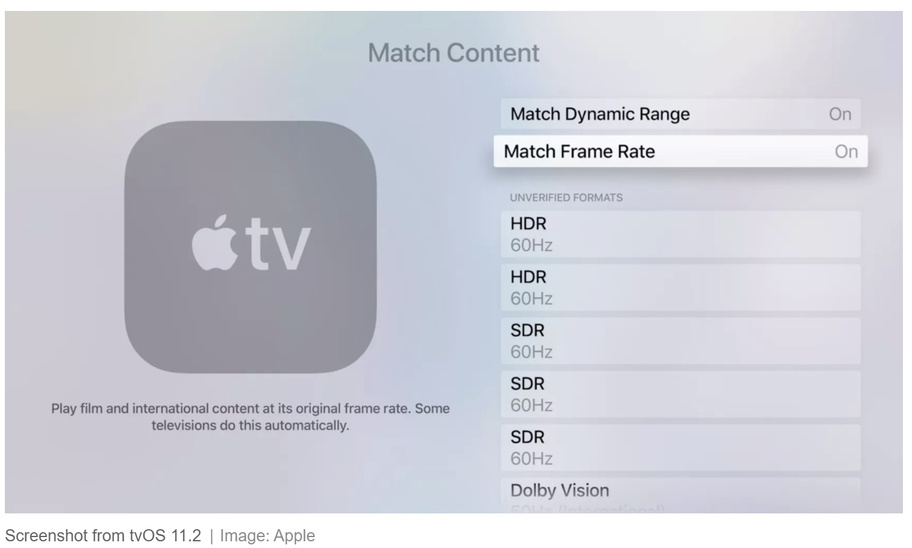
Well, I don’t know what’s going on anymore… I found the setting for “Match Frame Rate” in the AppleTV - it was off. But turning it on doesn’t seem to have an effect. And now I’m not able to get my Plex server to send an OTA stream to my ATV without transcoding it first, regardless of how I set the “Use old video player” option in the Plex app.
All I know is this: If I watch one of the local 1080i broadcast channels using Plex via AppleTV, the video is not smooth. It’s clearly reducing 60fps to 30fps. This is particularly evident when watching scrolling tickers. If I watch the exact same broadcast using the Fubo.tv app on AppleTV, it’s perfectly smooth.
What you’re seeing is normal. 1080i video is not smooth when there is a lot of motion – after all, it’s 30 frames per second. Your TV’s tuner is going to do the best job deinterlacing. I have no idea how Plex or the Apple TV deinterlaces, but things look pretty good for me when watching a 1080i cable stream.
Fubo is giving you a 1080p60 stream. It’s not going to be true 60fps, but it’s going to most likely look a lot smoother.
I have another TV with a Roku Streaming Stick+ (3810X). It’s plugged into a 1080p-capable TV. If I use the Plex app on Roku, the server streams the 1080i OTA video in native format (no transcode) and the Roku de-interlaces and plays it back with perfect smoothness. It’s definitely better than the AppleTV.
I would say it appears the Apple TV is probably the issue. If direct playing, the Apple TV should be doing the deinterlacing. If PMS is transcoding it first, I think the deinterlacing is then handled by the server. I can’t say that I’ve noticed an issue using the enhanced player with frame rate matching off.
I don’t know how hard it would be for you to setup a Channels DVR or Emby Server to test and see how they handle the OTA signal on the Apple TV, but it might be worth some test data to know if Apple TV is doing something weird to all interlaced signals.
Plex on AppleTV is using mpv on the backend. The app is only able to perform spatial deinterlacing to 30fps rather than doing both spatial and temporal deinterlacing for 60fps–which is what you are after.
It will be, but it’s also about the performance of the chip in the Apple TV, and what it can handle. We did some extensive testing prior to releasing the new player to determine what it could handle. What we have at the moment is the best that was possible to cover both hardware and software decoded video.
It will be updated when a future AppleTV can handle video post-processing with a spatial and temporal deinterlacing filter such as yadif frame doubling.
@Achilles - Are you saying the Apple TV 4K doesn’t have the necessary hardware to support more advanced deinterlacing algorithms? If so, how come other native Apple TV apps (i.e., Fubo) are able to do this? Or do those services de-interlace the streams at the server end into native 60p format? Would it be possible for Plex server to do the same?