Server Version#: 1.20.1.3252
Player Version#:
Tuner Make/Model: HD Homerun Connect Duo
Guide/Lineup name:
Using XMLTV?:
Channel number/Name:
I get the DVR set up with no issues and my guide downloads fine. I select a channel and it launches fine. However after a few seconds the video starts to stutter every few seconds. It’s really annoying.
I tried the native HD Homerun app on AppleTV and the video plays perfectly, no skipping, stuttering, etc.
Does it do this on all of your clients? For example, does Plex for Win/Mac have the same behavior?
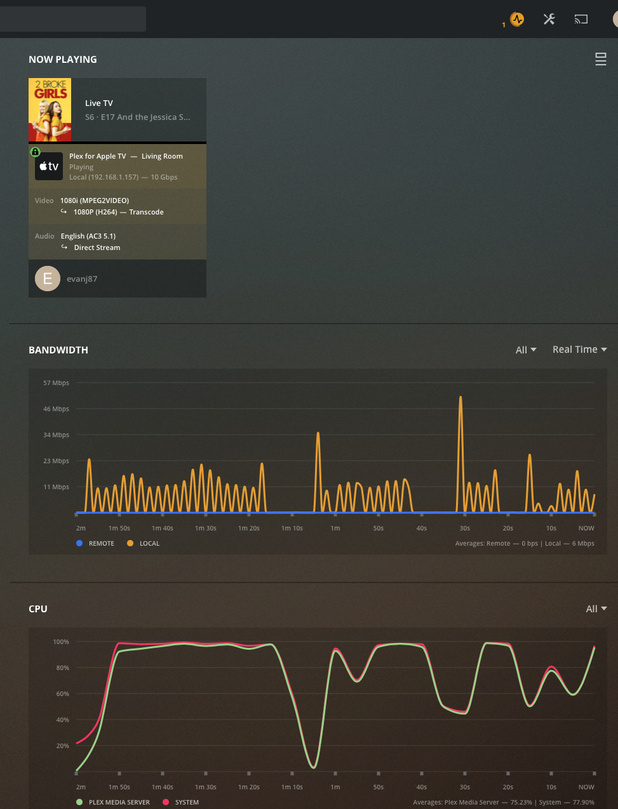
Shot in the dark is that you might be experiencing transcoding and your Plex server can’t keep up. If you go to Plex Web, in the Dashboard look in the “Now Playing” section. Make sure “Show Details” ( ) is clicked. While Live TV is playing, does it show it as Direct Play, Direct Stream, or Transcoding? If it is transcoding, then scroll down and see what the CPU usage looks like on your Plex server. To get additional help you could post a screen snapshot of what you see in “Now Playing” here. Note that if the client is remote you may want to blank out the IP address in the graphic before posting.
I don’t have an ATV, but for the vast majority of clients there are changes you can make in the client under Settings -> Video to get it to direct play/stream.
Yeah CPU was spiked and showed that it was trying to transcode the video feed. My server is running on a Raspberry Pi4, I changed the video settings on the AppleTV client to not automatically adjust quality. That seemed to fix the issue. Thanks for the tip!!
 ) is clicked. While Live TV is playing, does it show it as Direct Play, Direct Stream, or Transcoding? If it is transcoding, then scroll down and see what the CPU usage looks like on your Plex server. To get additional help you could post a screen snapshot of what you see in “Now Playing” here. Note that if the client is remote you may want to blank out the IP address in the graphic before posting.