Server Version#: 1.43.0.10467
Running in plexinc/pms-docker on a Debian host.
Player Version#: Any (web. android, android tv)
I have been using plex with Prefer local metadata turned on for years and the behavior has been pretty consistent.
But with one of the latest updates it suddenly changed
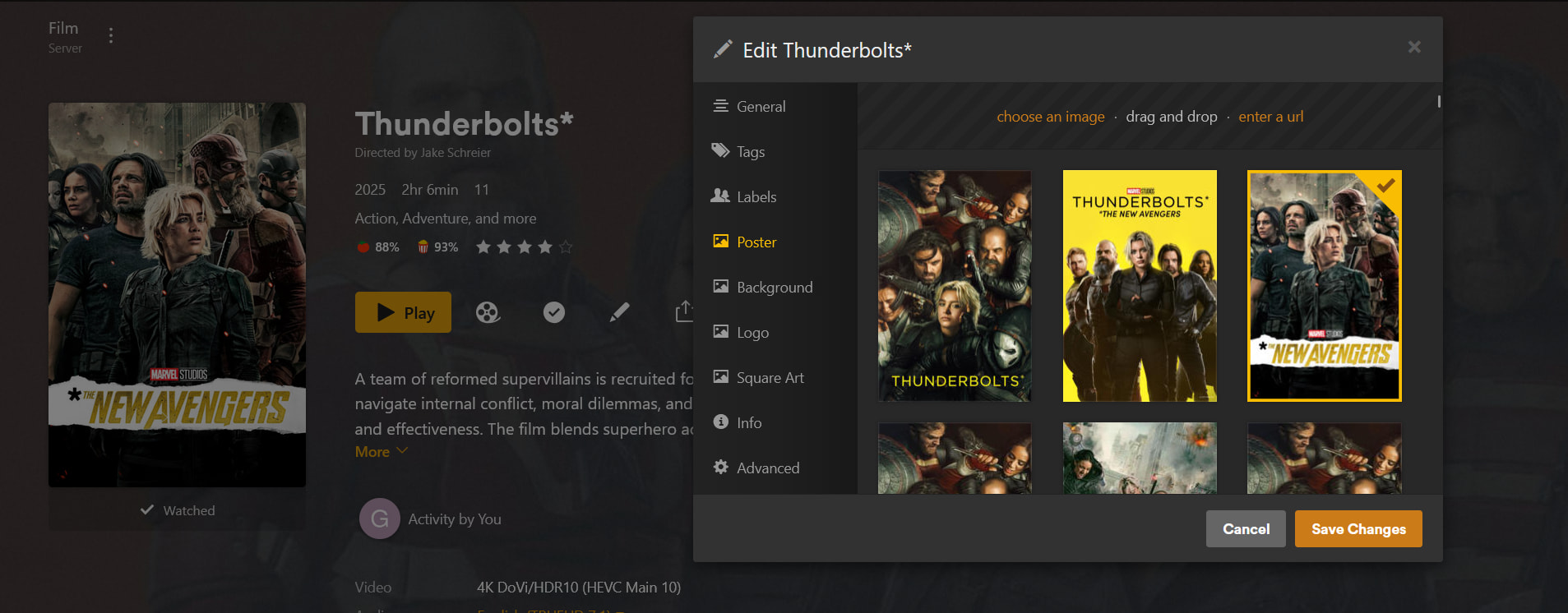
For a movie with three local posters named poster-1.webp poster-2.webp poster-3.webp
Plex used to select poster-1.webp
Plex currently selects poster-3.webp
Is this intentional?
UPDATE:
Its stranger than i initially thought.
If i move poster-1.webp out of the folder containing the movie. Refresh metadata. Then move the poster-1.webp back into the folder and refresh metadata then plex suddenly shows poster-1.webp as the poster.
The same happens if i move poster-2.webp out and back in. poster-2.webp is now suddenly the selected poster.
It appears as if the file last added to the folder is selected regardless of the file numbering.
As an FYI… Prefer local metadata has no effect on posters unless they are embedded into your media. The setting you want is Use local assets which is the one plex uses for local artwork assets.
Check my update.
Its broken broken.
If i rename poster-1.webp to poster.webp ti works… but only by accident.
If i rename poster-2.webp to poster-9.webp suddenly poster-9.webp is the active poster even when i still have a file named poster.webp in the folder.
It appears that the last touched file is the one that is selected regardless of file numbering.
That makes sense. I’ll try and repro this later as I’m heading out but the thing that might be happening is that the item might be locked in plex. Would you have EVER select poster-9 as the default poster via the plex ux edit function ? If so then it would be considered locked by plex (as you selected it).
One way to check is to open the xml for the movie and search for Field locked and if you see one for thumb (thumb = poster from what I remember). If there is and this is set to 1 then that would explain it.
Nope.
I can rename the poster file to poster-1 or poster-7 or poster-8 and suddenly that file is the one shown after refresh. Rename poster-9 to poster-5 and boom its back to being the favorite.
I have attached the XML.
Only locked field is collection. 453983.zip (14.3 KB)
Also this happens with all my movies. Thunderbolts is just an example.
Okay. I wonder if its the timestamps on the files and the way the scanner is detecting them when they change after the rename. Would you happen to have the server setting Run a partial scan when changes are detected enabled ?
I also wondering using something like touch to adjust the files and their times to match what order you are trying to get.
I rename poster-2 (middel poster) to dummy and then refresh metadata
then i open edit again to see order
poster-3 is still selected and dummy.webp is not in the list. As expected
Used SSH to my nas and tested touch poster-1.webp
This did not affect the order or the displayed poster.
But renaming poster-1.webp to dummy and back again did changed it to the active poster after a metadata refresh. mv poster-1.webp dummy mv dummy poster-1.webp
order changed poster-1.webp is now displayed.
I have a synology NAS with the files and a NUC running plex and other docker containers. Plex accesses the files via SMB. The auto detect changes at the top stopped working after i moved plex from the NAS to the NUC but i am pretty sure that is a limitation related to smb. So i turned it off.
disabling Run a partial scan when changes are detected does not appear to fix anything.
I can post my docker compose if its relevant?
I’m at a loss to explain it. Last shot in the dark from me is does a plex dance of the files help? Just the posters.
Maybe as it’s only a rename and the file itself is not changed (checksum) plex is remapping the files internally in the db when you rename them. Total speculation …
Tried first with just posters and then with the folder the movie is in.
Did not fix anything.
(i have loads of other movies with the same problem after a metadata scan of the full library.)
I am guessing Plex Media Scanner Matcher.log is the relevant file
Feb 04, 2026 18:15:39.733 [139754341915392] INFO - Plex Media Scanner v1.43.0.10467-2b1ba6e69 - Docker Docker Container x86_64 - build: linux-x86_64 - GMT 01:00
Feb 04, 2026 18:15:39.734 [139754341915392] INFO - Linux version: 6.12.63+deb13-amd64, language: en-US
Feb 04, 2026 18:15:39.734 [139754341915392] INFO - Processor: 18-core Intel(R) Core(TM) Ultra 5 125H
Feb 04, 2026 18:15:39.734 [139754341915392] INFO - /usr/lib/plexmediaserver/Plex Media Scanner --match --type 1 --log-file-suffix  Matcher --item 454386 --content-type=application/json --match-tag-mode=all
Feb 04, 2026 18:15:39.734 [139754342432512] DEBUG - Opening 20 database sessions to library (com.plexapp.plugins.library), SQLite 3.39.4, threadsafe=1
Feb 04, 2026 18:15:39.788 [139754342432512] DEBUG - Matcher: found 7 auxiliary files for Thunderbolts*
Feb 04, 2026 18:15:39.788 [139754342432512] DEBUG - Matcher: no sidecar subtitle files found for /data/video/Movies/4K Ultra HD/Thunderbolts (2025)/Thunderbolts (2025).mkv
Feb 04, 2026 18:15:39.788 [139754342432512] DEBUG - Scanner: found local media asset "/data/video/Movies/4K Ultra HD/Thunderbolts (2025)/background-2.webp"
Feb 04, 2026 18:15:39.788 [139754342432512] DEBUG - Scanner: found local media asset "/data/video/Movies/4K Ultra HD/Thunderbolts (2025)/background-3.webp"
Feb 04, 2026 18:15:39.788 [139754342432512] DEBUG - Scanner: found local media asset "/data/video/Movies/4K Ultra HD/Thunderbolts (2025)/background-1.webp"
Feb 04, 2026 18:15:39.788 [139754342432512] DEBUG - Scanner: found local media asset "/data/video/Movies/4K Ultra HD/Thunderbolts (2025)/poster-2.webp"
Feb 04, 2026 18:15:39.788 [139754342432512] DEBUG - Scanner: found local media asset "/data/video/Movies/4K Ultra HD/Thunderbolts (2025)/poster.webp"
Feb 04, 2026 18:15:39.788 [139754342432512] DEBUG - Scanner: found local media asset "/data/video/Movies/4K Ultra HD/Thunderbolts (2025)/poster-4.webp"
No idea why it decides that poster-4.webp should be selected