Chiming in as someone who watches a lot of anime and like having having openings and endings.
I have them named like S1 OP 1 - song name (if multiple seasons and mutiple op/eds for a season). I like seeing the song name in there, but at the very least keeping the Season descriptor I feel is essential for sane navigation. Really hard to differentiate when its just a list of a bunch of OP. If you have OP 1 or OP2 it does show that but not much help for shows with one OP/Ed per season. Why get rid of descriptive titles?
And why don’t I use per season extras? 2 of 3 clients I typically use don’t support season extras so its not valid solution for my case
I was hoping that someone who has a lot of anime, and uses the “anime notation” mentioned earlier might be able to provide some assistance. It doesn’t appear so, but I probably have misunderstood the OP1/OP2 reference in the reply.
If the OP and ED descriptors don’t show the descriptive title when it’s used , then what benefit does this new method provide for the average Plex user? I don’t see one, but perhaps one of the Plex employees or developers will reply, without being tagged…
Just a bump, so the topic doesn’t automatically close without resolution.
Does anyone know how or why any local extra with the words “opening” or “ending” in the descriptive file name title (example - Alternate Opening.mp4" is automatically renamed by Plex to Opening")
Discovered this problem this morning while watching some extras. It’s so bizarre that Plex is turning any extra for a film that contains the word “Ending” to simply “Ending”.
I did devise a fix for it. It’s kind of weird but I renamed any extras to include greek alphabet characters that happen to be the same as capital E and O. So for Ending I put in the greek “Ε” and made it “Εnding” and I added “Ο” to make it “Οpening”. It displays just fine once done.
Its a weird fix and its silly that we would have to do something like this… but until the day finally comes that they fix this, it works in a pinch.
To keep this thread from automatically closing, I’ll mention the problem was acknowledged by a Plex employee here:
I just checked on the status of this one, it is in the backlog but hasn’t been looked at yet. We have it documented as an issue, just haven’t had time to get to looking at it yet.
It’s alright, I’m sure y’all are busy!
In the meantime, the workaround I posted above does fix the issue. Not perfect but it works at least.
This issue was driving me crazy and this “weird fix” is a working solution!
By OP1/OP2 I just mean opening sequence #1 and opening sequence #2. Like a longer season, say 24 episodes or so, will have the first half use one song (OP 1) and the second half would use another song (OP 2). A different season would also use a different sequence, but rather than just keep counting I normally see the count start over but with a season descriptor (Season=S just to be clear) S1 OP 1, S1 OP 2, S2 OP 1, S2 OP 2. For clarity’s sake I’ll also mention that the numbering isn’t used if it’s not warranted. For example OP 1 and OP 2 for a single season show that has multiple openings, S1 OP and S2 OP for multiple seasons but each only one opening, or just OP for single season shows with one opening sequence. This all applied to Endings as well
Also my question. As I said I personally like to have the song names included, I’m sure I’m not alone, but also even within the same OP or ED there may be different “versions.” Usually this is only very slight differences such as the inclusion or exclusion of certain characters that may not have been introduced yet, died, or the character(s) the episode focuses on. It’s very debatably whether its worth having these difference versions or not, but if someone wants it why shouldn’t they be able to have them distinguishable? The bug of Plex not ordering extras correctly also adds to the issue. I’ll upload a picture to show what a mess this ends up looking like.
The spelled out Opening and Ending does seem to be the one causing most of the collateral damage with things like Alternate Ending and such. But Opening=OP=NCOP (No Credit Opening) and likewise Ending=ED=NCED. Ive also seen Textless Opening/Ending. I mean spelling it out isn’t wrong or inherently bad, but maybe it would be easier and faster to just require anime opening and endings to be in their abbreviate forms? Actually, tbh I’m not really sure they need to be treated differently, name them however people want it, it was working before. If they got their own extra type subfolder, that would actually be pretty neat. Personally I put them under Scenes since I never use it otherwise and it seems appropriate enough.
This particular series (Girls und Panzer) in the picture has one season, multiple specials, multiple movies. So I tried to keep them in order starting the filenames with numbering, but also having a description of what part of the series a particular OP/ED belonged to. But doesn’t come out so sensical in Plex (and out of order ofc).



PS I know this was from like a year ago so I apologize for the sorta necro, but I just recently ripped the latest movie and was adding to Plex. Saw this mess which reminded of this post and checked back to see if there was any updates
PPS just noticed my first comment was in my other account RichardArc


There are no OVAs in the pictured filelist, just the OPs and EDs for OVAs. The actual OVAs are in a Specials folder.
Can this please get fixed already? I’ve just encountered it myself; I have “Alternate Ending” extra that always shows up as “Ending” no matter what I name it. I found this thread and was surprised just how far back it went without a fix.
Bumping this. I’ve been organizing a ton of extras, and have several titled Alternate Opening that are simply showing up as “Opening” on Plex. Really annoying.
Also encountered this problem now. Bumping it to make sure it’s resolved in time. I know, time is always too little for the devs but it seems like an easy thing to fix. Just remove the part that looks for “Ending” or “Opening” in the Extras or give a toggle in the options for it, if it really is something important for Anime fans (which, as far as I’ve read isn’t even the case, considering how this makes naming multiple openings difficult).
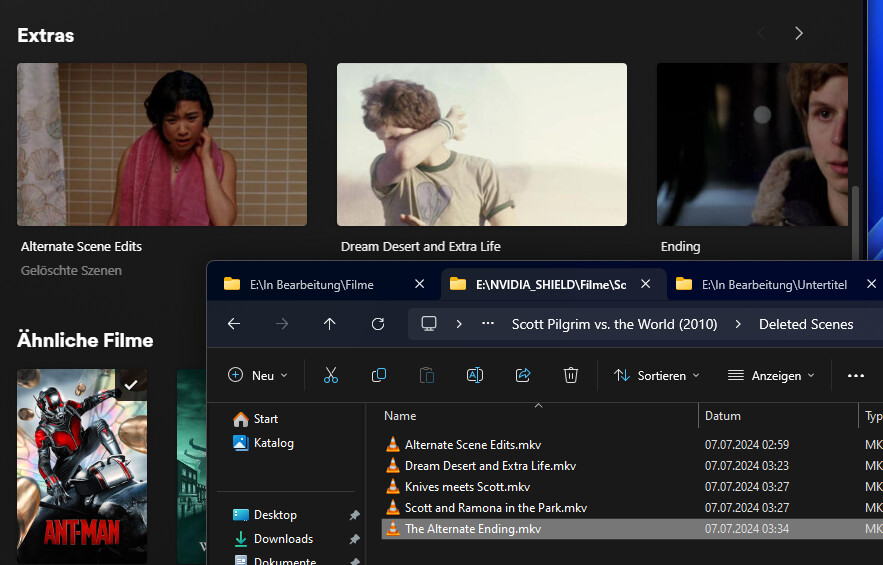
Adding my 2¢ here that this is a big problem. At a minimum, could it be documented somewhere on the file organization pages?
I stumbled across this “feature” totally accidentally and spent quite a while trying to figure out why some things were renamed before I accidentally discovered that the words “opening” and “closing” are magic but “ending” is not. Before that I was digging deep to see if it was an issue with metadata embedded in one of the files, unable to find anything.
From there it took me quite a while before I came to this forum and searched for the word “textless” (my files were named things like “Textless Opening.mp4”) and managed to stumble across this thread.
Even if this can’t be fixed for a while, please document this on pages this this, this, or especially this. That would have saved me a lot of time.
