Server Version#: Linux Version 1.42.2.10156 (on Debian via downloads.plex.tv repo)
Player Version#: Plex Web Version 4.147.1 (Firefox/Chrome) / Plex for Linux 1.110.0.351-4e48eb83 / …
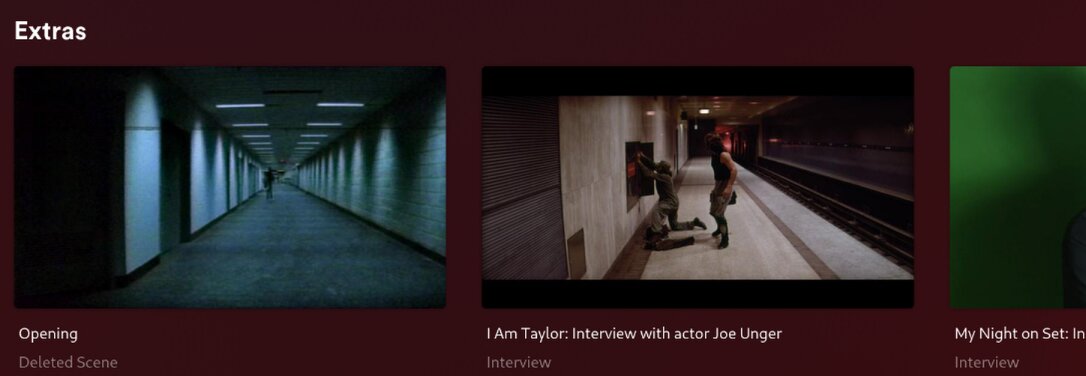
I’ve run into some weird issues sometimes that require various shenanigans to resolve with regards to some extras just not showing up or whatever, but this is the first time I’ve had it appear with a name that isn’t the filename (even after doing the dance, even going so far as to remove the movie entirely during troubleshooting and putting it back again).
Specifically, the filename is “The Original Opening Bank Robbery Sequence (with optional commentary by John Carpenter and Kurt Russell).mkv” and whether I’ve got it in Deleted Scenes (which would be the most correct location), Scenes, Featurettes, etc, it appears in Plex as just ‘Opening’. This is for the movie Escape from New York, which I’ve ripped from my own discs.
All the other extras show up with whatever the filename is, but this one extra just shows up as ‘Opening’, which is very odd - is Plex doing some back end lookup and deciding to change this? I dumped all the metadata with mediainfo and there’s no mention of the word ‘Opening’ except for the filename itself, so it’s not like it’s pulling some metadata from the file that isn’t correct.
I want this to be named this way so that it clearly indicates what it is (not merely an opening but specifically the original opening that wasn’t used) and that it has an available commentary track (since movie extras, unlike Season 0/Specials for TV series, have no way of editing / providing metadata beyond the filename itself, and I would have to remember to check if there’s a second audio track otherwise).
The current relevant files:
$ find /storage/plex/movies/action/Escape\ from\ New\ York\ \(1981\)/|sort
/storage/plex/movies/action/Escape from New York (1981)/
/storage/plex/movies/action/Escape from New York (1981)/Behind The Scenes
/storage/plex/movies/action/Escape from New York (1981)/Behind The Scenes/Purgatory: Entering John Carpenter's
Escape From New York.mkv
/storage/plex/movies/action/Escape from New York (1981)/Deleted Scenes
/storage/plex/movies/action/Escape from New York (1981)/Deleted Scenes/The Original Opening Bank Robbery Seque
nce (with optional commentary by John Carpenter and Kurt Russell).mkv
/storage/plex/movies/action/Escape from New York (1981)/Escape from New York (1981) {imdb-tt0082340} - 1080p R
emux.mkv
/storage/plex/movies/action/Escape from New York (1981)/Escape from New York (1981) {imdb-tt0082340} - 4k Remu
x.mkv
/storage/plex/movies/action/Escape from New York (1981)/Featurettes
/storage/plex/movies/action/Escape from New York (1981)/Featurettes/Big Challenges in Little Manhattan: The Vi
sual Effects of Escape from New York.mkv
/storage/plex/movies/action/Escape from New York (1981)/Featurettes/On Set with John Carpenter: The Images of
Escape from New York.mkv
/storage/plex/movies/action/Escape from New York (1981)/Featurettes/Return to Escape from New York.mkv
/storage/plex/movies/action/Escape from New York (1981)/Featurettes/Trailers From Hell - Filmmaker Neil Marsha
ll On Escape From New York.mkv
/storage/plex/movies/action/Escape from New York (1981)/Interviews
/storage/plex/movies/action/Escape from New York (1981)/Interviews/I Am Taylor: Interview with actor Joe Unger
.mkv
/storage/plex/movies/action/Escape from New York (1981)/Interviews/My Night on Set: Interview with filmmaker D
avid DeCoteau.mkv
/storage/plex/movies/action/Escape from New York (1981)/Interviews/Scoring the Escape: A Discussion with Compo
ser Alan Howarth.mkv
/storage/plex/movies/action/Escape from New York (1981)/Other
/storage/plex/movies/action/Escape from New York (1981)/Other/Photo Gallery: Movie Stills & Behind the Scenes.
mkv
/storage/plex/movies/action/Escape from New York (1981)/Other/Photo Gallery: Posters & Lobby Cards.mkv
/storage/plex/movies/action/Escape from New York (1981)/Trailers
/storage/plex/movies/action/Escape from New York (1981)/Trailers/Radio Spot.mkv
/storage/plex/movies/action/Escape from New York (1981)/Trailers/Theatrical Trailers.mkv
Every other extra is named exactly in Plex as it is on the filesystem (whatever.mkv → whatever). It’s just the one for the original opening that is strangely being set to “Opening” for it’s name in Plex.